The Cost of Guesswork in B2B SaaS
Most B2B marketing teams approach A/B testing as a creative exercise rather than a statistical one. They change a button color, watch the numbers for a few days, and declare a winner. This approach is not only scientifically invalid; it is expensive. In the B2B SaaS landscape, where customer acquisition costs (CAC) are high and sales cycles are long, wasting a month on an inconclusive test is a direct hit to the bottom line.
The failure usually stems from three specific gaps: insufficient sample size, a lack of statistical rigor, and a focus on trivial changes. B2B audiences are small and segmented. You cannot rely on the brute-force volume tactics that work for e-commerce giants. Instead, precision is the only currency that matters. If you cannot act on the result of a test, you should not run it. A test is only valuable if it changes a business decision.
Prerequisites for Clean Data
Before you touch a single pixel in HubSpot, you must ensure your environment is ready to capture clean data. Misconfigured tracking is the silent killer of A/B tests. If your conversion events are not firing correctly, your sample size calculations are meaningless.
Start by auditing your UTM parameters. Ensure that all traffic sources are correctly tagged so you can distinguish between organic, paid, and referral traffic. Next, verify your Conversion Actions. In HubSpot, confirm that form submissions, demo requests, and content downloads are properly defined as conversion events. If you are testing a landing page but the form submission is not tracked as a conversion, you are flying blind.
Finally, check your Audience Segmentation. B2B buyers are not a monolith. A test that works for SMBs may fail for enterprise clients. Ensure your target audience is well-defined, perhaps by industry, company size, or lifecycle stage. If your traffic is a mix of free-tier users and enterprise prospects, your results will be noisy and difficult to interpret.
Critical Step: Disable any other simultaneous changes on the same page. If you update the header navigation while testing a CTA, you cannot attribute performance changes to the CTA alone. Isolation is key to causality.
Crafting a Testable Hypothesis
A vague goal like “increase conversions” is not a hypothesis; it is a wish. To get scientific results, you need a specific, testable statement. Structure your hypothesis using the If-Then-Because framework:
- If we change [element] to [new version],
- Then [metric] will improve by [amount],
- Because [reason].
Example:
- If we change the primary CTA from “Download” to “Get Free Assessment,” Then lead volume will increase by 10% Because the new copy emphasizes personalized value over generic content.
This structure forces you to define your expected outcome and the underlying logic. It also helps you choose the right metrics. You must select one Primary Metric and one or two Secondary Metrics.
- Primary Metric: The single number that determines success (e.g., Conversion Rate).
- Secondary Metrics: Contextual data (e.g., Time on Page, Bounce Rate).
Warning: Do not optimize for multiple primary metrics simultaneously. This dilutes statistical power and confuses results. If you care about both conversion rate and average deal size, pick one for the test. Deal size is a downstream metric that takes too long to measure in a standard A/B test.
Step-by-Step Setup in HubSpot
Once your hypothesis is locked, you can configure the test. HubSpot’s native A/B testing tool is located under Marketing > A/B Testing. It allows you to test landing pages, blog posts, and emails directly within the platform.
- Navigate to the Asset: Go to the landing page or email you want to test.
- Select A/B Test: Click the three-dot menu and select A/B Test.
- Create Variation: HubSpot will create a duplicate. Name it clearly (e.g., ‘V2 - Personalized CTA’).
- Make Changes: Edit only the elements defined in your hypothesis. Do not touch layout, speed, or other copy.
- Set Traffic Split: Start with a 50/50 split. This is the standard for balanced data collection.
- Define Goal: Select your primary conversion action from the list.
Use the Preview feature to check both versions on mobile and desktop. B2B buyers often start on mobile but convert on desktop. Ensure both experiences are flawless. A broken form on mobile will ruin your test data.
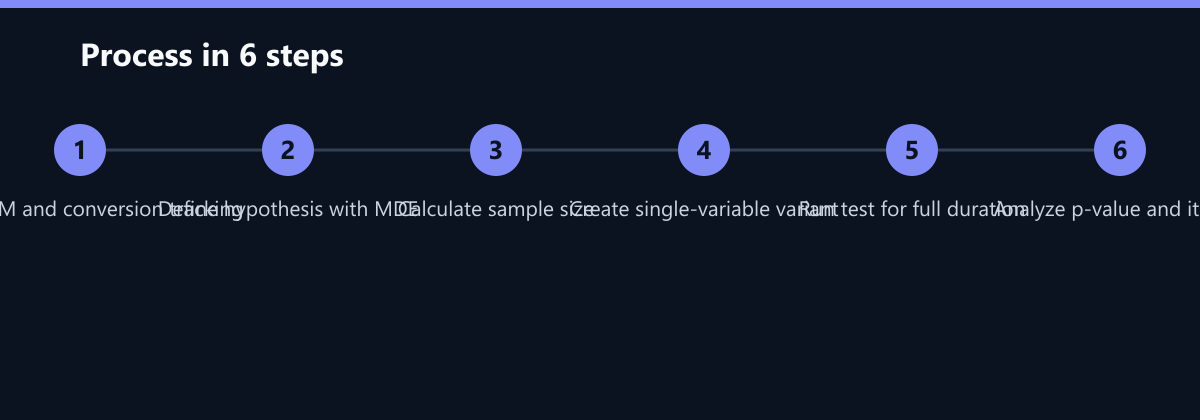
Calculating Sample Size: The B2B Bottleneck
This is the most critical step for B2B teams, and the one most often skipped. You must calculate the required sample size before launching. If you do not, you will likely stop the test too early, leading to inconclusive results.
Use an online A/B test calculator. Input your:
- Baseline Conversion Rate: Your current performance.
- Minimum Detectable Effect (MDE): The smallest improvement you consider significant (e.g., 5% relative lift).
- Statistical Power: Set to 80% (standard).
- Confidence Level: Set to 95% (standard).
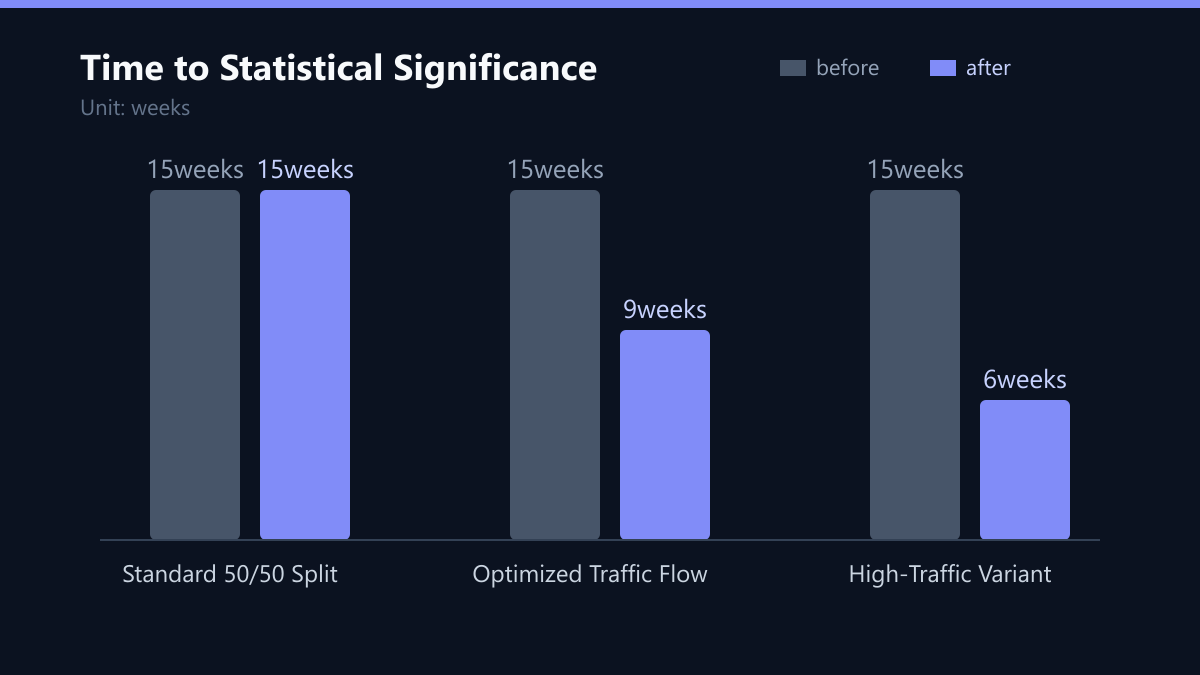
Example Calculation: If your baseline conversion rate is 2% and you want to detect a 5% relative lift (to 2.1%), you need approximately 7,350 visitors per variation.
If your landing page receives 500 visitors per week:
- 7,350 / 500 = 14.7 weeks.
- Minimum Duration: 15 weeks.
This is where many B2B teams falter. A 15-week test is long. It requires patience and discipline. However, stopping early is worse than waiting. Early stopping leads to false positives. You might see a 20% lift after one week and stop, only to find that the lift disappears over the next four weeks.
Rule of Thumb: Never stop a test early, even if one variant appears to be winning. Let the data run for the full calculated duration or at least two full business cycles to account for weekly fluctuations.
Analyzing Results and Iterating
Once the test reaches the required sample size, analyze the results in HubSpot. Do not just look at the conversion rate; look at the statistical evidence.
Look for:
- Statistical Significance: Is the p-value below 0.05?
- Confidence Interval: Does the interval exclude zero?
- Business Impact: Is the lift large enough to justify implementation?
Interpretation Guide:
- Significant Win: Implement the winning variation permanently.
- Inconclusive: Review the hypothesis. Was the MDE too small? Was the audience too broad?
- Significant Loss: Revert to the original version. Document why the change failed.
Next Steps:
- Implement: Replace the original asset with the winner.
- Document: Record the hypothesis, results, and insights in a shared document.
- Iterate: Use the insights to form the next hypothesis. Did the new CTA work? Test a different headline next.
Pro Tip: Share results with sales teams. If a test shows that “ROI Calculator” converts better than “Case Study,” sales should lead with ROI conversations in follow-up emails. Marketing and sales alignment is a direct result of rigorous testing.
Typical Mistakes to Avoid
Even with the right tools, teams make consistent errors that undermine their results.
- Testing on Low-Traffic Pages: If your page gets 50 visitors a month, you will never reach statistical significance. Focus your testing efforts on high-traffic, high-impact pages first.
- Ignoring Seasonality: If you run a test across a holiday or a major industry conference, your data will be skewed. Ensure your test duration covers a representative period.
- Over-Optimizing for Vanity Metrics: A lower bounce rate is nice, but if it doesn’t lead to more leads, it doesn’t matter. Always tie your metrics to business outcomes.
How You Measure Success
Success in A/B testing is not just about winning a single test. It is about building a culture of experimentation. Measure your success with these KPIs:
- Test Velocity: How many tests do you launch per quarter? Aim for 2-4 significant tests per quarter for a B2B team.
- Implementation Rate: What percentage of significant wins do you actually implement? This should be 100%.
- Cumulative Lift: Track the total percentage improvement in conversion rate over the year. This shows the compounding effect of small wins.
To measure this, maintain a central spreadsheet or use a tool like Notion to log every test. Include the hypothesis, sample size, duration, result, and p-value. This creates an institutional memory that prevents you from repeating failed tests.
Checklist for Your Next Test
Before you click “Start Test,” run through this checklist:
- Is the hypothesis specific and testable?
- Have I calculated the required sample size?
- Do I have enough traffic to complete the test in a reasonable timeframe?
- Are all tracking pixels and conversion events firing correctly?
- Have I disabled other changes on the page?
- Is the test scheduled to run for at least two full business cycles?
By following this disciplined approach, you transform A/B testing from a guesswork exercise into a reliable growth engine. In B2B, where every lead counts, this rigor is not optional; it is essential.
Passend dazu
- Performance Marketing
- SEO & AI Search (GEO)
- HubSpot CRO: 32% Increase in Demo Bookings through A/B Testing of Landing Pages for a DACH Industry Provider
- B2B Industry: 34% Reduction in CPA through Dynamic Google Ads Campaigns and HubSpot Attribution in the DACH Region
- Affiliate Marketing
- Content & CRO
- HubSpot Content Strategy for 30-Day B2B Lead Growth
- CRM Migration Without Data Loss: Checklist for Moving from Pipedrive to HubSpot
- A/B Testing in Practice: Calculating Significance and Sample Size Correctly
- Top 5 Tools to Monitor Your Brand in AI Search Results
- 19 Percent Increase in Form Completions via Simplified HubSpot Paths