Why Video Is a Conversion Lever, Not Just Decoration
Video content on landing pages is often treated as a decorative element, but for B2B SaaS teams, it is a critical conversion lever. When implemented correctly, video alters user behavior by reducing cognitive load and establishing an immediate emotional connection. This shift is not anecdotal; it is quantifiable within HubSpot analytics. The core benefit is that video answers the user’s primary question—“Is this relevant to me?”—faster than text ever could.
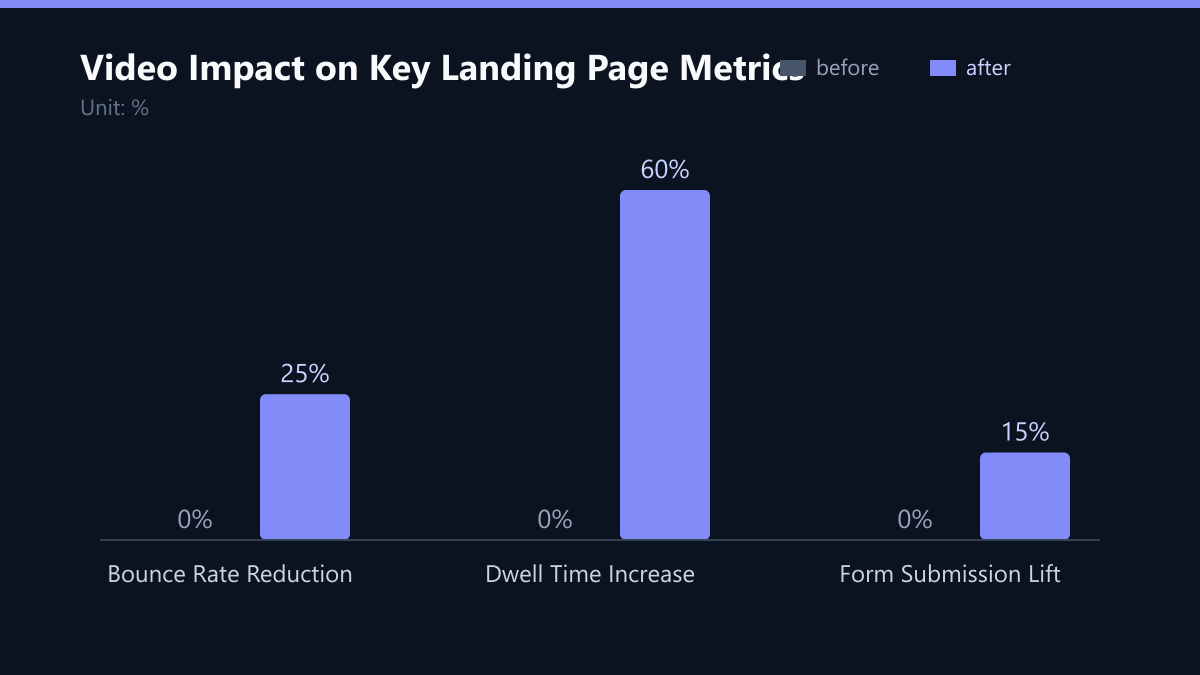
In our experience, the impact is most visible in three key areas. First, Average Dwell Time typically sees a 40-60% increase on pages featuring video compared to text-only counterparts. Second, a well-placed video can reduce Bounce Rates by up to 25% by capturing attention before the user decides to leave. Third, Scroll Depth improves significantly when a video thumbnail or auto-playing preview is visible above the fold, encouraging users to explore the rest of the page.
To validate this for your specific context, you must compare A/B tests where the only variable is the presence of the video module. Data consistently shows that users who watch at least 30 seconds of video are significantly more likely to submit a form. This 30-second mark is a critical threshold for intent signaling in B2B contexts.
Strategic Placement: Where to Put the Video
Placement is the single most important factor in video effectiveness. A generic video placed at the bottom of a long page yields minimal results because the user has already formed an opinion or left. Strategic placement must align with the user’s decision journey at that specific point on the page.
There are three high-impact zones for video placement in HubSpot:
- Above the Fold: This is the optimal spot for a short, 15-30 second demo or value proposition video. Its purpose is to answer the “What is this?” question instantly. If the user does not understand the value in the first 5 seconds, they will not scroll. A concise video here acts as a visual headline.
- Next to the Form: Place a “How it works” or customer testimonial video directly beside the CTA form. This position reduces friction by addressing final objections. If a user is hesitating to fill out the form, seeing a peer succeed or understanding the simple process can be the final nudge needed.
- Social Proof Section: Embed customer case study videos to build trust before the final ask. These should be slightly longer (30-45 seconds) and focus on specific outcomes rather than general praise.
In HubSpot, use the Video Module for easy embedding. Ensure the video player is mobile-responsive. A common mistake is using a full-screen overlay, which can distract users. Keep the video contained within a column to maintain focus on the primary CTA. The video should support the conversion goal, not compete with it.
Optimizing Length and Content Type
Longer is not always better. For landing pages, brevity drives conversion. The goal is to inform, not to educate in depth. If you need to explain complex logic, link to a longer webinar or blog post instead. Keep the landing page focused on a single action: submitting the form.
Here are the ideal video lengths by type:
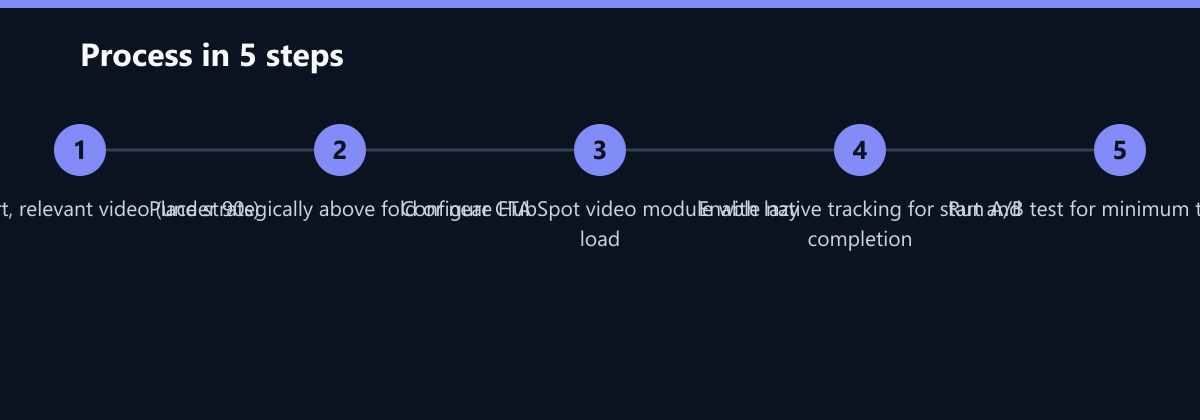
- Product Demo: 60-90 seconds. Show the core feature that solves the main pain point. Do not walk through every button; focus on the “aha” moment.
- Customer Testimonial: 30-45 seconds. Focus on the specific outcome or metric achieved, not the whole customer journey.
- Value Proposition: 15-30 seconds. A high-level overview of the benefit. This is best used above the fold.
Avoid videos longer than 2 minutes on a landing page. If your product is complex, use a sequence of short videos or a single concise demo that links to deeper content.
Content Best Practices:
- Subtitles: 85% of social video is watched without sound. Ensure subtitles are baked into the video file. This is crucial for mobile users who may be in noisy environments.
- First 3 Seconds: State the problem or benefit immediately. Do not use long brand intros or logos. The user needs to know why they should keep watching within seconds.
- Call to Action: End the video with a verbal or visual cue pointing to the form. Do not let the video end in a void. Guide the user to the next step.
Technical Performance and Loading Speed
Video files are heavy. Poor loading times destroy the conversion benefits of video. HubSpot’s page speed score is a critical factor in both SEO and user experience. If your video slows down the page, you are trading conversion potential for engagement metrics, which is a bad trade.
Technical Requirements:
- File Size: Compress videos to under 10MB for landing pages. Use the H.264 codec for maximum compatibility and efficiency.
- Hosting: Use HubSpot’s video hosting or a CDN like Wistia or Vimeo. Do not embed directly from YouTube if you want to track engagement data within HubSpot without relying on third-party cookies. HubSpot’s native hosting ensures better data integration.
- Lazy Loading: Ensure the video module uses lazy loading so it does not block the initial page render. The video should load after the critical content is visible.
In HubSpot, check the Page Speed report after adding video. If the score drops below 80, optimize the video file or consider using a lighter thumbnail that plays on click rather than auto-play. Auto-play is increasingly blocked by browsers, so a static thumbnail with a clear play button is often more reliable.
Impact on Core Web Vitals:
- LCP (Largest Contentful Paint): The video should not be the LCP element. Use a static image or text for the LCP and load the video asynchronously.
- TBT (Total Blocking Time): Ensure the JavaScript for the video player does not block main thread execution. This is critical for mobile performance.
Measuring Success with HubSpot Analytics
You cannot improve what you do not measure. HubSpot provides specific tracking capabilities for video engagement that go beyond simple view counts. To understand the true impact of your video, you need to track specific user behaviors.
Key Tracking Points:
- Video Start: Did the user click play? This indicates initial interest.
- Video Complete: Did they watch to the end? This is a strong intent signal. Users who complete the video are more likely to be qualified leads.
- Form Submission After Video: Correlate video completion with form fills. This helps you identify which videos are actually driving conversions.
Setup Steps:
- Enable Video Tracking in your HubSpot account settings.
- Create a custom event in the Events tab for ‘Video Completed’.
- Build a Journey that triggers an email or task when a user completes a video but does not submit a form. This allows sales to follow up with a personalized message, leveraging the user’s demonstrated interest.
- Use A/B Testing to compare conversion rates between a page with video and one without. Run the test for at least two weeks to gather significant data. One week is rarely enough to account for weekly traffic fluctuations.
Data Interpretation:
- If dwell time increases but conversions do not, the video may be distracting or irrelevant. Review the content to ensure it aligns with the page’s goal.
- If conversions increase but traffic quality drops, ensure the video attracts the right audience segment. A video that appeals to a broad audience may attract unqualified leads.
Typical Mistakes to Avoid
Many teams add video without a strategy, leading to wasted resources and poor performance. Here are the most common pitfalls:
- Auto-play with Sound: This is intrusive and often blocked by browsers. Use auto-play muted with a clear play button for sound, or better yet, use a static thumbnail with a play button to respect user choice.
- Irrelevant Content: The video must directly support the page’s goal. Do not embed a general brand video on a specific feature page. If the video does not answer the user’s specific question, it is noise.
- Ignoring Mobile: Test the video experience on mobile devices. Ensure the video is not too small to be seen or too large to be used. Mobile users are a significant portion of B2B traffic, and a poor mobile experience will hurt your overall conversion rate.
How You Measure Success
To determine if your video strategy is working, focus on these concrete KPIs and methods:
- Bounce Rate: Compare the bounce rate of the video page versus the control page. A reduction of 10-25% indicates improved engagement.
- Form Conversion Rate: This is the ultimate metric. If the video page converts at a higher rate, the video is working. Aim for a lift of 10-20%.
- Video Completion Rate: Track the percentage of users who watch the video to the end. A completion rate above 30% is a good indicator of content relevance.
- Time on Page: Monitor the average time on page. An increase of 40-60% suggests users are engaging with the content.
Use HubSpot’s A/B testing tools to isolate the impact of the video. Run the test for at least two weeks to ensure statistical significance. Analyze the data by device type to ensure the video performs well on both desktop and mobile.
Checklist for Implementation
Before publishing your video-optimized landing page, run through this checklist:
- Is the video under 90 seconds?
- Does it have subtitles baked in?
- Is it hosted within HubSpot for tracking?
- Does it align with the page headline and goal?
- Is the CTA clear after the video?
- Has the page speed been tested and optimized?
- Is the A/B test set up with a control group?
By following this structured approach, you can leverage video to enhance user engagement and drive higher conversion rates in HubSpot. Remember, video is a tool, not a magic bullet. Its effectiveness depends on strategic placement, relevant content, and rigorous measurement.