The High Cost of Mismatched Intent
Search Engine Advertising (SEA) delivers high-intent traffic, but this intent is fragile. When a user clicks on a specific keyword, they expect an immediate, relevant answer. If the landing page does not mirror the promise made in the ad, cognitive dissonance sets in. The result is not just a missed opportunity; it is a direct loss of ad spend. In B2B SaaS and mid-market contexts, the buyer journey is complex, spanning awareness, consideration, and decision stages. A single, static corporate homepage cannot address these nuances. Without tailored entry points, you lose qualified leads to competitors who offer clearer, more relevant paths to value. HubSpot provides the infrastructure for dynamic, adaptive pages, but only if the underlying strategy is sound. The following levers outline how to bridge the gap between ad click and qualified lead.
Aligning the Narrative: Message Match
The first and most critical lever is strict message match. The headline of your landing page must mirror the promise made in your ad copy. If the ad mentions ‘Automated Lead Scoring for SaaS’, the H1 should reflect that specific benefit. This reduces cognitive load, allowing the visitor to confirm they are in the right place within seconds.
- Headline Consistency: Use the primary keyword in the H1 to reinforce relevance.
- Value Proposition: State the core benefit within the first three lines of visible text.
- Visual Continuity: Use imagery or graphics that appear in the ad creative to create a seamless transition.
Do not rely on a single static page for all campaigns. In HubSpot, you can create multiple variations of the same page to test different headline angles against specific ad groups. This alignment ensures that the user’s expectation is met immediately, setting the stage for deeper engagement.
Reducing Friction: Forms and Progressive Profiling
Long forms are the primary killer of conversion rates in B2B. Every additional field reduces the completion rate significantly. For top-of-funnel SEA campaigns, keep forms to a maximum of three fields: Name, Work Email, and Company Name. This minimal approach respects the visitor’s privacy and reduces the perceived effort required to engage.
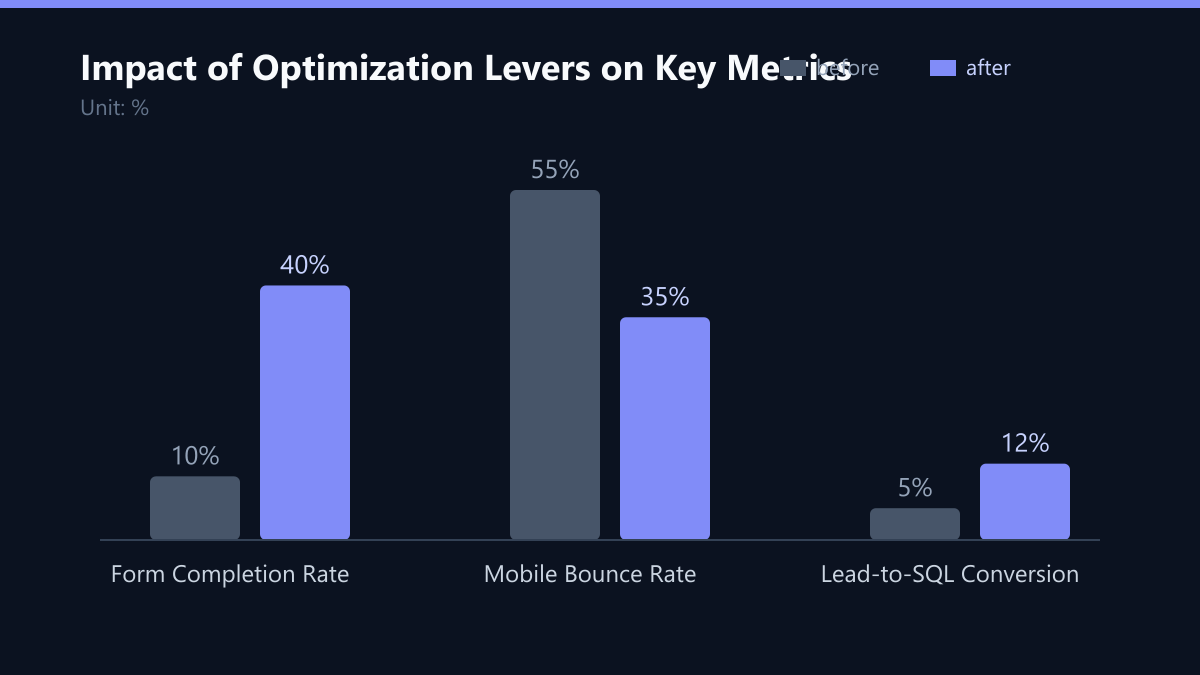
Use HubSpot’s progressive profiling to gather deeper data over time. Instead of asking for budget and timeline on the first visit, request these details on the second or third interaction. This approach increases initial conversion rates by up to 40% by lowering the barrier to entry.
- Field Relevance: Only ask for data that directly impacts the next step in the journey.
- Auto-Completion: Pre-fill known fields if the user is a returning visitor.
- Error Handling: Use inline validation to guide users without reloading the page.
By decoupling data collection from the initial conversion event, you capture more leads at the top of the funnel and enrich them gradually as trust builds.
Personalization Through Dynamic Content
HubSpot’s dynamic content blocks allow you to show different elements based on the visitor’s source, location, or industry. For SEA campaigns, this is critical for regional relevance. A user from Germany should see local case studies and contact details, while a user from the UK sees relevant local examples. This personalization increases trust and perceived relevance, signaling that your company understands the specific market context.
Implement this by creating content groups in HubSpot that target specific countries or industries. Ensure that the core value proposition remains consistent, while the supporting evidence adapts.
- Local Social Proof: Show logos of clients in the visitor’s region.
- Language Nuances: Adapt phrasing to local business culture.
- Compliance Badges: Display relevant GDPR or data protection seals for EU visitors.
This level of detail transforms a generic page into a tailored experience, significantly improving engagement metrics.
Focusing the User: Strategic CTA Design
A single, clear Call-to-Action (CTA) is essential for maximizing conversion. Multiple competing CTAs dilute user focus and increase decision paralysis. Choose one primary action that aligns with the campaign goal, such as ‘Book a Demo’ or ‘Download the Guide’. Place the CTA above the fold and repeat it at the end of the page. Use high-contrast colors that stand out from the brand palette but do not clash. The button text should be action-oriented and specific. Avoid generic terms like ‘Submit’ or ‘Click Here’.
- Above the Fold: Ensure the primary CTA is visible without scrolling.
- Action-Oriented Text: Use ‘Get My Free Audit’ instead of ‘Contact Us’.
- Visual Hierarchy: Make the CTA the most prominent element on the page.
Clarity is key. When the user knows exactly what to do next, conversion rates rise. Ambiguity leads to hesitation, and hesitation leads to bounce.
Speed and Mobile Experience
Page speed is a direct ranking factor for SEO and a critical conversion driver for paid traffic. Users expect pages to load in under two seconds. Slow loading times increase bounce rates and waste ad spend. HubSpot pages are generally fast, but custom modules and heavy images can slow them down. Mobile traffic accounts for a significant portion of B2B searches. Ensure your landing page is fully responsive and optimized for touch interactions. Buttons should be large enough to tap easily, and text should be readable without zooming. Test your page on real devices to identify layout issues.
- Image Optimization: Compress images and use modern formats like WebP.
- Code Minification: Minify CSS and JavaScript files.
- Mobile Testing: Verify form usability and CTA visibility on mobile devices.
Performance is not just a technical metric; it is a user experience factor. A fast, smooth experience builds trust and encourages action.
Iterating with Data: A/B Testing
Guessing what works is inefficient. Use HubSpot’s built-in A/B testing tools to experiment with different elements. Test one variable at a time to isolate its impact on conversion rates. Common elements to test include headlines, CTA buttons, form length, and social proof placement. Run tests until you reach statistical significance. Do not stop a test early based on short-term fluctuations. Document your findings and apply successful changes to other landing pages. This creates a compounding effect on overall conversion performance.
- Hypothesis-Driven Testing: Define a clear hypothesis before starting a test.
- Sample Size: Ensure a sufficient number of visitors for valid results.
- Documentation: Record test results and insights for future reference.
Data-driven iteration ensures that every change is backed by evidence, reducing risk and improving outcomes.
Closing the Loop: HubSpot Journeys
A landing page does not exist in isolation. It is the entry point to a broader marketing journey. In HubSpot, connect your landing page forms to automated workflows that nurture leads based on their behavior. If a user downloads a guide but does not book a demo, trigger a follow-up email sequence with additional value. Use lead scoring to prioritize high-intent prospects. Assign points for actions like form submissions, email opens, and page visits. When a lead reaches a specific score, notify sales via HubSpot’s CRM. This ensures that your sales team focuses on the most qualified opportunities, improving overall ROI.
- Workflow Automation: Create personalized email sequences for different lead segments.
- Lead Scoring: Define criteria for MQL and SQL status.
- Sales Handoff: Automate task creation for sales reps when leads convert.
By integrating the landing page into a broader workflow, you ensure that no lead is lost and that every interaction moves the user closer to a decision.
Typical Mistakes to Avoid
- Ignoring Message Match: Using a generic homepage for specific ad campaigns leads to high bounce rates. Always align the landing page headline with the ad copy.
- Over-Collecting Data: Asking for too many details upfront reduces conversion rates. Use progressive profiling to gather data gradually.
- Multiple Competing CTAs: Offering too many choices confuses users. Focus on one primary action to guide the user effectively.
- Neglecting Mobile Optimization: Many B2B users search on mobile devices. Ensure your page is responsive and fast on all devices.
How You Measure Success
To determine if your optimization efforts are working, track the following KPIs:
- Conversion Rate: The percentage of visitors who complete the desired action. Aim for a consistent increase month-over-month.
- Form Completion Rate: The percentage of users who start a form and complete it. A low rate indicates friction issues.
- Bounce Rate: The percentage of visitors who leave after viewing only one page. A high bounce rate suggests message mismatch or poor user experience.
- Cost Per Lead (CPL): The cost to acquire a qualified lead. A decrease in CPL indicates improved efficiency.
Use HubSpot’s reporting tools to track these metrics and identify areas for improvement. Regularly review your data to ensure that your strategies are aligned with your business goals.
Checklist for Implementation
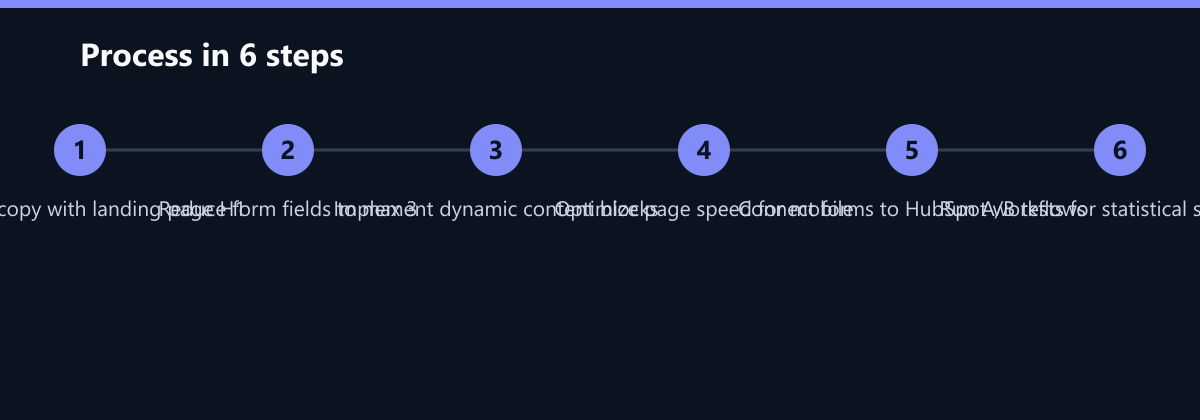
- Audit Ad Copy: Ensure your ad headlines match your landing page H1.
- Simplify Forms: Reduce form fields to three or fewer for top-of-funnel campaigns.
- Implement Dynamic Content: Add location- or industry-specific elements to your page.
- Optimize Speed: Compress images and minify code to improve load times.
- Set Up Workflows: Connect forms to automated email sequences and lead scoring.
- Test and Iterate: Run A/B tests to continuously improve your landing page performance.
By following these steps, you can transform your B2B SEA landing pages from static pages into powerful conversion engines. Focus on relevance, speed, and personalization to drive more qualified leads and improve your overall marketing ROI.