The Hidden Bottleneck: Why Account-Level Budgets Fail
Most B2B SaaS teams still manage their Search Engine Advertising (SEA) budgets at the account level. This approach creates a structural bottleneck that silently erodes ROI. When you set a single daily cap for the entire account, high-performing campaigns often hit their limit early in the day, while low-performing ones continue to drain funds until the daily ceiling is reached. The result is a misallocation of resources where your best keywords are starved of impressions while poor ones consume the surplus.
The core issue is that budgets should reflect current performance, not historical averages or arbitrary caps. In the B2B SaaS sector, variance between campaigns is extreme. It is common to see one specific campaign generate 70% of qualified leads while consuming only 30% of the total spend. Conversely, another campaign might consume 40% of the budget to generate only 5% of the leads. By keeping budgets at the account level, you prevent scaling your winners and fail to cut losses on your losers efficiently.
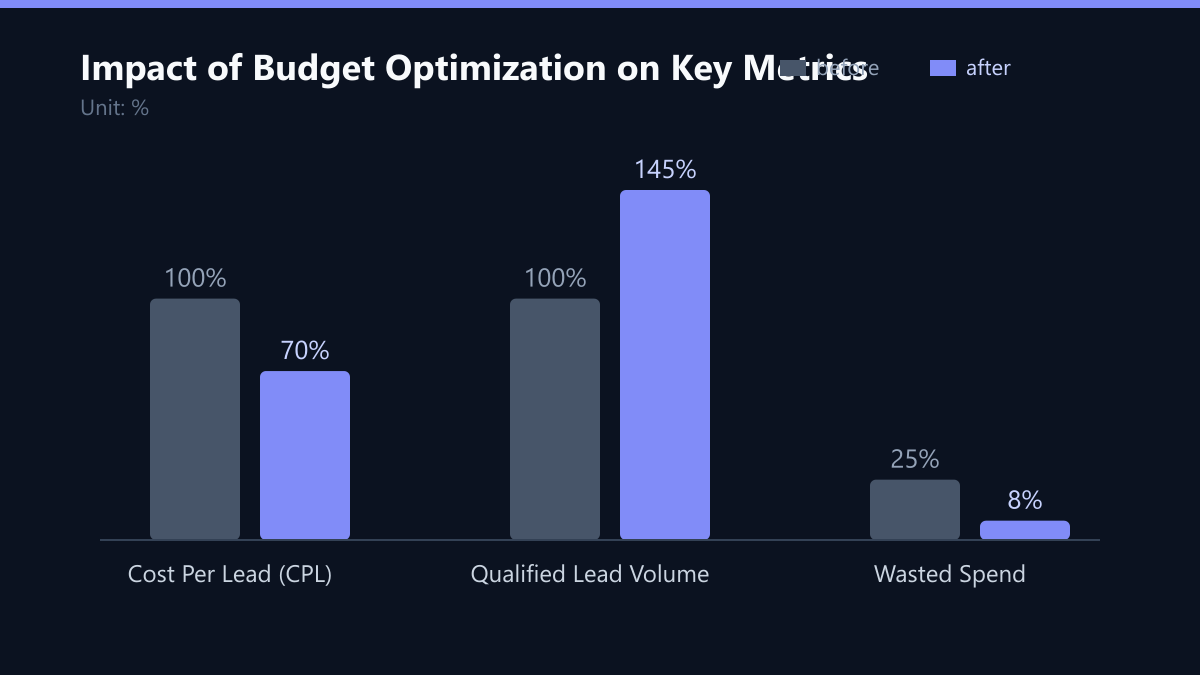
Moving to campaign-level budgets allows for precise control over Cost Per Lead (CPL). It enables dynamic allocation, ensuring that the highest ROI keywords receive priority. This shift from static caps to dynamic performance-based limits is the single most impactful change you can make to your PPC structure.
Establishing a Data-Driven Baseline
Before reallocating funds, you must establish a factual baseline. Do not guess your starting budget. Use the last 90 days of data to identify your true cost efficiency. This period is long enough to smooth out weekly volatility but short enough to reflect recent market conditions. Ignore outliers from major holidays, product launches, or one-off events unless you expect them to repeat in the future.
You need to extract three specific data points for each campaign:
- Average Cost Per Click (CPC): This indicates the raw cost of traffic.
- Conversion Rate (CVR): This measures the efficiency of the traffic in generating leads.
- Customer Lifetime Value (LTV): This provides the revenue context for each lead.
With these figures, calculate the maximum allowable CPL for each campaign. For example, if a campaign has a 5% conversion rate and a target LTV of $5,000, your break-even CPL is $250 (calculated as $5,000 / 0.05). To maintain a healthy margin, you might target a CPL of $150-$200. Set the daily budget to support 2-3 conversions per day. This volume is critical because it keeps the Google Ads algorithm stable. If you aim for fewer than 2 conversions a day, the data becomes too noisy for automated bidding to function effectively.
The 70/20/10 Allocation Model
Once you have your baselines, distribute your total daily budget using a performance-based tier system. This model prevents over-exposure to risky keywords while protecting your core revenue streams. It balances the need for immediate ROI with the need for long-term growth and experimentation.
| Tier | Allocation | Purpose |
|---|---|---|
| Core | 70% | High-intent, proven converters |
| Growth | 20% | New keywords, adjacent audiences |
| Testing | 10% | Experimental match types, new geo |
Core campaigns represent your business engine. These should have strict daily caps to prevent overspending but high enough to capture all available high-intent traffic. Growth campaigns target adjacent keywords or new audiences. They can have higher caps to allow for volume testing. Testing campaigns are for experimental match types, new landing pages, or new geographies. They need low caps to limit financial loss if the experiment fails. This structure ensures that 90% of your spend is directed toward known performance drivers.
Automating Stability with Bid Rules
Manual adjustments are too slow for daily budget optimization. By the time you notice a spike in CPA, the budget may already be depleted. Use automated rules to react to real-time performance. These rules act as safety nets and accelerators, removing emotional decision-making from the equation.
We recommend implementing the following three rules in your ad platform:
- Increase budget by 10% if CPA is 20% below target for 3 consecutive days.
- Decrease budget by 15% if CPA is 20% above target for 3 consecutive days.
- Pause campaign if spend exceeds 2x the target CPL with zero conversions.
These rules ensure that budget shifts are based on data, not intuition. They allow you to scale winners automatically without daily intervention. However, automation is not a set-and-forget solution. You must review rule performance monthly to adjust thresholds. If your market becomes more competitive, a 20% variance might trigger too often. In that case, tighten the threshold to 10%.
Navigating Seasonality and Market Fluctuations
Search volumes and CPCs are not static. B2B SaaS buying cycles often align with fiscal quarters. Q4 and Q1 typically see higher competition and CPCs as companies finalize budgets or plan for the new year. If you keep your budgets static during these periods, you will lose impression share to competitors who adjust proactively.
Action steps for seasonal adjustment:
- Q4: Increase budgets by 15-20% to maintain visibility. Accept slightly higher CPCs as a cost of doing business during peak season.
- Q1: Maintain baseline budgets; focus on efficiency. Use this time to refine keywords and negative lists.
- Mid-Year: Use surplus from efficient quarters to fund testing. This is the ideal time to expand into new geographies or test new ad formats.
Track industry-specific CPC trends. If your competitors launch a new product, expect a 10-15% spike in CPCs. Adjust budgets proactively rather than reactively after the spend spikes. Monitoring competitor activity and industry news allows you to anticipate these shifts and protect your market share.
The Weekly Optimization Routine
Consistency beats intensity. A 30-minute weekly review is sufficient for most mid-market teams. Do not check daily metrics unless you are in a launch phase or a crisis. Over-monitoring leads to over-adjusting, which destabilizes the algorithm.
Weekly checklist:
- Identify winners: Which campaigns exceeded CPL targets? Increase their daily cap by 10%.
- Identify losers: Which campaigns missed targets? Decrease cap by 10% or pause if underperforming for 2 weeks.
- Check impression share: If share is below 60% for high-intent keywords, increase budget. This indicates you are losing auctions due to budget limits, not bid amounts.
- Review search terms: Add negative keywords to prevent waste. Look for terms that are irrelevant to your service but semantically similar.
Document changes in a shared spreadsheet. This creates an audit trail and helps new team members understand the strategy. Avoid making more than two major budget changes per week to allow data to stabilize. Each change requires a 3-5 day period for the algorithm to recalibrate.
Typical Mistakes to Avoid
Even with a solid strategy, teams often fall into specific traps that undermine their efforts.
- Ignoring Quality Score: Increasing budget on a campaign with a low Quality Score is like pouring water into a leaking bucket. Focus on improving ad relevance and landing page experience before scaling spend.
- Over-Splitting Campaigns: Creating too many small campaigns spreads data too thin. If a campaign has fewer than 10 conversions per month, consider merging it with a similar campaign to gather more data.
- Chasing Every Trend: Not every new keyword or trend is worth testing. Stick to your 70/20/10 model and only test trends that align with your core value proposition.
How You Measure Success
To determine if your budget optimization is working, track the following KPIs:
- Cost Per Lead (CPL): The primary metric. Aim for a 10-20% reduction within the first 3 months.
- Return on Ad Spend (ROAS): Calculate as (Revenue from Leads / Ad Spend). A healthy ROAS for B2B SaaS is often 3-5x.
- Impression Share: Monitor this for core campaigns. A drop in impression share despite increased budget indicates a bid or quality issue.
Measure these KPIs weekly. Compare current performance against your 90-day baseline. If CPL is trending down and ROAS is trending up, your strategy is working. If not, revisit your allocation model and check for data leakage in your tracking.
Checklist for Implementation
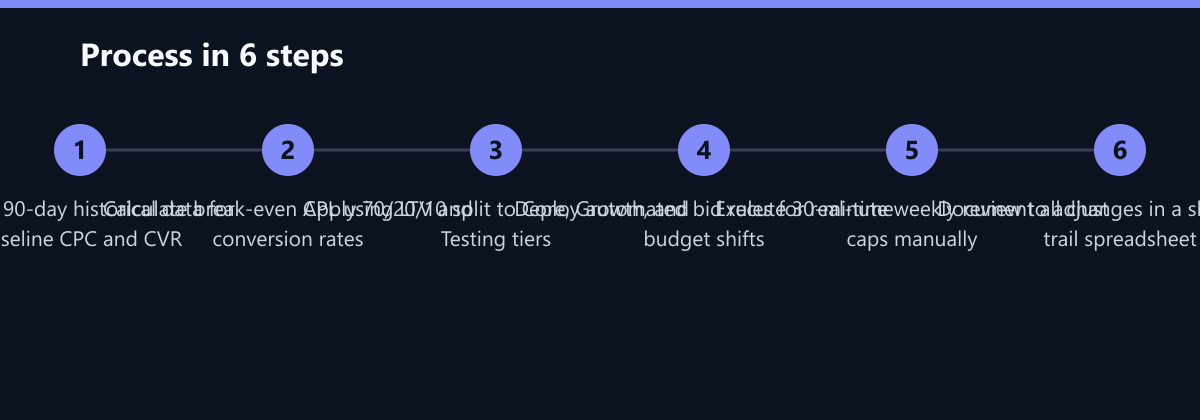
- Extract 90-day data for all campaigns.
- Calculate break-even CPL for each campaign.
- Categorize campaigns into Core, Growth, and Testing tiers.
- Set daily budgets based on the 70/20/10 model.
- Implement automated bid rules for CPA variance.
- Schedule a recurring 30-minute weekly review meeting.
Passend dazu
- Performance Marketing
- SEO & AI Search (GEO)
- Manufacturing in Asia: Optimizing campaign budgets by 25% through server-side data synchronization between AdWords and SAP
- Scaling Campaign Management to Three New Markets in 60 Days
- Affiliate Marketing
- Content & CRO
- Conversational Marketing
- Optimizing Quality Score: 5 Levers for Lower CPCs in PPC