The Executive Attention Economy
C-suite leaders operate in an environment of extreme information scarcity. They do not have the bandwidth to process every click, form fill, or minor fluctuation in organic traffic. Their primary need is not raw data transparency, but strategic clarity. They need to know immediately if the business is healthy, where growth is stalling, and where capital should be deployed next. A dashboard that fails to respect this attention economy quickly becomes noise rather than a decision-making tool.
The primary goal of executive reporting is not to prove that marketing is working, but to facilitate faster, higher-quality decisions. If a metric does not directly influence a strategic choice, it does not belong on the main screen. This approach shifts the conversation from activity metrics (like impressions or clicks) to business outcomes (like revenue and retention). By focusing on the intersection of marketing performance and revenue impact, you transform the dashboard from a passive reporting artifact into an active strategic instrument.
Core KPIs for B2B SaaS Leadership
Selecting the right metrics requires alignment with the company’s current strategic phase. The focus for a growth-stage SaaS company differs significantly from that of a mature enterprise. However, certain metrics remain universally critical for executive oversight in the B2B SaaS context.
Customer Acquisition Cost (CAC) Payback Period This metric measures how many months it takes to recoup the cost of acquiring a customer. A target of under 12 months is a common benchmark for healthy growth. If this number rises above 18 months, it signals that the sales cycle is lengthening or marketing costs are inflating without proportional revenue gains.
Net Revenue Retention (NRR) NRR indicates whether your existing customer base is growing or shrinking. An NRR above 100% signals strong product-market fit and effective upsell potential. For leadership, this is often a more important indicator of long-term viability than new customer acquisition.
Pipeline Velocity This tracks the speed at which leads move through the sales funnel. Slowing velocity often indicates friction in the sales process, poor lead quality, or market saturation. It is a leading indicator of future revenue.
Marketing-Influenced Revenue This isolates the revenue directly attributed to marketing efforts, separating it from organic or referral sources. It provides a clear view of marketing ROI, allowing leaders to assess the efficiency of spend relative to closed deals.
Avoid vanity metrics such as total website visits or social media followers. These numbers rarely correlate with revenue in B2B contexts and distract from actionable insights.
Structuring the Dashboard Hierarchy
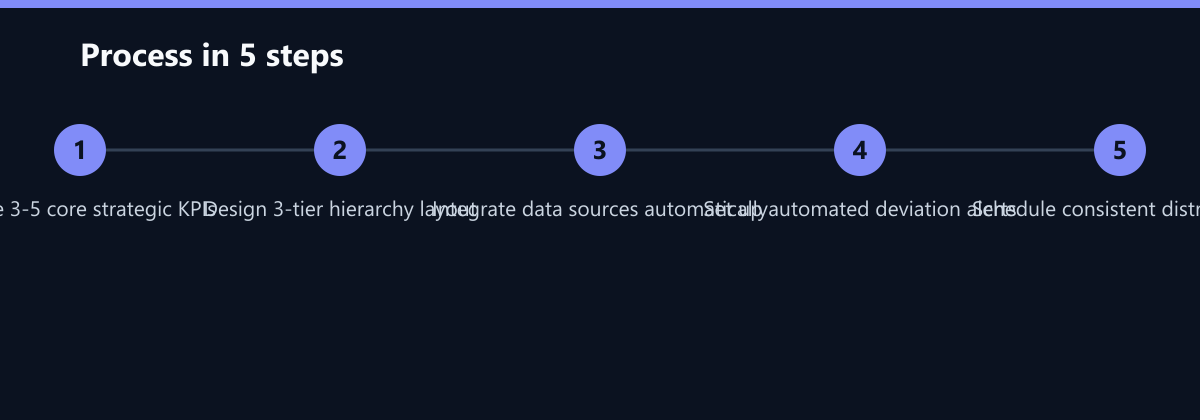
A well-structured dashboard follows a logical flow from high-level health to specific drivers. The layout should guide the eye from the most critical summary to the underlying details. This hierarchical approach ensures that leaders can grasp the situation in seconds and drill down only when necessary.
Level 1: The Executive Summary Display 3 to 5 key metrics in large, clear cards. Use color coding (green, amber, red) to indicate performance against targets. Include a single trend line for the primary revenue metric. This layer answers the question: “Are we on track?”
Level 2: The Driver Analysis Break down the primary metric into its components. For example, if Pipeline Velocity is down, show breakdowns by stage or by sales rep. Use bar charts or stacked bars to compare segments. This layer answers the question: “Where is the problem?”
Level 3: The Diagnostic Detail Provide access to raw data or detailed tables for specific inquiries. This level is rarely viewed by the C-suite but must be available for follow-up questions. Ensure data freshness is clearly indicated (e.g., ‘Updated 2 hours ago’). This layer answers the question: “What exactly happened?”
This three-tier structure prevents cognitive overload while maintaining depth. It allows the CEO to see the ‘what’ and the ‘why’ without getting lost in the ‘how’.
Design Principles for Clarity and Speed
Visual clarity is as important as data accuracy. A cluttered dashboard forces leaders to spend time deciphering the layout rather than analyzing the data. Apply minimalist design principles to ensure immediate comprehension.
- Limit Chart Types: Use line charts for trends, bar charts for comparisons, and tables for precise figures. Avoid pie charts and 3D effects, which distort perception and make accurate comparison difficult.
- Standardize Color Coding: Use consistent colors across all dashboards. For example, always use blue for current year and gray for previous year. This reduces the cognitive load required to interpret visuals.
- Remove Gridlines and Clutter: Strip away unnecessary gridlines, axis labels, and legends where possible. Let the data speak for itself.
- Mobile Optimization: Executives often review dashboards on mobile devices during commutes or travel. Ensure the layout is responsive and key metrics are visible without scrolling.
A clean design respects the reader’s time. It allows for quick pattern recognition and anomaly detection. If a user needs a legend to understand a chart, the chart is too complex.
Automating the Reporting Workflow
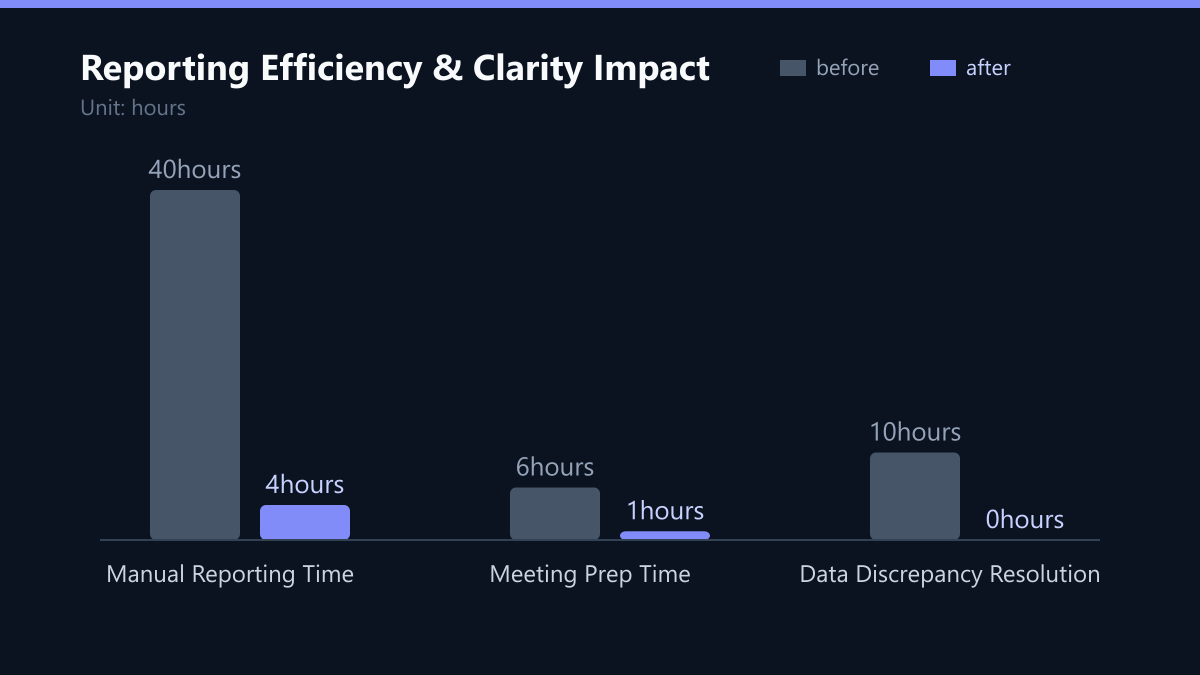
Manual data aggregation is a significant source of error and delay. For C-suite reporting, data must be accurate and timely. Automation ensures that the dashboard reflects the current state of the business without human intervention, saving an average of 40 hours per month in manual reporting effort.
- Centralize Data Sources: Integrate CRM, marketing automation, and billing systems into a single data warehouse or BI tool. This eliminates version control issues and ensures a single source of truth.
- Set Automated Alerts: Configure notifications for significant deviations from targets. For example, alert the CMO if CAC spikes by more than 10% week-over-week. This shifts reporting from reactive to proactive.
- Schedule Distribution: Send the dashboard via email or Slack at a consistent time, such as Monday morning at 8:00 AM. Consistency builds habit and ensures the data is fresh for the weekly leadership meeting.
- Version Control: Maintain a log of changes to KPI definitions. If the definition of ‘Qualified Lead’ changes, the dashboard must reflect this immediately to maintain trust.
Automation frees up marketing and sales leads from manual reporting tasks. It allows them to focus on analysis and strategy rather than data entry.
How You Measure Success
To determine if your dashboard is effective, you must measure its impact on decision-making and operational efficiency. Do not rely on subjective feedback alone; use these concrete KPIs:
- Time to Insight (TTI): Measure the average time it takes a leader to identify a critical issue from opening the dashboard to identifying the root cause. Target: Under 2 minutes.
- Decision Latency: Track the time between data availability and the subsequent strategic decision. A shorter latency indicates the dashboard is facilitating faster action.
- Manual Effort Reduction: Quantify the hours saved by automation. Compare the pre-implementation manual reporting hours (e.g., 40 hours/month) with post-implementation maintenance hours (e.g., 4 hours/month).
- Data Discrepancy Rate: The number of times stakeholders question the data accuracy. Target: Zero. This indicates successful centralization and definition standardization.
Typical Mistakes
Even with the right tools, teams often fall into traps that undermine the value of executive reporting. Identifying and avoiding these pitfalls is crucial for maintaining dashboard credibility.
- The ‘Data Dump’ Error: Including every possible metric in an attempt to be comprehensive. This results in a dashboard that no one reads. Curate ruthlessly; if it doesn’t drive a decision, remove it.
- Lack of Context: Presenting numbers without benchmarks or targets. A 5% growth rate is good or bad depending on the industry and company stage. Always provide context by comparing against historical averages or industry standards.
- Ignoring Qualitative Feedback: Numbers tell you what is happening, but not why. Include a section for qualitative notes or key insights from the sales and marketing teams to explain anomalies. Without this, the dashboard remains a static report rather than a dynamic tool.
- Stale Definitions: Allowing KPI definitions to drift over time. If ‘MQL’ means something different in January than in July, trends become meaningless. Standardize definitions and document them clearly in a data dictionary.
Checklist for Implementation
- Audit Current KPIs: List all currently reported metrics and map them to strategic goals. Remove any that do not align.
- Define Hierarchy: Assign each KPI to Level 1, 2, or 3 based on its importance to daily/weekly decision-making.
- Establish Data Source: Identify the single authoritative system for each KPI to prevent discrepancies.
- Design Layout: Create the visual prototype, ensuring mobile responsiveness and consistent color coding.
- Automate Pipeline: Connect data sources to the BI tool and set up scheduled refreshes and alerts.
- Pilot with Leadership: Test the dashboard with C-suite members for one week and gather feedback on clarity and usability.
- Document Definitions: Create a simple data dictionary accessible to all stakeholders to ensure consistent interpretation.
By following this structured approach, you ensure that the dashboard remains a trusted source of truth. Trust is the currency of executive reporting. Once lost, it is difficult to regain. A well-designed, automated, and hierarchically structured dashboard not only saves time but fundamentally improves the quality of strategic decisions in B2B SaaS environments.