The Hidden Cost of Sloppy Data Migration
Most failed HubSpot implementations share a common root cause: teams rush the migration process without addressing data quality. Migrating dirty data into a powerful CRM like HubSpot does not fix errors; it amplifies them. When duplicate contacts and inconsistent formats enter the system, lead scoring becomes inaccurate, and reporting becomes unreliable. This creates a cycle of distrust where sales teams revert to spreadsheets because the CRM data feels untrustworthy.
To prevent this, you must treat data hygiene as a prerequisite, not a post-launch task. Before the first record moves, audit your legacy database. Deduplicate records using a matching score of at least 90%. Standardize field formats for phone numbers, emails, and company names to ensure consistency. Archive inactive contacts older than 24 months to reduce database bloat and improve performance.
Clean data is the foundation of accurate lead scoring and efficient reporting. It prevents sales teams from wasting valuable time on invalid entries. If your data is messy, no amount of automation will save your workflow. The time invested in cleaning upfront saves weeks of debugging later. Consider using a dedicated data cleansing tool or a professional service if your legacy database exceeds 50,000 records. The goal is a single, clean source of truth from day one.
Streamlining the Data Model for User Adoption
A common mistake is trying to replicate every legacy field in HubSpot. This creates a bloated interface that slows down user adoption. Sales reps are more likely to update records when the interface is intuitive and fast. A complex data model increases cognitive load and leads to data entry gaps.
Keep your data model lean and focused on core business needs. Limit custom properties to those used in daily workflows. If a field is not used in at least 80% of interactions, consider removing it or making it optional. Use calculated properties for derived data instead of manual entry. For example, instead of asking users to manually enter “Company Size Category,” use a calculated property based on the numeric “Company Size” field.
Group properties by lifecycle stage to improve navigation. This helps users find the information they need quickly. A streamlined model reduces friction and encourages consistent data entry. When the interface is clean, users are more likely to trust the system. This leads to higher data quality and better insights. Regularly review your property usage to identify and remove unused fields. A lean model is a scalable model.
Aligning Sales and Marketing Workflows
HubSpot bridges marketing and sales, but only if both teams agree on definitions. Discrepancies in lead qualification criteria cause friction and lost opportunities. You need a unified definition of a Sales Qualified Lead (SQL). If marketing and sales have different ideas of what qualifies a lead, handoffs become chaotic.
Define MQL criteria based on behavior and firmographics. For example, a lead might be an MQL if they visit the pricing page three times and have a company size of 50-500 employees. Set SLA response times for new SQLs, such as 15 minutes. This ensures that leads are contacted while they are still hot. Map lifecycle stages to sales pipeline stages explicitly. This creates a clear path from marketing to sales.
When marketing and sales share the same rules, handoffs become seamless. This alignment improves conversion rates and reduces internal conflict. Regularly review these definitions with both teams to ensure they remain relevant. As your business evolves, your qualification criteria should evolve too. A misaligned workflow is a leaky bucket. No amount of top-of-funnel effort will matter if the handoff is broken.
Driving User Adoption Through Training
Technology fails without human buy-in. Many organizations roll out HubSpot without proper training or change management. Users revert to old habits like spreadsheets if the tool feels burdensome. Adoption is not a one-time event; it is an ongoing process.
Train by role rather than by feature set. Sales reps need to know how to log calls and update deal stages. Marketing teams need to know how to create campaigns and analyze performance. Identify champions in each team to drive peer support. These champions can answer questions and share best practices. Start with quick wins to demonstrate immediate value. For example, show how HubSpot can automate follow-up emails, saving time for sales reps.
Ongoing support is crucial after the initial launch. Regular check-ins help identify friction points early. A high adoption rate ensures that the CRM becomes the single source of truth. Monitor usage metrics to identify users who are not engaging with the system. Provide additional training or support for these users. Change management is as important as technical setup. Without buy-in, the best tool in the world will fail.
Post-Launch Optimization and Continuous Improvement
Launch day is not the finish line. HubSpot is a living platform that requires continuous refinement. Teams that stop after go-live miss out on significant efficiency gains. The system will change as your business changes. Your workflows, data, and goals will evolve.
Review workflow performance monthly for bottlenecks. Analyze data entry gaps to identify missing fields. Update automation rules based on new campaign results. This continuous improvement keeps the system relevant. It also adapts to changing business goals. Treat your CRM as a product that needs regular updates and maintenance.
Use HubSpot’s reporting tools to track key metrics. Monitor lead response time, sales cycle length, and data entry compliance. Compare these KPIs against your pre-implementation baseline. A 20% reduction in manual data entry time is a common early indicator of success. Use these insights to drive further optimization. Continuous improvement is a mindset, not a one-time task. The teams that succeed with HubSpot are those that commit to ongoing refinement.
Typical Mistakes to Avoid
- Ignoring Data Quality: Migrating dirty data leads to inaccurate reporting and low trust in the system. Always clean data before migration.
- Over-Complicating the Interface: Too many custom properties create cognitive load and reduce user adoption. Keep the data model lean.
- Lack of Alignment: Discrepancies in MQL/SQL definitions cause friction between sales and marketing. Define clear, shared criteria.
- Insufficient Training: Rolling out HubSpot without proper training leads to low adoption and reversion to old habits. Train by role and provide ongoing support.
How You Measure Success
To measure the success of your HubSpot implementation, track the following KPIs:
- Lead Response Time: Measure the average time from lead creation to first sales contact. Aim for a reduction from hours to minutes.
- Data Entry Compliance: Track the percentage of records with complete and accurate data. Aim for a 95% compliance rate.
- Sales Cycle Length: Measure the average time from lead creation to closed-won deal. Aim for a 10-20% reduction.
Use HubSpot’s built-in reporting tools to track these metrics. Compare them against your pre-implementation baseline. Regularly review these KPIs with your team to identify areas for improvement. A successful implementation is one that drives measurable business results.
Checklist for Successful Implementation
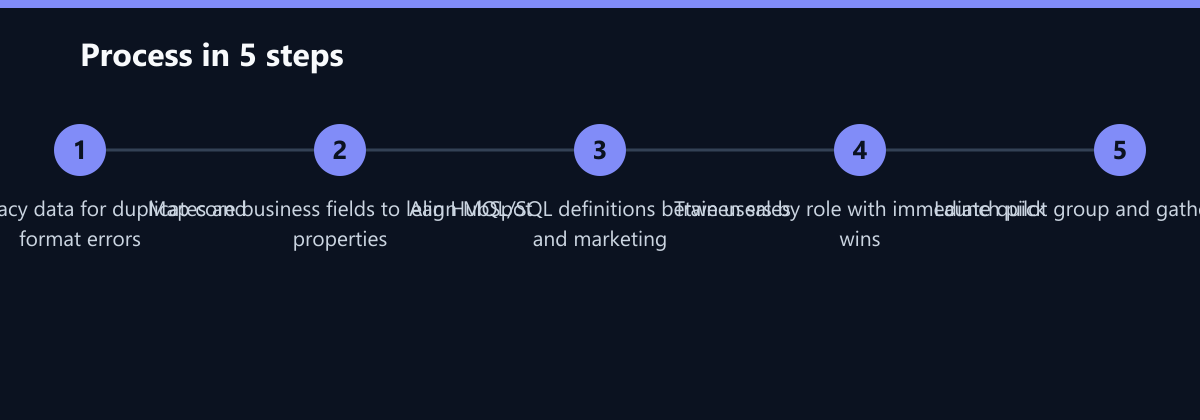
- Audit Legacy Data: Deduplicate records and standardize formats.
- Map Data Model: Define core properties and group them by lifecycle stage.
- Align Workflows: Define MQL/SQL criteria and set SLA response times.
- Train Users: Conduct role-based training and identify champions.
- Launch Pilot: Test with a small group and gather feedback.
- Optimize Continuously: Review performance monthly and update workflows.
By following these steps, you can avoid the most common pitfalls of HubSpot implementation. A well-executed implementation will drive better data quality, higher user adoption, and improved business results. Treat your CRM as a strategic asset, not just a tool. The investment in proper implementation will pay off in the long run. Start with a clean slate, align your teams, and commit to continuous improvement. Your HubSpot implementation will become a powerful engine for growth.
Passend dazu
- Performance Marketing
- SEO & AI Search (GEO)
- Automated Affiliate Attribution in HubSpot: Cutting CPA by 18% for a B2B SaaS Provider
- Reducing B2B Lead Response Time from 48 Hours to 5 Minutes
- Affiliate Marketing
- Content & CRO
- Conversational Marketing
- 5 Segmentation Mistakes Ruining Your B2B Email Performance
- Consent Management for HubSpot and GA4 Following TDDDG Implementation
- CRM Data Migration to HubSpot: 5 Critical Steps for Error-Free Transfer
- Integrating GEO into Your HubSpot Funnel: A Practical Guide
- Chatbot Setup in 48 Hours: B2B Implementation Checklist
- Interaktive Video-CTAs: Wie man Klicks in HubSpot-Kontakte verwandelt