The Silent Killer of B2B Marketing Budgets
In B2B environments, the sales cycle is rarely a straight line. It is a complex web of touchpoints spanning LinkedIn, email newsletters, webinars, and direct outreach. Without a rigorous UTM (Urchin Tracking Module) strategy, Google Analytics 4 (GA4) often fails to connect the dots. The result? A significant portion of your traffic is misclassified as ‘Direct’ or ‘Unassigned,’ rendering your ROI calculations unreliable.
When attribution breaks down, you cannot determine which channels drive actual revenue versus mere vanity metrics. This leads to budget misallocation, where high-performing channels are underfunded because their contribution is invisible. Implementing a strict UTM standard is not just a technical task; it is a foundational business decision that protects your marketing investment.
The Five Pillars of GA4 Tracking
GA4 relies on five specific parameters to attribute traffic. Understanding their distinct roles is the first step toward clean data.
- utm_source: Identifies the specific origin. Examples include
linkedin,newsletter, orpartner-site. - utm_medium: Defines the channel type. Use
social,email,cpc, orreferral. - utm_campaign: Names the specific initiative. Examples include
q3-webinarornew-product-launch. - utm_content: Distinguishes between multiple links in the same campaign. Useful for A/B testing (e.g.,
banner-topvs.cta-button). - utm_term: Primarily for paid search keywords (e.g.,
crm-software).
Critical Rule: utm_source and utm_medium are mandatory for every external link. utm_campaign is required for any trackable initiative. utm_content and utm_term are situational.
Building a Scalable Naming Convention
Inconsistency is the primary driver of data fragmentation. If one team uses LinkedIn and another uses linkedin, GA4 treats them as two separate sources. This splits your data, making reports difficult to read and analyze.
To prevent this, adopt a rigid, company-wide naming convention before launching any new campaign. The following rules are non-negotiable for scalable tracking:
- Lowercase Only: All values must be lowercase.
linkedin,email,q3-campaign. - Hyphens for Separation: Use hyphens (
-) to separate words. Avoid spaces, which break URL encoding.2024-q3-webinaris valid;2024 Q3 Webinaris not. - No Special Characters: Avoid symbols like
#,?, or&in parameter values unless URL-encoded.
Example Matrix:
| Parameter | Example | Description |
|---|---|---|
| Source | linkedin | Platform name |
| Medium | social | Channel type |
| Campaign | 2024-q3-webinar | Specific initiative |
| Content | hero-banner | Placement on page |
This dictionary must be shared across Marketing, Sales, and PR. Every team member who creates a link must reference this central document. This ensures that a link created by a junior marketer aligns with the strategic data structure defined by the analytics team.
Typical Mistakes That Break Attribution
Even with a defined convention, human error and technical glitches can corrupt your data. Here are the most common pitfalls in B2B environments and how to mitigate them.
1. UTM Overwriting via Internal Links If a user clicks an external link with UTMs, lands on your site, and then clicks an internal link that also contains UTMs, GA4 may overwrite the original source. This resets the attribution to the internal source or ‘Direct.’ Fix: Never add UTMs to internal navigation links. Ensure that only external entry points carry tracking parameters.
2. Case Sensitivity Errors
GA4 is case-sensitive. LinkedIn and linkedin are distinct entities. This creates duplicate rows in your reports, fragmenting your data.
Fix: Implement a ‘Lowercase’ filter in GA4 Admin under Data Display. This automatically normalizes future data. For historical data, consider using a Looker Studio report with a transformation step or a third-party tool to merge datasets.
3. Missing utm_medium
If utm_medium is omitted, GA4 may classify the traffic as ‘Other’ or ‘Direct,’ depending on the context. This makes it impossible to segment by channel type.
Fix: Use a UTM Builder Tool to generate links. This ensures all required fields are populated and correctly formatted. Manual typing is a high-risk activity that should be eliminated.
4. Fragmented Campaign Names
Minor typos in utm_campaign (e.g., q3-webinar vs. q3-webnair) create separate campaigns in GA4. This splits the performance data, making it difficult to assess the total impact of the initiative.
Fix: Maintain a central campaign list. Before launching, validate all links against this list. Use a script or tool to auto-generate campaign names based on a template.
Bridging the Gap: UTM to CRM Integration
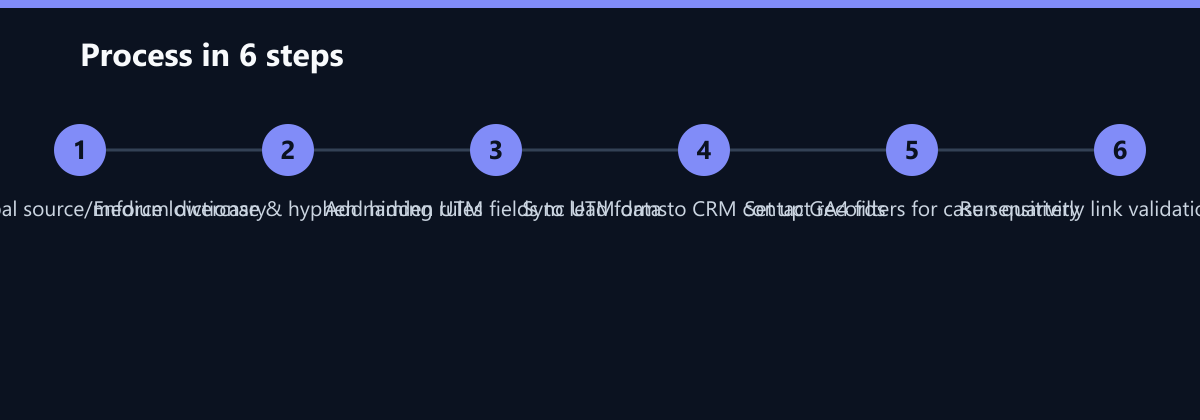
GA4 provides session-level data, but B2B sales require lead-level attribution. A single lead may interact with your website across multiple sessions and devices before converting. To capture this journey, you must bridge GA4 with your CRM (e.g., HubSpot, Salesforce).
Implementation Steps:
- Hidden Form Fields: Add hidden fields to your lead capture forms for
utm_source,utm_medium, andutm_campaign. These fields automatically populate with the UTM values from the user’s first session. - CRM Sync: Ensure these fields sync to the contact record in your CRM. This allows you to see the original touchpoint for every lead.
- Lead Scoring: Use UTM data to boost lead scores. A lead coming from a high-intent webinar (
utm_campaign=advanced-demo) should score higher than a lead from a general blog post. This enables sales teams to prioritize high-potential leads.
This integration allows your sales team to understand why a lead converted, not just that they converted. It enables personalized follow-up sequences based on the original touchpoint, increasing conversion rates.
How You Measure Success
Implementing a UTM strategy is an investment. To justify this effort, you must measure its impact on data quality and operational efficiency. Here are the key KPIs to track:
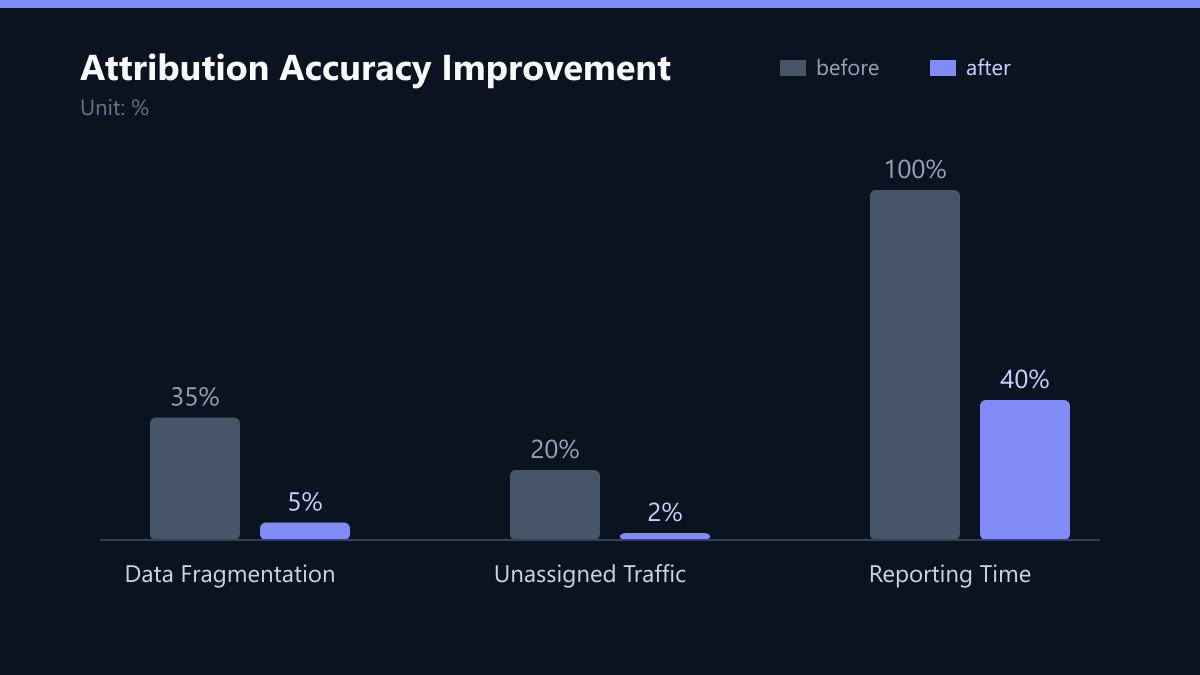
1. Unassigned Traffic Percentage Definition: The percentage of total sessions classified as ‘Direct’ or ‘Unassigned.’ Target: Reduce from a baseline of 20-30% to under 5%. Method: In GA4, go to Reports > Acquisition > Traffic Acquisition. Filter by ‘Source/Medium’ and check the percentage of ‘Direct (none)’ or ‘(not set)’.
2. Data Fragmentation Index
Definition: The number of unique utm_source values in GA4 versus the number of valid sources in your dictionary.
Target: 100% match (no orphaned sources).
Method: Export the ‘Source/Medium’ report. Compare the list of sources against your central dictionary. Any source not in the dictionary is a fragmentation error.
3. Reporting Time Reduction Definition: The time spent manually cleaning data before creating reports. Target: Reduce by 40-50%. Method: Track the time spent on data cleaning before and after implementation. Use time-tracking tools or team surveys to estimate this.
Quarterly Audit Checklist
UTM hygiene is an ongoing process. As your marketing mix evolves, new channels and campaigns will emerge. A quarterly audit ensures data integrity remains high.
- Review Source List: Check GA4 for misspelled or new sources. Add any valid new sources to your central dictionary. Create filters to correct or merge invalid ones.
- Check for Orphaned Campaigns: Identify campaigns with traffic but no conversions. Investigate if the tracking is broken or the offer is weak. If tracking is broken, fix the links. If the offer is weak, adjust the strategy.
- Update Naming Conventions: If you launch new channels (e.g., TikTok, LinkedIn Ads), add them to your central UTM dictionary. Ensure all teams are aware of the new conventions.
- Validate Links: Spot-check 5-10 active links per week. Ensure parameters are present, lowercase, and correctly formatted. Use a URL decoder tool to verify the structure.
Final Thoughts
Clean attribution is the foundation of data-driven marketing. By implementing a strict UTM strategy, you transform raw click data into actionable business intelligence. This empowers you to allocate budget to channels that truly drive revenue, not just traffic. Start with a central dictionary, enforce naming conventions, and integrate with your CRM. The result is a marketing operation that is transparent, efficient, and aligned with business goals.
Remember, the goal is not just to track clicks, but to understand the customer journey. Every UTM parameter is a data point that helps you piece together the story of how a lead becomes a customer. Treat your data with the same care you treat your customers, and the insights will follow.