The Silent Erosion of Your Ad Budget
Ad fatigue is rarely a sudden crash. It is a gradual, invisible erosion of efficiency that quietly drains your marketing budget. When users encounter the same message repeatedly, they stop engaging. Your cost per acquisition (CPA) climbs, not because of poor targeting, but because the creative itself has become stale. In B2B SaaS, where decision cycles are long and audiences are narrow, this phenomenon is particularly destructive. You cannot afford to rely on gut feeling; you need quantitative signals to intervene before budget waste becomes structural.
This guide moves beyond vanity metrics. We focus on five specific KPIs visible in your HubSpot dashboard that indicate creative exhaustion. By monitoring these signals, you can trigger refresh workflows in your marketing automation stack proactively, turning a potential crisis into a manageable routine.
1. Frequency Cap Breaches and Impression Decay
Frequency measures how often the average user sees your ad. In HubSpot, you can correlate frequency data with performance trends to identify the tipping point. A rising frequency without a corresponding drop in CTR is a warning sign, but a rising frequency combined with falling CTR is a critical alert.
- Healthy Range: For B2B audiences, a frequency of 2–3 per week is often optimal.
- Fatigue Signal: When frequency exceeds 5–6 per week, CTR typically drops by 15–20%.
Action: Set an alert in HubSpot for frequency spikes. If frequency rises while CTR falls, pause the creative immediately. Do not wait for the CPA to double. Rotate in a new variant with a different hook or visual style to reset user perception.
2. Click-Through Rate (CTR) Trend Reversal
CTR is the most direct indicator of user interest. Initially, a new creative sees a high CTR as it targets cold or warm audiences. Over time, this rate should stabilize, not decline. A downward trend in CTR over a 14-day period signals that the message no longer resonates.
Compare your CTR against the account average. If a specific ad group’s CTR drops below 50% of the average, it is underperforming. In HubSpot, use the ‘Trends’ view to visualize this decline over time. A flat or declining line is a clear directive to refresh.
- Benchmark: B2B SaaS average CTR is often between 0.8% and 1.5%.
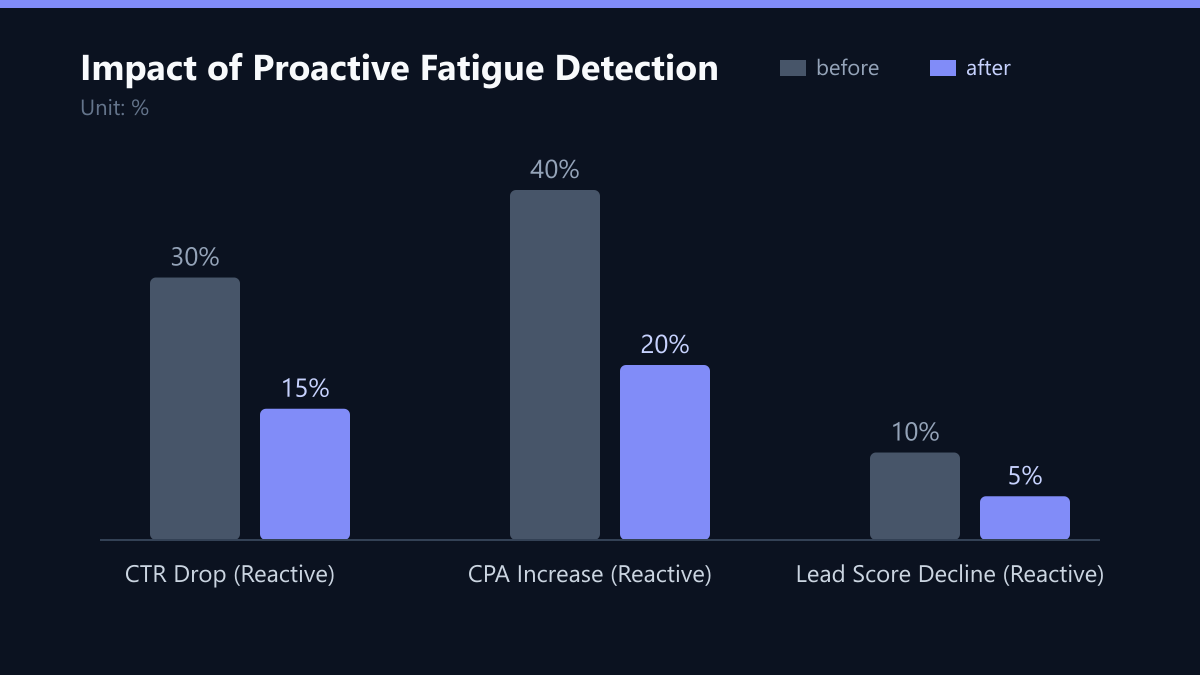
- Red Flag: A drop of more than 30% from the initial peak CTR within two weeks.
Action: Identify the specific ad group. Test a new value proposition. If the core offer is unchanged, change the creative format (e.g., from image to video) to reset user perception.
3. Cost Per Acquisition (CPA) Escalation
CPA is the bottom-line metric. Ad fatigue directly inflates this number because the algorithm struggles to find qualified users who are willing to convert. In HubSpot, track the ‘Cost per Marketing Qualified Lead’ (MQL) or ‘Cost per Closed-Won Deal’ for each campaign. If CPA rises steadily while spend remains constant, fatigue is likely the cause.
Analyze the CPA trend against your target threshold. If your target CPA is $100 and it has risen to $140 over two weeks, the creative is inefficient. This metric accounts for both engagement and conversion quality. A high CTR with a high CPA indicates that you are attracting clicks but not customers.
- Warning Threshold: 20% increase in CPA over a 14-day period.
- Critical Threshold: 40% increase in CPA over a 14-day period.
Action: Reduce budget on the fatigued creative. Shift budget to top-performing variants. Use HubSpot’s attribution reports to verify that the CPA increase is not due to a broader market shift.
4. Lead Quality Score Decline
Quantity does not equal quality. Ad fatigue can attract lower-intent users who click out of curiosity or mistake the ad for organic content. These leads often fail to convert, dragging down your overall ROI. In HubSpot, you can monitor the ‘Lead Score’ of generated contacts. If the average lead score from a specific campaign drops, the creative is attracting the wrong audience.
Compare the lead scores from the first two weeks of the campaign against the last two weeks. A significant drop indicates that the remaining audience is less qualified. This is a subtle but powerful signal of fatigue. It means the algorithm is exhausting the high-intent pool and reaching broader, less relevant segments.
- Metric: Average Lead Score per Campaign.
- Signal: A 10-point drop in average lead score over two weeks.
Action: Refine your targeting. If the creative is fatigued, the audience is likely saturated. Broaden the audience slightly to find new prospects or narrow it to exclude existing customers and recent leads. Update the creative to speak to a new pain point.
5. Engagement Rate on Retargeting Audiences
Retargeting is where ad fatigue hits hardest because the audience is smaller and more exposed. Monitor the engagement rate (likes, comments, shares) on retargeting ads in HubSpot. A decline in engagement from retargeting users is a strong indicator that they have seen the message too many times.
Retargeting audiences should have high engagement rates. If these rates drop below 50% of the initial peak, the creative is stale. Users may even develop ad blindness, where they actively ignore the ad. This is common in B2B SaaS where the same decision-makers are targeted repeatedly.
- Benchmark: Retargeting engagement should be 2–3x higher than cold audience engagement.
- Fatigue Signal: Retargeting engagement drops to cold audience levels.
Action: Refresh the creative for retargeting specifically. Use social proof, case studies, or limited-time offers to create urgency. Exclude users who have already converted or shown high engagement to avoid over-exposure.
Implementing a Fatigue Monitoring Workflow
Manual monitoring is inefficient. Use HubSpot’s automation capabilities to create a fatigue detection workflow. Set up alerts for the five KPIs outlined above. When a KPI breaches its threshold, trigger an email notification to the creative team and the media buyer.
Integrate this workflow with your creative production process. When an alert is triggered, automatically assign a task to create a new variant. This ensures that creative refreshes happen within 48 hours of detection. Speed is critical in paid social; delays compound the cost of fatigue.
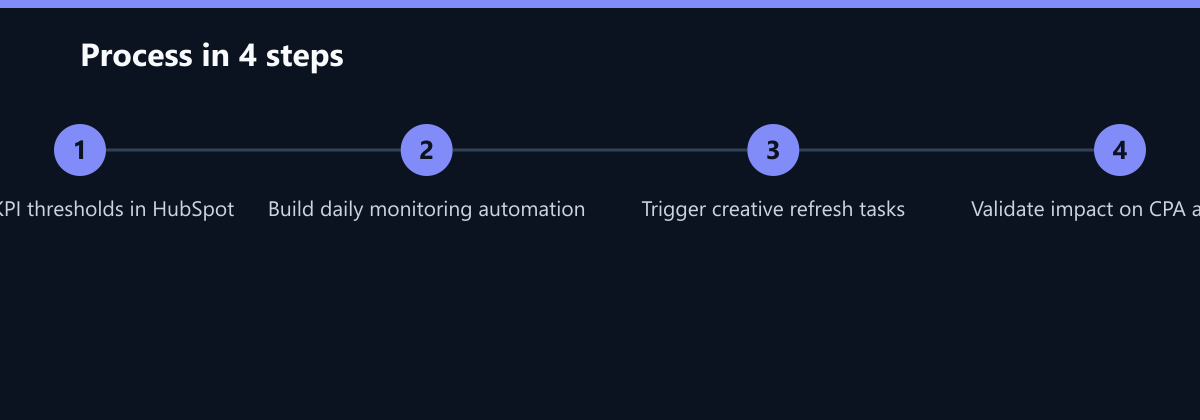
- Step 1: Define KPI thresholds in HubSpot for each campaign type.
- Step 2: Create an automation workflow that monitors these KPIs daily.
- Step 3: Trigger a task assignment for creative refresh when thresholds are breached.
- Step 4: Track the impact of the refresh on the KPIs to validate the process.
Typical Mistakes
- Ignoring the Frequency/CTR Correlation: Many marketers look at CTR in isolation. If CTR is flat but frequency is rising, the ad is still working. However, if both are moving in opposite directions (frequency up, CTR down), you have a fatigue issue. Ignoring this correlation leads to premature creative swaps or delayed interventions.
- Waiting for CPA to Spike: CPA is a lagging indicator. By the time CPA rises by 40%, you have already wasted significant budget. Proactive monitoring of leading indicators like CTR and lead score allows you to refresh creatives before the bottom-line metrics are affected.
- One-Size-Fits-All Refresh Cycles: Refreshing all ads every 30 days regardless of performance is inefficient. Some creatives perform well for 60 days, while others fatigue in 10. Data-driven refreshes based on KPI thresholds save budget and creative resources.
How You Measure Success
To ensure your fatigue monitoring workflow is effective, track the following KPIs:
- Time to Refresh: The average time between a KPI threshold breach and the launch of a new creative variant. Target: < 48 hours.
- CPA Stability: The variance in CPA over a 30-day period. A lower variance indicates better fatigue management. Target: < 10% variance.
- Creative Lifespan: The average number of days a creative remains active before being paused due to fatigue. Target: Consistent with industry benchmarks (2–4 weeks for B2B).
Checklist: Setting Up Your HubSpot Fatigue Monitor
- Define Baselines: Calculate the average CTR, CPA, and Lead Score for your top-performing campaigns over the last 90 days.
- Set Thresholds: Configure alerts for a 20% CPA increase, 30% CTR drop, and 10-point Lead Score decline.
- Create Automation: Build a HubSpot workflow that triggers a task assignment and email notification when thresholds are breached.
- Integrate with Ad Platforms: Use Zapier or Make to connect HubSpot alerts to Meta/LinkedIn Ads APIs for auto-pausing if needed.
- Monitor Weekly: Review the fatigue dashboard weekly to adjust thresholds and identify trends.
By implementing this systematic approach, you reduce guesswork and ensure that your ad library remains fresh and effective. You turn ad fatigue from a crisis into a manageable routine, protecting your budget and maximizing your ROI.