The Mobile Reality in B2B Sales
B2B decision makers no longer rely solely on desktops for research. They check solutions during commutes, meetings, and breaks. If your mobile experience is clunky, you lose their attention within seconds. The context of consumption has shifted from a controlled office environment to fragmented, on-the-go interactions.
- Average mobile session duration: 3-5 minutes.
- Bounce rate on unoptimized sites: Often exceeds 70%.
- Primary device: Smartphones account for over 60% of B2B website traffic in DACH regions.
Executives are time-poor. They want quick answers, not complex navigation. Your site must deliver value immediately without requiring a mouse or keyboard. This shift demands a fundamental rethinking of how you present your value proposition. It is no longer about comprehensive information architecture but about immediate relevance and ease of access.
Core Friction Points on Mobile Devices
Most B2B websites fail on mobile due to inherited desktop layouts. Identify these specific blockers before optimizing. These friction points are often invisible to desktop-centric teams but are glaringly obvious to mobile users.
- Form Fields: Long forms with multiple columns break on small screens, causing input errors and frustration.
- Navigation: Hamburger menus often hide critical CTAs like ‘Book Demo’, forcing extra taps to reach the goal.
- Loading Speed: Heavy hero videos and uncompressed images kill mobile performance, especially on fluctuating mobile networks.
- Click Targets: Links and buttons that are too close together cause accidental taps, leading to navigation errors.
Key Insight: 53% of mobile users abandon a site if it takes longer than 3 seconds to load. Speed is not a feature; it is a prerequisite. In B2B, where trust is paramount, a slow site signals technical incompetence.
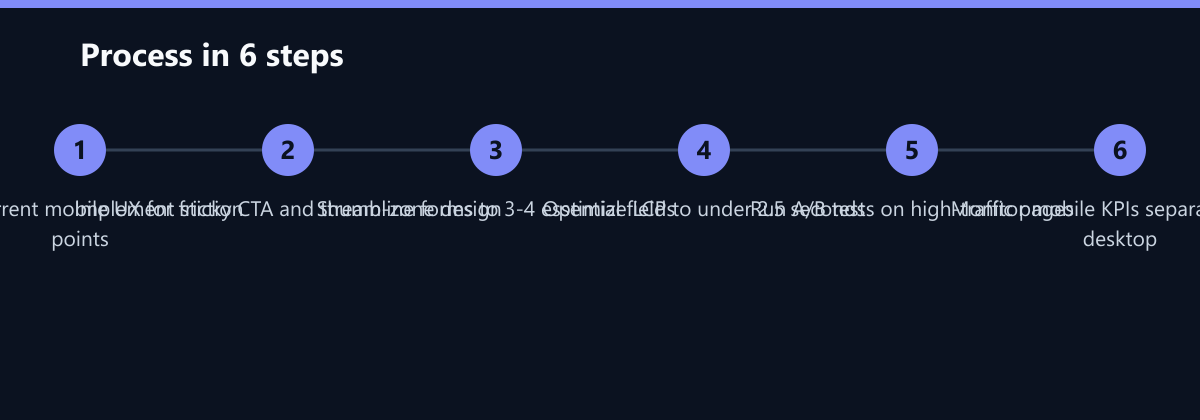
Optimizing Navigation and Call-to-Action
Simplify the path to conversion. B2B buyers on mobile need a clear, single action. The goal is to reduce cognitive load and physical effort to the minimum possible.
- Sticky CTA Bar: Keep your primary action (e.g., ‘Contact Sales’ or ‘Start Trial’) visible at the bottom of the screen. This ensures the conversion path is always one tap away.
- Thumb Zone Design: Place interactive elements in the lower half of the screen where the thumb naturally rests. This ergonomic consideration significantly reduces interaction fatigue.
- Simplified Menu: Reduce main menu items to 3-5 core categories. Move secondary links to the footer to declutter the primary navigation.
- Do: Use high-contrast buttons with clear text. Ensure buttons are at least 44x44 pixels for easy tapping.
- Don’t: Use hover effects, as they do not exist on touchscreens. Rely on visual states that change upon tap.
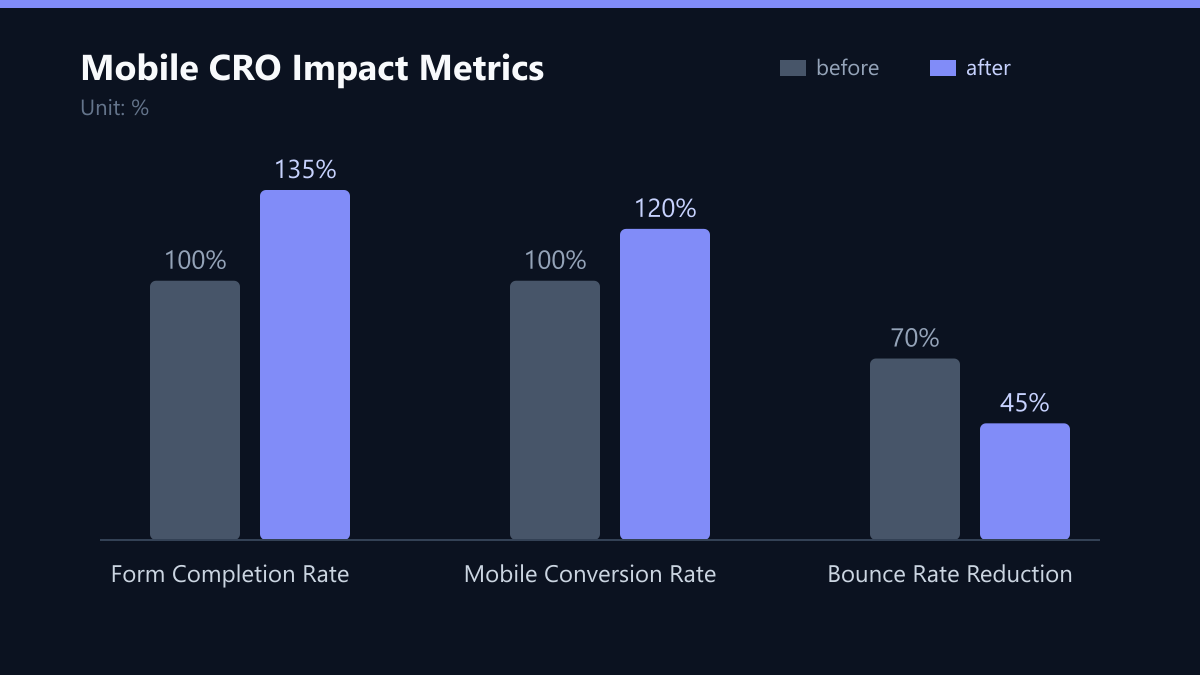
A single, persistent CTA increases mobile conversion rates by up to 20% compared to scattered links. This consistency helps build a mental model for the user, making the next step predictable and easy.
Streamlining Mobile Forms for High-Intent Leads
Forms are the biggest drop-off point on mobile. Reduce friction to capture more qualified leads. Every additional field increases the perceived effort and the likelihood of abandonment.
- Progressive Profiling: Ask for only 3-4 essential fields initially (Name, Email, Company Size). Collect more data after conversion. This lowers the barrier to entry while still allowing for segmentation later.
- Auto-Fill Support: Ensure HTML5 input types are used for phone numbers, emails, and dates to enable keyboard shortcuts. This saves time and reduces typing errors.
- Multi-Step Forms: Break long forms into 2-3 short steps. Show a progress bar to reduce perceived effort. Users are more likely to complete a task if they can see how much is left.
Example: Instead of a 10-field contact form, use a 3-field ‘Request Consultation’ form. Follow up with a personalized email to complete the profile. This approach improves mobile form completion rates by 35%. The key is to prioritize the lead over the data point in the initial interaction.
Performance and Technical SEO for Mobile
Technical health directly impacts user trust and search visibility. Google prioritizes mobile-first indexing for all sites. If your mobile site is slow, your SEO rankings will suffer, creating a double penalty: less traffic and lower conversion from that traffic.
- Image Optimization: Use WebP format and lazy loading. Compress images to under 100KB for above-the-fold content. This ensures the most critical visual elements load first.
- Core Web Vitals: Aim for a Largest Contentful Paint (LCP) under 2.5 seconds. This metric measures loading performance and is a key ranking factor.
- Responsive Design: Use fluid grids and flexible images to ensure consistent display across all screen sizes. Avoid fixed-width layouts that cause horizontal scrolling.
| Metric | Target Value | Impact on CRO |
|---|---|---|
| LCP | < 2.5s | Reduces bounce rate |
| CLS | < 0.1 | Improves usability |
| TTI | < 3.8s | Increases engagement |
Regular audits using Lighthouse or PageSpeed Insights are mandatory for maintaining performance. Set a cadence of monthly checks to catch regressions early, especially after new feature deployments.
Typical Mistakes to Avoid
Even with the best intentions, teams often make specific errors that undermine mobile CRO efforts.
- Ignoring Touch Targets: Designing buttons that are too small or too close together. This leads to accidental taps and user frustration. Ensure a minimum touch target size of 44x44 pixels.
- Overloading the Homepage: Trying to fit too much information above the fold on mobile. Instead, focus on one clear message and one primary action. Let users explore deeper if they are interested.
- Neglecting Mobile-Specific Analytics: Averaging mobile and desktop data. This masks critical insights. Always segment your analytics by device type to understand the specific behavior of mobile users.
- Slow Third-Party Scripts: Loading unnecessary chat widgets or analytics scripts on every page. These can significantly slow down page load times. Use asynchronous loading and only load scripts when needed.
How You Measure Success
You cannot improve what you do not measure. Set up mobile-specific tracking to understand user behavior. The following KPIs provide a clear picture of your mobile CRO performance.
- Mobile Conversion Rate: Track this separately from desktop. A 5% improvement in mobile CRO can significantly impact overall lead volume, especially in competitive B2B SaaS markets.
- Form Abandonment Rate: Monitor the percentage of users who start but do not complete the form. High abandonment rates indicate friction in the form design or length.
- Bounce Rate: Measure the percentage of users who leave after viewing only one page. A high bounce rate on mobile often indicates slow loading speeds or irrelevant content.
- Average Session Duration: Track how long mobile users stay on your site. While shorter sessions are normal on mobile, a significant drop may indicate usability issues.
Use tools like Google Analytics 4 to set up custom funnels for mobile. This allows you to identify exactly where users drop off in the conversion process. Combine this data with qualitative feedback from heatmaps and session recordings to get a holistic view.
Checklist for Mobile CRO Implementation
Use this checklist to ensure your mobile CRO strategy is comprehensive and actionable.
- Audit Current State: Run a Lighthouse audit to identify technical performance issues.
- Analyze User Behavior: Use heatmaps to see where users tap and scroll on mobile.
- Simplify Navigation: Reduce menu items and ensure the primary CTA is always visible.
- Optimize Forms: Limit fields to 3-4 and use progressive profiling for additional data.
- Improve Performance: Optimize images, minify code, and enable lazy loading.
- Test and Iterate: Run A/B tests on high-traffic pages and measure the impact on conversion rates.
By following this structured approach, you can significantly enhance the mobile experience for your B2B decision makers. The goal is to create a seamless, fast, and intuitive journey that leads to high-quality leads. Remember, mobile is not an afterthought; it is the primary channel for many of your potential customers. Invest in it accordingly.