The Real Cost of Choice: Beyond the Sticker Price
Choosing between HubSpot and Salesforce is rarely about feature checklists. It is a strategic decision regarding organizational maturity, budget allocation, and long-term scalability. For B2B mid-market companies in the DACH region, the Total Cost of Ownership (TCO) often surprises stakeholders who focus exclusively on monthly license fees. The true financial impact emerges only when you account for implementation, customization, training, and ongoing maintenance.
HubSpot excels in speed-to-value and marketing-sales alignment. It suits companies that need rapid deployment and integrated marketing automation without heavy customization. Salesforce offers superior depth for complex sales processes and enterprise-grade reporting, but it demands a significant upfront investment in configuration and continuous technical support. This guide breaks down the financial and operational realities for mid-market firms in Germany, Austria, and Switzerland, helping you avoid the most common budgeting pitfalls.
Licensing Models: Where the Direct Costs Diverge
Direct costs include user licenses, add-ons, and platform fees. The pricing models differ fundamentally, impacting how costs scale with your team size. Understanding these structures is the first step in an accurate TCO model.
HubSpot uses a tiered subscription model per seat. The Marketing Hub, Sales Hub, and Service Hub can be bundled or purchased separately. Entry-level tiers are accessible, but advanced features like predictive lead scoring or complex journey building often require the Professional or Enterprise tiers.
- Entry-Level: Approximately €32 per user/month for Sales Hub Professional.
- Mid-Market Standard: A typical 15-user team (5 Marketing, 10 Sales) pays roughly €3,000 to €4,500 per month.
- Scaling: Costs rise linearly. Adding a user adds a predictable, manageable cost.
Salesforce employs a more complex licensing structure based on editions (Starter, Professional, Enterprise, Unlimited). Most mid-market B2B companies require the Enterprise Edition to access essential automation tools like Flow Builder and advanced reporting.
- Entry-Level: Enterprise Edition starts around €100 to €150 per user/month.
- Mid-Market Standard: A 15-user team often exceeds €2,500 to €3,500 per month in base licenses.
- Add-ons: Marketing Cloud or Pardot (now part of Salesforce Marketing Cloud) requires separate contracts, often adding €50 to €100 per user/month.
Key Insight: For teams under 20 users, HubSpot is typically 30-40% cheaper in direct licensing costs. For larger teams with complex role-based access needs, Salesforce’s pricing can become competitive if volume discounts are negotiated, but the base gap remains significant for most mid-market budgets.
Implementation: The Hidden TCO Multiplier
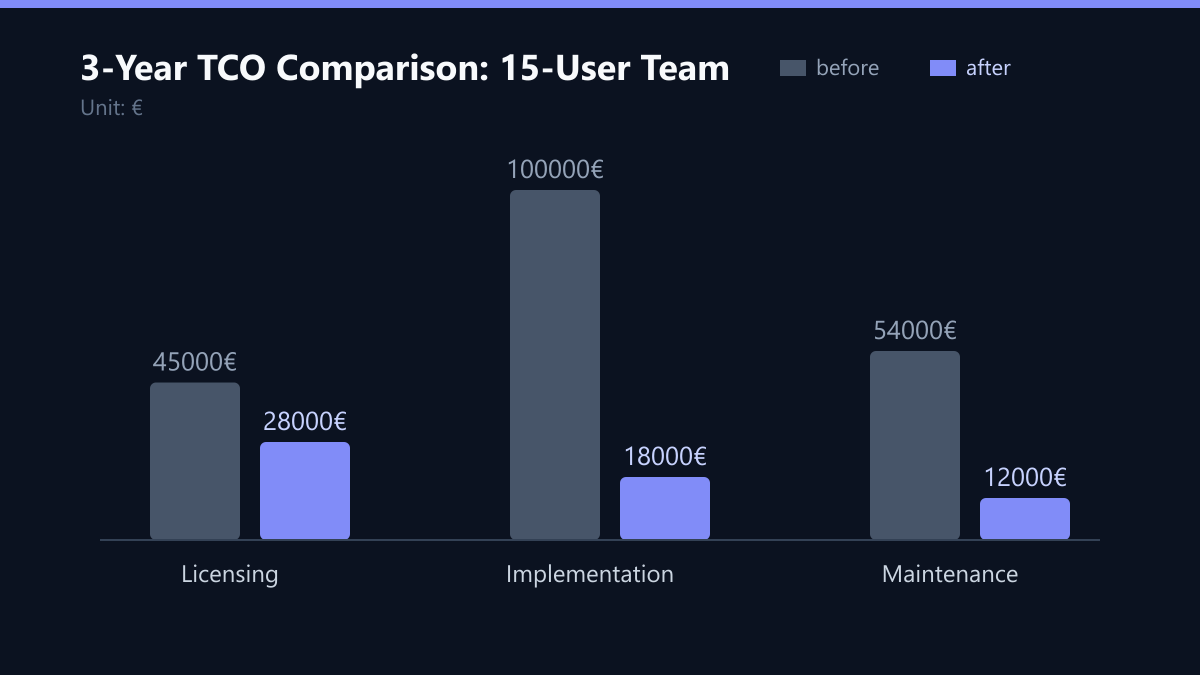
The sticker price is only 30-50% of the true Total Cost of Ownership. Implementation, customization, and ongoing maintenance dominate the budget for the first two years. This is where the divergence between the two platforms becomes most critical.
HubSpot Implementation is generally faster and less resource-intensive. The platform is designed for out-of-the-box functionality. Most mid-market companies can go live within 4 to 8 weeks using internal resources or a certified partner.
- Consulting Fees: Typically €10,000 to €25,000 for data migration and basic workflow setup.
- Training: Minimal. Most users learn the interface within a few days.
- Maintenance: Low. Standard updates are managed by HubSpot. Custom code is rarely needed.
Salesforce Implementation is a project. It requires detailed process mapping, configuration, and testing. The complexity of the AppExchange ecosystem allows for deep customization but increases dependency on external partners.
- Consulting Fees: Often €50,000 to €150,000+ for a mid-market rollout, including data migration, object modeling, and integration.
- Training: Significant. Sales and Marketing teams require structured onboarding programs. Admin training is mandatory to manage the system effectively.
- Maintenance: High. Custom Apex code, complex flows, and integrations require ongoing technical support. Many companies hire a dedicated Salesforce Administrator or retain a partner for retainer services (€3,000 to €5,000/month).
Data Migration is a critical cost factor for both. Cleaning legacy data (often from Excel or legacy CRMs) takes 20-30% of the implementation time. Salesforce requires stricter data hygiene due to its relational database structure, potentially increasing consulting costs significantly.
Operational Efficiency and ROI Drivers
The return on investment (ROI) of a CRM is measured in time saved, conversion rate improvement, and revenue attribution. Both platforms offer powerful analytics, but they serve different operational needs and drive value through different mechanisms.
HubSpot drives ROI through marketing-sales alignment. Its native integration between marketing and sales hubs reduces manual data entry and improves lead handoff speed. Companies often report a 15-25% increase in lead-to-opportunity conversion within the first six months due to better lead scoring and automated nurturing.
- Speed: Rapid deployment allows teams to start generating value immediately.
- User Adoption: High. The intuitive interface reduces friction, leading to higher data entry compliance.
- Reporting: Standard dashboards cover 80% of mid-market needs without custom development.
Salesforce drives ROI through process optimization and scalability. It handles complex, multi-stage sales cycles and large volumes of data with precision. For companies with long sales cycles (6-12 months) and multiple product lines, Salesforce provides granular control over the sales process.
- Depth: Advanced forecasting, pipeline management, and cross-functional workflows.
- Integration: Stronger native integration with ERP systems (SAP, Oracle) common in the DACH region.
- Reporting: Highly customizable. However, creating meaningful insights requires skilled analysts.
Adoption Risk: Salesforce has a higher risk of low user adoption if not properly trained. Poor data entry in Salesforce renders the system useless. HubSpot’s lower barrier to entry often leads to higher initial data quality, which is crucial for accurate reporting and actionable insights.
Strategic Fit for the DACH Mid-Market
The DACH market has specific characteristics: high data privacy standards (GDPR), preference for structured processes, and a mix of traditional B2B sales with emerging digital channels. Both platforms are GDPR-compliant, but their approach to data management differs.
Choose HubSpot if:
- Your team size is between 10 and 50 users.
- You need to launch marketing automation quickly (within 3 months).
- Your sales process is relatively standard (lead to opportunity to close).
- You lack a dedicated IT/CRM administration team.
- Your primary goal is improving marketing-to-sales handoff and lead nurturing.
Choose Salesforce if:
- Your team size exceeds 50 users or you plan to scale rapidly.
- You have complex, multi-threaded sales processes with long cycles.
- You require deep integration with existing ERP or legacy systems.
- You have a dedicated CRM administrator or IT team.
- You need advanced custom objects and complex workflow automation beyond standard templates.
Hybrid Approach: Some DACH companies start with HubSpot for marketing and early-stage sales, then migrate to Salesforce as they scale. This is possible but incurs migration costs and dual-system overhead during transition. It is generally recommended to choose one platform to avoid data silos and integration complexity.
Typical Mistakes in CRM Selection
- Ignoring Admin Labor Costs: Many companies budget for licenses but forget the salary of a dedicated Salesforce Admin. This €50k-€80k/year cost often tips the TCO balance in favor of HubSpot for mid-market firms.
- Overestimating Customization Needs: Assuming you need complex custom objects for a standard B2B process leads to unnecessary Salesforce complexity and cost. Start with standard templates first.
- Underestimating Data Cleaning Time: Assuming data migration is a simple copy-paste job. In reality, cleaning legacy Excel data takes 20-30% of the implementation time and significantly impacts project timelines.
- Focusing Only on Features: Choosing a platform based on a feature list rather than user adoption potential. A simple CRM used by everyone beats a complex CRM used by no one.
How You Measure Success
To validate your choice, track these concrete KPIs post-implementation:
- User Adoption Rate: Percentage of active users logging in weekly. Target: >80% for HubSpot, >70% for Salesforce (due to complexity).
- Data Completeness Score: Percentage of records with mandatory fields filled. Target: >90% within 3 months.
- Lead-to-Opportunity Conversion: Measure the change in conversion rate before and after implementation. Target: 15-25% increase for HubSpot, 10-20% for Salesforce.
- Time-to-Value: Days from contract signing to first live campaign or deal. Target: <8 weeks for HubSpot, <4 months for Salesforce.
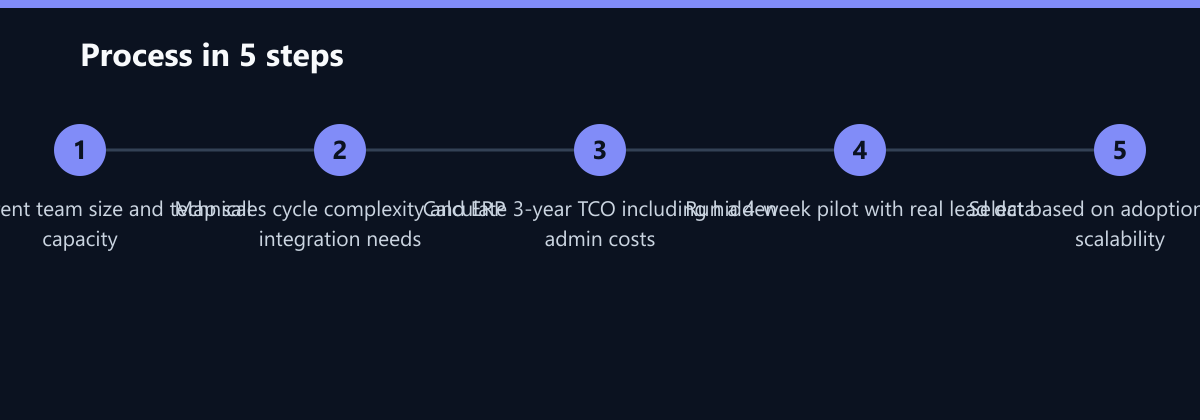
3-Year TCO Checklist
- Audit Team Size: Determine current and projected user count for 3 years.
- Map Process Complexity: Identify if standard templates suffice or if custom logic is required.
- Calculate Licensing: Multiply user count by tier-specific monthly fees for both platforms.
- Estimate Implementation: Add consulting fees based on data quality and integration needs.
- Include Admin Costs: Add salary for dedicated admin (Salesforce) or part-time support (HubSpot).
- Add Maintenance: Include retainer fees for ongoing support and updates.
- Compare Total: Sum all costs over 3 years to identify the true financial difference.
Conclusion: Making the Financial Decision
The cost-benefit analysis reveals that HubSpot is the financially prudent choice for most B2B mid-market companies in the DACH region with fewer than 50 CRM users. Its lower TCO, faster implementation, and higher user adoption rates lead to quicker ROI. Salesforce is the strategic choice for companies with complex operational needs, larger teams, and the budget for ongoing technical support.
Final Recommendation:
- Conduct a 3-year TCO model including licenses, implementation, training, and maintenance.
- Assess your team’s technical capacity. Do you have an admin? If not, HubSpot is safer.
- Map your sales process. If it fits standard templates, HubSpot saves money. If it requires custom logic, Salesforce may be necessary.
- Prioritize adoption over features. A simple CRM used by everyone beats a complex CRM used by no one.
For the majority of DACH mid-market B2B firms, HubSpot offers the best balance of cost, speed, and value. Salesforce remains the gold standard for scalability but requires a commitment to resources that smaller teams may not sustain.