The Hidden Cost of Static Forms
In B2B SaaS marketing, the form is often the bottleneck. Most teams treat the lead capture form as a static gatekeeper: a single, long list of fields that every visitor must fill out, regardless of how much the system already knows about them. This approach ignores a fundamental truth of user behavior: friction kills conversion. Every additional click, every redundant question, and every second of cognitive load measurably increases the drop-off rate.
Consider the typical experience. A prospect who has already downloaded two whitepapers and attended a webinar is asked for their name and email address again. Worse, they are asked for their job title, company size, and budget—data points they may have provided in a previous interaction or simply do not want to share at this stage. This frustration leads to abandonment. Progressive Profiling solves this problem by shifting the data collection strategy from a “one-time snapshot” to a “continuous dialogue.” It respects the user’s time by only asking for what is missing, thereby collecting high-quality data without overwhelming the lead.
Strategic Data Prioritization
Before touching the HubSpot interface, you must define what data actually matters. Not all fields are created equal. If you ask for a LinkedIn URL before you know if the lead is even interested, you are wasting their attention. You need to prioritize fields based on their value to your sales qualification process.
Create a tiered system for your data points:
- High Priority (Qualification Critical): Company size, industry, job title, and budget range. These fields directly influence whether a lead is Sales Accepted (SQL) or Marketing Qualified (MQL).
- Medium Priority (Contextual): Area of interest, specific product preferences, and current challenges. These help tailor the messaging in your nurture sequences.
- Low Priority (Nice-to-Have): Social media profiles, detailed demographics, or non-critical preferences. These should be requested only after the lead has demonstrated significant engagement.
This prioritization must be directly linked to your lead scoring logic. A lead that provides their company size should receive a higher score than one that only leaves an email address. In HubSpot, this is achieved by assigning specific point values to properties. For example, you might assign +20 points for “Company Size” and +15 for “Job Title.” This ensures that as data accumulates through progressive profiling, the lead’s score rises, automatically triggering the next stage of automation.
| Field | Priority | Scoring Value | Rationale |
|---|---|---|---|
| Company Size | High | +20 | Critical for SDR qualification |
| Job Title | High | +15 | Determines decision-making power |
| Industry | Medium | +10 | Helps with sector-specific messaging |
| LinkedIn URL | Low | +5 | Useful for social selling, low urgency |
Implementation in HubSpot: Step-by-Step
HubSpot offers native features for progressive inquiries, meaning you do not need external development or complex custom code. The configuration is handled directly within the CRM settings. However, incorrect setup can lead to data loss or broken workflows, so precision is key.
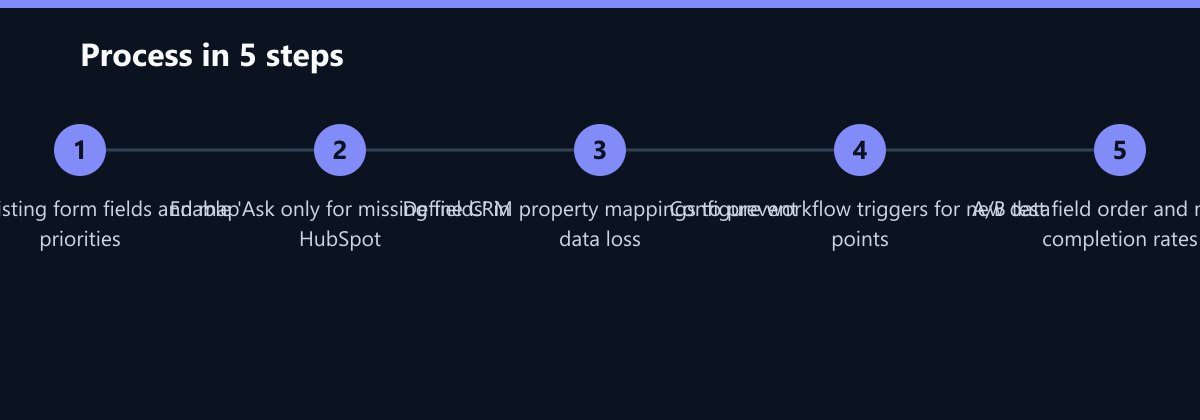
- Create the Base Form: Start by adding all possible fields you might ever need to a single master form. This includes high, medium, and low-priority fields.
- Configure Field Properties: In the field settings, ensure that non-essential fields are marked as “Optional” in the UI, but more importantly, configure the logic in the form settings.
- Enable Progressive Logic: Turn on the toggle labeled “Ask only for missing fields.” This is the core engine of the strategy. It tells HubSpot to check the contact record before rendering the form.
- Map CRM Properties: Verify that every field on the form is correctly mapped to a specific CRM property. If a field is not mapped, the data will be lost upon submission. This is the most common technical error.
- Test with Multiple Accounts: Create test contacts with varying levels of data. Submit the form as a “new” contact, a “partial” contact, and a “complete” contact to ensure the correct fields appear each time.
Optimizing the User Experience
Even with perfect logic, a poorly designed form will fail. The visual presentation of the form influences the willingness to share data. Keep the interface clean, intuitive, and free of visual clutter. Users are more likely to engage if the request feels fair and beneficial.
- Clear Labeling: Do not just list fields. Explain the benefit. Instead of “Budget,” use “Estimated Annual Budget (helps us tailor the demo).”
- Visual Feedback: Use progress indicators if the form is multi-step. This reduces the perceived effort.
- Mobile Optimization: Over 50% of B2B traffic is now mobile. Test the display on smartphones to ensure buttons are tappable and text is readable without zooming.
Offer a clear value proposition. Users only share data if they expect something in return. Link the data request with relevant content. For example, after a whitepaper download, ask about their current challenge. This immediately demonstrates the benefit of personalization: “Tell us your biggest challenge, and we will send you a case study relevant to your industry.”
Integrating with Marketing Journeys
Progressive Profiling is not an isolated tool; it is a data engine that must feed into your automated workflows. The value of the collected data is realized only when you react to it dynamically.
Configure HubSpot Workflows to trigger on new data points. For instance:
- Trigger: A new field is filled out (e.g., “Budget” is added to the contact record).
- Action: Send a specific email template that references the budget range.
- Sales Notification: If the lead provides a budget estimate above a certain threshold, route them directly to an Account Manager and update the pipeline stage.
Use branches in your workflows. If a lead provides their budget estimate, they move to the “Sales Handoff” track. If they do not, they remain in the “Nurturing” track. This automation reduces manual work for SDRs and ensures that high-intent leads are contacted immediately.
Monitor data quality regularly. Progressive profiling can sometimes result in duplicate or outdated information if a user changes their job. Implement a cleanup process to remove duplicates and verify data accuracy. Clean data is the foundation for precise targeting strategies.
Typical Mistakes to Avoid
Even with a solid strategy, implementation errors can sabotage your results. Watch out for these common pitfalls:
- Over-Asking in One Session: Asking for five new fields at once defeats the purpose. Stick to the 2-3 rule. If the form feels long, the user will leave.
- Ignoring Mobile UX: If the form breaks on mobile, you lose half your potential data. Always test on multiple devices.
- No Scoring Integration: Collecting data without updating lead scores means your sales team still sees low-quality leads. Ensure every new field triggers a score update.
- Lack of Consent Management: Failing to update consent records when new data types are collected can lead to GDPR violations. Ensure your privacy policy covers all collected fields.
How You Measure Success
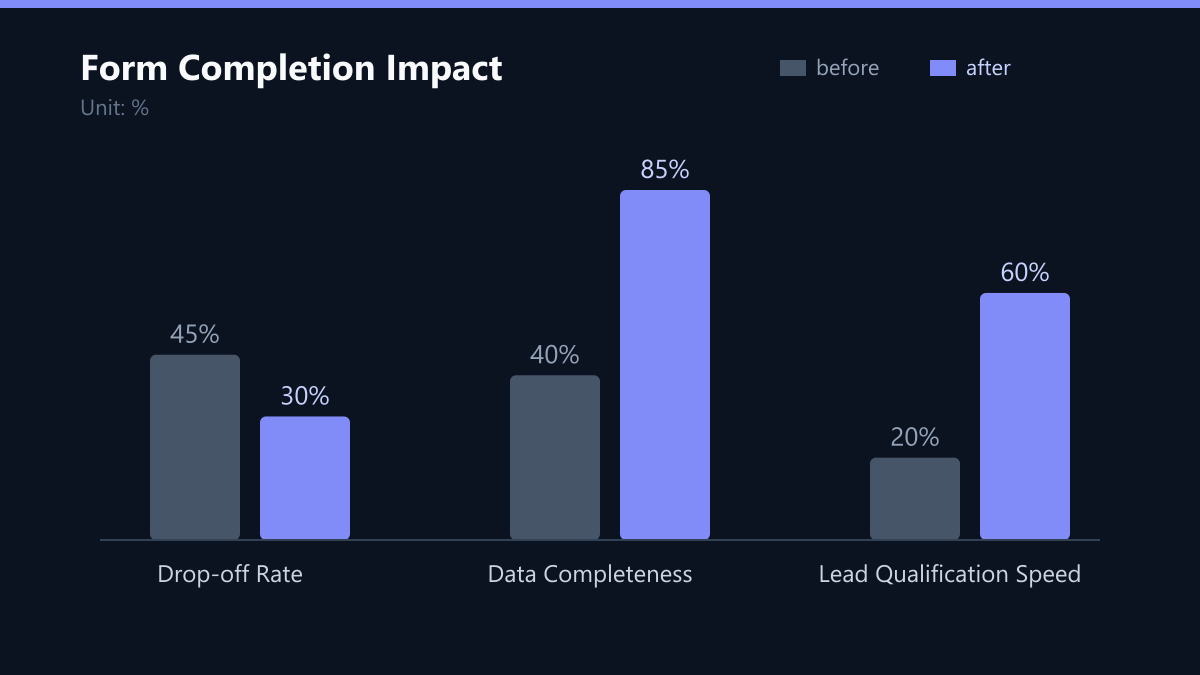
Without data analysis, the strategy remains a guess. You need to track specific KPIs to prove the ROI of Progressive Profiling. Compare your metrics from the three months before implementation to the three months after.
- Form Completion Rate: This is your primary indicator. You should see a significant increase (often 20-30%) because the forms are shorter for returning users.
- Data Completeness Rate: Measure the percentage of contacts who have at least 80% of their high-priority fields filled. This should rise steadily over time.
- Lead Velocity Rate (LVR): Track the number of qualified leads per month. If your LVR increases while your traffic remains constant, your profiling is working.
- Sales Cycle Time: Monitor how long it takes for a lead to become a customer. Better data means faster qualification, which should shorten the cycle.
Adjust the query sequence based on the results. If a specific field consistently increases the drop-off rate, move it to a later interaction or remove it entirely. Use A/B testing to determine the optimal field order.
Checklist for Implementation
Use this checklist to ensure your Progressive Profiling setup is robust:
- All high-priority fields are mapped to CRM properties.
- “Ask only for missing fields” is enabled on all relevant forms.
- Lead scoring rules are updated to reflect new data points.
- Workflows are triggered by specific new field additions.
- Mobile display is tested and optimized.
- GDPR consent text is updated to reflect new data collection.
- A/B tests are planned for field order and wording.
Document your findings and share the results with the sales team. Close collaboration between marketing and sales optimizes the entire lead lifecycle. When sales sees that the data is accurate and timely, they trust the leads more, leading to higher conversion rates.
Passend dazu
- Video & Short-Form Marketing
- 19 Percent Increase in Form Completions via Simplified HubSpot Paths
- Performance Marketing
- SEO & AI Search (GEO)
- Reduction of Sales Cycle Time by 22 % for a German mid-sized machinery manufacturer through HubSpot Lead Scoring and sales-oriented Nurturing Journeys
- Affiliate Marketing
- Content & CRO
- CRM Marketing