The Hidden Cost of Friction in B2B Lead Gen
In the competitive landscape of B2B SaaS and mid-market sales, Customer Acquisition Cost (CAC) is the metric that keeps CMOs awake at night. While many teams focus heavily on ad spend and landing page copy, they often overlook the most critical friction point: the form itself. Long forms are the primary driver of high CAC. Every additional field you add to a standard lead capture form reduces conversion rates by 10% to 20%. This is not a trivial statistic; it is a direct leak in your revenue funnel.
The core issue is psychological. Users abandon forms when the perceived value does not match the effort required. If you ask for a job title, department, and budget upfront for a generic whitepaper, the user calculates that the effort is too high for the reward. This leads to three common failure modes:
- Field Overload: Asking for granular data like budget ranges before establishing trust creates immediate friction.
- Lack of Clarity: Users are often unsure what happens after submission. Do they get spammed? Do they get a human call?
- Poor UX: Mobile-incompatible layouts, specifically tiny tap targets and horizontal scrolling, silently drop off a significant portion of traffic.
Strategy 1: Field Reduction and Progressive Profiling
The most effective way to lower CAC is to collect only the data necessary for the immediate action. This approach relies on the principle of progressive profiling. Instead of demanding everything at once, you gather deeper insights over time as the lead engages with your content.
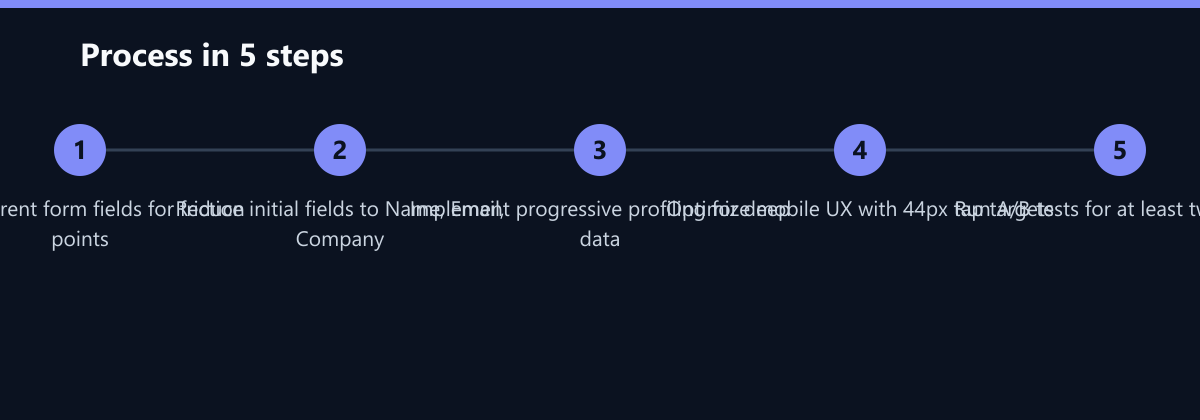
Implementation Steps:
- Limit Initial Forms: Restrict your first touchpoint to just Name, Work Email, and Company. This is the minimum viable data set for a sales handoff.
- Leverage CRM History: Use your CRM to identify returning visitors. If you already know their job title from a previous visit, skip that field entirely. This makes the form feel personalized and effortless.
- Delay Specific Questions: Only ask for budget, timeline, or specific pain points after the first engagement. Once the user has downloaded a resource, they are more likely to answer detailed questions in a follow-up survey or during a sales call.
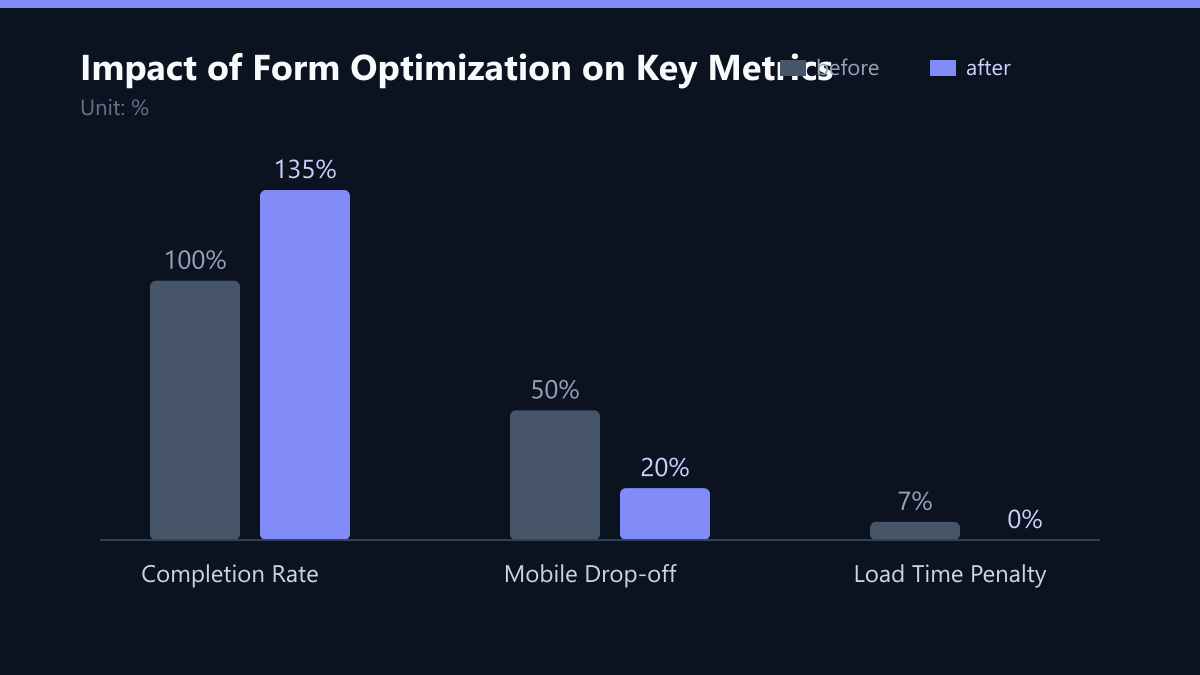
This approach increases completion rates by up to 35% while maintaining data quality for sales. The data is not lost; it is simply shifted from a high-friction point to a low-friction point.
Strategy 2: UX and Trust Signals
Design forms that reassure users and guide them through the process. Visual clarity reduces cognitive load, which is crucial for conversion. Users should never have to guess what the next step is.
Best Practices for High-Converting Forms:
- Clear CTAs: Use action-oriented verbs that promise value. Replace generic terms like “Submit” with specific benefits like “Get the Report” or “Download Guide.”
- Privacy Notice: Include a concise GDPR-compliant statement near the submit button. This builds trust and reduces anxiety about data sharing.
- Progress Indicators: For multi-step forms, show a visual bar indicating progress. This sets expectations and reduces abandonment at intermediate steps.
- Error Handling: Display validation errors immediately next to the specific field, not at the bottom of the form. Generic red boxes are frustrating; specific inline text (e.g., “Please enter a valid work email”) is helpful.
Comparison of Form Elements:
| Element | Low Conversion Approach | High Conversion Approach |
|---|---|---|
| CTA Text | Submit | Download Guide |
| Field Count | 8+ fields | 3-4 fields |
| Error Message | Generic red box | Specific inline text |
Strategy 3: Mobile-First Optimization
Over 50% of B2B research happens on mobile devices. If your form requires horizontal scrolling or has tiny tap targets, you are effectively excluding half your potential audience. Mobile optimization is not optional; it is a baseline requirement.
Mobile Optimization Checklist:
- Tap Targets: Ensure input fields are at least 44px high. This allows for easy tapping with a thumb, reducing input errors.
- Input Types: Use auto-detect input types (e.g.,
type="email",type="tel") to bring up the correct keyboard layout on mobile devices. - Field Removal: Remove non-essential fields on mobile versions. If a field is not critical for the initial lead capture, hide it on mobile.
- Load Times: Test load times rigorously. Forms taking longer than 3 seconds to load lose 53% of visitors. Optimize images and scripts to ensure speed.
How You Measure Success
Optimization is an iterative process. You cannot improve what you do not measure. Define key metrics before launching changes to ensure you are tracking the right outcomes.
Key Metrics to Track:
- Form Completion Rate: Calculated as
(Completed Submissions / Form Views) x 100. This is your primary health indicator. - Cost per Lead (CPL): Calculated as
Total Ad Spend / Number of Qualified Leads. This ties form performance directly to financial ROI. - Field Drop-off Rate: The percentage of users who abandon the form at a specific field. This helps identify which fields are causing friction.
Testing Protocol:
- One Variable at a Time: Test one change at a time (e.g., CTA color vs. CTA text). Testing multiple variables simultaneously makes it impossible to attribute results.
- Duration: Run tests for at least two weeks to account for weekly B2B buying cycles. Shorter tests may yield statistically insignificant results.
- Statistical Significance: Use statistical significance tools to validate results before full deployment. Do not rely on gut feeling.
Typical Mistakes to Avoid
Even with the best intentions, teams often make errors that negate their optimization efforts.
- Ignoring Mobile Users: Designing for desktop first and shrinking the layout for mobile leads to poor UX and high drop-off rates.
- Over-Reliance on Static Fields: Assuming that static form data (like job title) is more valuable than behavioral data (like pages visited) leads to unnecessary friction.
- Lack of CRM Integration: If form data does not sync automatically with your CRM, sales teams cannot follow up quickly, leading to lost leads and wasted optimization efforts.
Checklist for Implementation
- Audit: List all current form fields and identify which are essential for the immediate action.
- Reduce: Remove non-essential fields from the initial form. Move them to a progressive profiling step.
- Optimize UX: Update CTA text, add privacy notices, and ensure error messages are inline and specific.
- Mobile Test: Test the form on at least three different mobile devices to ensure tap targets and load times are optimal.
- Integrate: Connect the form to your CRM via a marketing automation platform to ensure real-time data sync.
- Test: Launch an A/B test with a clear hypothesis and run it for at least two weeks.
FAQ
How many fields are optimal for a B2B lead capture form?
For top-of-funnel content, limit to 3-4 fields (Name, Work Email, Company). For bottom-of-funnel demos, 5-6 fields are acceptable if the value proposition is clear. Always test to find the balance for your specific audience.
Does removing fields negatively impact lead quality?
Not necessarily. Qualifying leads based on behavior (e.g., content downloaded, pages visited) is often more accurate than static form fields. You can enrich data later via CRM enrichment tools or follow-up emails.
What is the impact of form load speed on conversion?
A delay of one second in load time can reduce conversions by 7%. Ensure your form script is lightweight and hosted on a fast CDN. Lazy loading non-essential assets helps maintain speed.
How do I integrate form data with my CRM automatically?
Use a marketing automation platform (like HubSpot, Marketo, or Salesforce) to connect your forms directly to your CRM. This ensures real-time data sync, automatic lead scoring, and immediate sales notifications without manual entry.