The Economics of Relevance: Why Extensions Beat Bids
In the high-stakes environment of B2B SaaS marketing, the temptation is often to increase bids to secure top-of-page placement. However, this is a linear path to diminishing returns. A more sophisticated approach leverages the structural components of your ad to influence the auction algorithm itself. Ad extensions are not merely cosmetic additions; they are critical levers for reducing Cost Per Click (CPC) by improving the fundamental metrics Google uses to determine Ad Rank.
The mechanism is straightforward but powerful. Google’s auction algorithm rewards advertisers who provide more relevant, detailed information to users. By adding extensions, you increase your Ad Rank. A higher Ad Rank allows you to maintain or even improve your position in the search results while paying a lower bid. For mid-market B2B SaaS companies, this dynamic is particularly potent because the sales cycle is long and trust is paramount. Extensions serve as pre-click trust signals that reduce the perceived risk for the buyer, thereby increasing the likelihood of a click and, subsequently, a conversion.
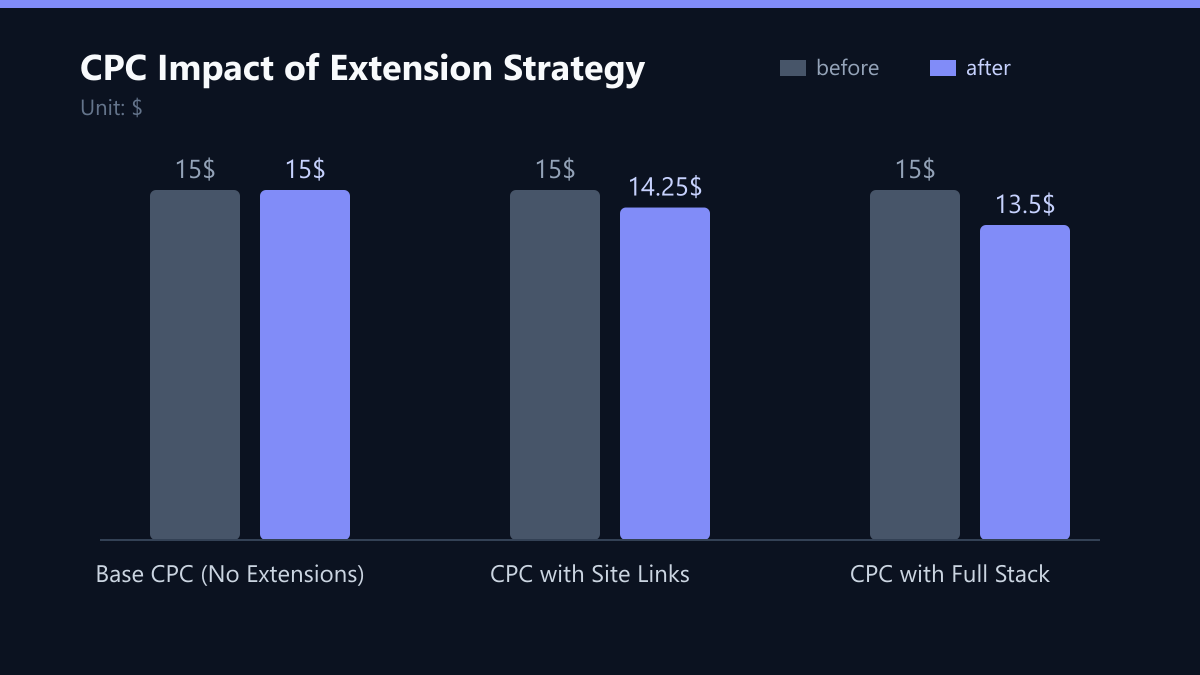
Consider the direct financial impact. A higher Quality Score directly lowers your effective CPC. If your base CPC is $15, a 10% improvement in Quality Score through strategic extension usage can reduce that cost to $13.50 without changing your bid strategy at all. This is free margin. This guide dissects which extensions deliver this value and how to implement them systematically.
Site Links: The Precision Tool for Intent Matching
Site Links are arguably the most effective extension for reducing wasted clicks in B2B environments. In SaaS, user intent is often specific but complex. A potential customer might be searching for “CRM integration for fintech”. If they land on a generic homepage, they are forced to navigate a menu tree, increasing friction and bounce probability. If they land on a dedicated page about fintech integrations, the friction is removed.
By directing users to specific landing pages, you align their search intent with the content they see immediately. This reduces bounce rates and increases the likelihood of conversion, which feeds back into better Quality Scores over time. It is a virtuous cycle: better relevance leads to higher Quality Score, which leads to lower CPC, which allows for more budget efficiency.
For a mid-market SaaS company, the Site Links should reflect the top three to four high-intent destinations:
- Pricing Page: Direct users to transparent pricing. This is a powerful filter. It attracts users who are budget-aligned and repels those who are not, saving you from low-quality leads.
- Case Studies: Link to industry-specific success stories. If you target the healthcare sector, link to a healthcare case study. This builds immediate trust through social proof.
- Contact Sales: Provide a direct path for high-value leads who are ready to talk to a human. This is critical for enterprise or mid-market deals where self-service is not an option.
- Free Trial or Demo: Highlight self-service options for lower-acquisition-cost segments. This captures users who are in the early evaluation phase.
Structured Snippets: Pre-Qualifying the Click
Structured Snippets allow you to list specific aspects of your business, such as features, services, or brands. For SaaS companies, this is an opportunity to highlight key differentiators that justify your price point. When users see these details in the ad, they are more likely to click because they already understand what they are getting. This pre-qualification reduces the cost of clicks from unqualified traffic.
You are not just buying a click; you are buying a click from a user who has already processed your core value proposition. This distinction is vital for B2B, where the cost of a wasted click is high due to the high value of the final conversion.
Use this extension to list your top 3-4 features or services. For example:
- Features: List top differentiators like ‘Automated Reporting’, ‘API Integration’, or ‘Single Sign-On’.
- Services: Highlight support tiers such as ‘24/7 Support’, ‘Dedicated Account Manager’, or ‘Onboarding Assistance’.
- Brands: If you have multiple products or suites, list them to capture broader demand and prevent competitors from siphoning off related searches.
Callouts: The Low-Effort Trust Builder
Callouts are short phrases (25 characters or less) that highlight unique selling points. They occupy valuable space in the ad and serve as quick trust signals. In competitive B2B markets, trust is a major barrier to conversion. By displaying callouts like ‘ISO 27001 Certified’ or ‘99.9% Uptime’, you reduce perceived risk before the user even clicks.
Lower perceived risk leads to higher click-through rates. As CTR improves, your Quality Score rises, and your CPC drops. These extensions are low-effort but high-impact for establishing credibility. They answer the unspoken question: “Is this company legitimate and reliable?”
Common high-impact callouts for B2B SaaS include:
- Compliance: Mention security certifications relevant to your industry (e.g., GDPR, SOC 2).
- Uptime: Highlight reliability metrics for infrastructure-heavy SaaS (e.g., ‘99.9% Uptime SLA’).
- Support: Emphasize human support availability (e.g., ‘Human Support 24/7’).
- Guarantees: Include money-back or trial guarantees if applicable to lower the entry barrier.
Price Extensions: Filtering for Budget Alignment
Price Extensions are underutilized in B2B but highly effective for SaaS companies with transparent pricing tiers. They display starting prices, which helps filter out users who are not ready to commit to a budget. This reduces the number of low-intent clicks that do not convert, directly improving your return on ad spend.
By showing prices upfront, you attract users who are already aligned with your pricing model. This improves the quality of your leads and reduces the average CPC for those who convert. For mid-market companies, this transparency builds trust and reduces sales friction, as the sales team can focus on value proposition rather than justifying price.
- Starting Price: Display the entry-level price to set expectations immediately.
- Tier Comparison: If allowed, show different pricing tiers to help users self-select
- Currency: Ensure currency matches the user’s location to avoid confusion and mistrust.
Measuring Success: KPIs and Methodology
How do you know if your extension strategy is working? You must move beyond vanity metrics and focus on the direct correlation between ad structure and cost efficiency. The primary KPI is the Quality Score (QS) of your keywords. Monitor the change in QS for keywords where you have implemented new extensions.
Secondary KPIs include Cost Per Click (CPC) and Click-Through Rate (CTR). A successful implementation should show a stable or increasing CTR while CPC remains flat or decreases. If CTR increases but CPC also increases, you may be attracting more clicks but at a higher price, which is not necessarily efficient. Use Google Ads’ ‘Ad Preview’ tool to ensure your ad looks clean and professional, and compare the ‘Ad Strength’ score before and after changes.
| KPI | Baseline (Example) | Target (Example) | Method |
|---|---|---|---|
| Quality Score | 6/10 | 8/10 | Keyword-level QS tracking |
| Avg. CPC | $15.00 | $13.50 | Campaign-level CPC trend |
| CTR | 3.0% | 3.5% | Ad-level CTR comparison |
Typical Mistakes to Avoid
- Overloading the Ad: Adding every possible extension can clutter the ad and confuse the user. Stick to the 4-5 most relevant extensions. A clean ad is a trustworthy ad.
- Ignoring Landing Page Alignment: If your Site Link points to a page that is slow, mobile-unfriendly, or lacks the promised content, you will destroy your Quality Score. The extension is only as good as the landing page it leads to.
- Static Content: Using outdated prices or features in your extensions. If your pricing changes, update your Price Extensions immediately. Inaccurate information erodes trust and can lead to penalties or poor user experience.
- Neglecting Negative Keywords: Extensions attract more clicks. If you have not optimized your negative keywords, you will pay for more irrelevant clicks. Ensure your negative keyword list is robust before scaling up with extensions.
Implementation Checklist
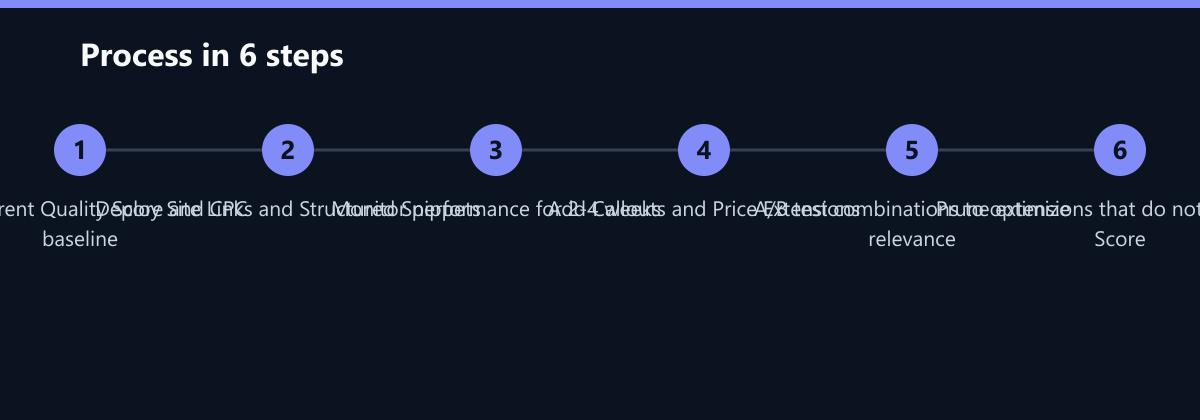
- Audit: Review current Quality Score and CPC for top 20 keywords.
- Map: Identify top 3-4 high-intent landing pages for Site Links.
- Draft: Write 3-4 Structured Snippets and 4-5 Callouts based on key differentiators.
- Deploy: Add Site Links and Structured Snippets to all relevant ad groups.
- Monitor: Track Quality Score and CPC for 2-4 weeks.
- Expand: Add Callouts and Price Extensions if initial results are positive.
- Test: A/B test different combinations to find the optimal set.
- Prune: Remove any extensions that do not contribute to a higher Quality Score or lower CPC.
By treating ad extensions as a core component of your bidding strategy rather than an afterthought, you can significantly improve the efficiency of your Google Ads spend. The goal is not just to get more clicks, but to get better clicks at a lower cost. This is the foundation of sustainable B2B SaaS growth.