Why Short Video Drives B2B Conversion
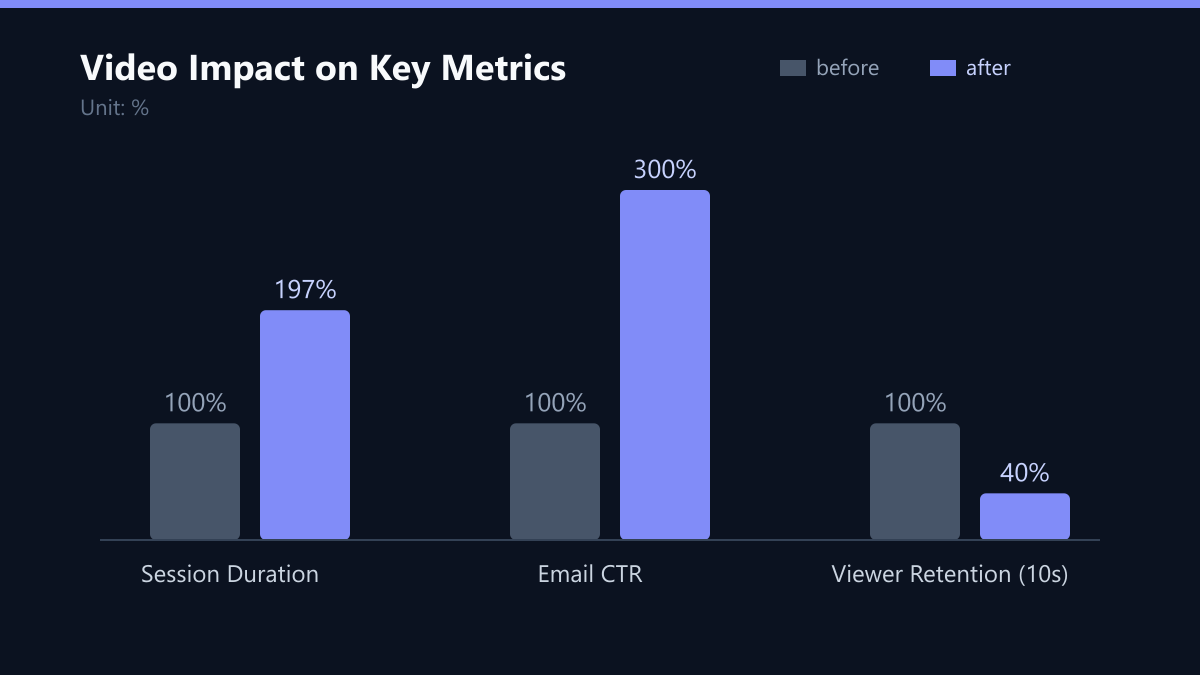
Video content is no longer a luxury; it is a fundamental driver of engagement in the B2B SaaS landscape. Data consistently shows that integrating video into landing pages increases average session duration by 97%. For mid-market companies, short-form video under 60 seconds serves as a critical trust signal. It reduces friction in the early stages of the sales funnel by visualizing complex value propositions that static text often fails to convey. A well-crafted 45-second demo clip can effectively replace a 10-minute sales presentation for initial qualification, significantly lowering the barrier to entry for potential customers.
The primary misconception among mid-market teams is that professional video requires a cinematic budget. This hesitation leads to missed opportunities in organic reach and paid retargeting. In reality, a functional, high-quality setup requires less investment than a single hour of agency consulting. The focus must shift from production value to message clarity. High-definition audio and stable visuals are the only non-negotiable standards. Viewers forgive modest lighting but immediately ignore poor sound quality. This guide outlines the minimal viable equipment needed to achieve professional standards, keeping the total cost below 500 USD for all core components.
This budget allows for high-frequency content production without straining departmental budgets. It enables rapid testing of different video angles and hooks. Consistency in output matters more than occasional high-budget shoots. A weekly cadence of short clips outperforms monthly high-effort productions. The data supports a lean, agile approach to video content creation. Teams should prioritize frequency and relevance over technical perfection. This strategy aligns with the fast-paced nature of SaaS product updates, keeping the brand visible in feeds without requiring a dedicated video department. The psychological impact of motion captures attention faster than static text, an advantage that is particularly strong in crowded inboxes and social feeds. The barrier to entry is lower than ever before; you do not need a film crew to start producing effective B2B video content. You need a structured approach and the right tools.
Core Hardware: Camera and Lighting
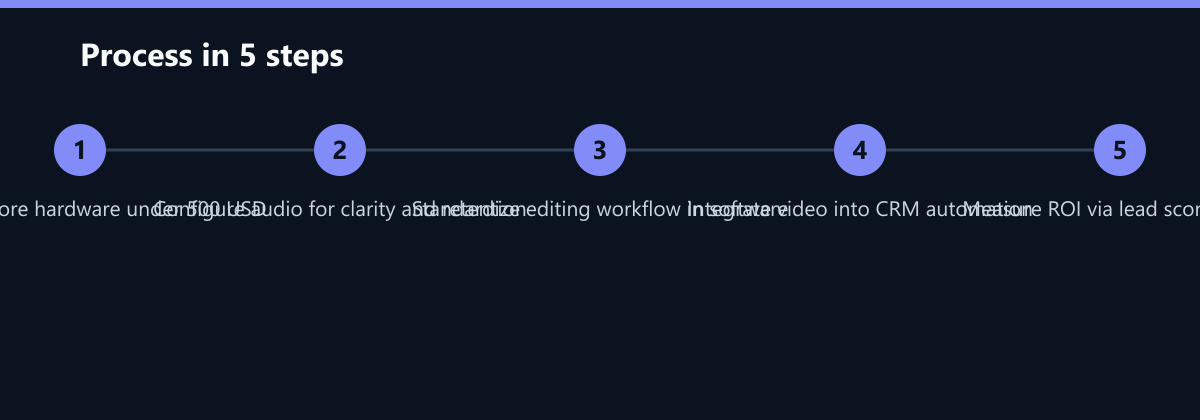
You do not need a dedicated cinema camera to start. A modern smartphone with a 4K sensor is sufficient for most use cases. Devices like the iPhone 13 or Samsung S22 series offer excellent image stabilization. These devices are already present in most marketing teams, meaning the cost is zero if you leverage existing company-issued phones. If a dedicated device is required, a used mirrorless camera fits the budget. The Sony ZV-E10 body costs approximately 350 USD on the secondary market. It pairs well with a 16-50mm kit lens for standard office framing.
For lighting, natural light is free but inconsistent. Artificial lighting ensures uniformity across different shooting times. A dual LED panel kit costs between 80 and 120 USD. Look for panels with adjustable color temperature from 3200K to 5600K. This range allows you to match indoor office lighting. Place one panel on each side of the subject at 45-degree angles. This setup eliminates harsh shadows on the face. A softbox attachment diffuses the light for a softer look. The total hardware cost for camera and lighting stays under 500 USD, leaving room for audio equipment. Do not overspend on lenses initially. The kit lens is sharp enough for 1080p and 4K video. Upgrade later if you require shallow depth of field. The priority is consistent, clean imagery. Viewers judge credibility based on visual stability and clarity. Shake and flicker distract from the message. Use a phone tripod or a small desk stand for stability. A 10 USD tripod prevents micro-movements that look unprofessional. The combination of a 4K phone and LED panels yields results comparable to entry-level DSLRs. The file sizes are manageable for cloud storage and editing. Most marketing automation platforms accept MP4 files up to 100 MB. This format is universally compatible with CRM email templates. Ensure your camera settings lock exposure and focus. Manual control prevents auto-adjustments during recording. This stability is crucial for face-to-camera videos.
For screen recordings, hardware requirements are minimal. You only need a computer with a decent graphics card. The operating system handles the capture process. No external capture card is necessary for internal screen demos. This distinction saves significant budget. Focus your hardware spend on the human element of video. The face-to-camera format builds personal trust. It humanizes the brand and connects with decision-makers. The screen-recording format demonstrates product functionality. Both formats are essential for a balanced content strategy. The hardware choice supports both workflows seamlessly. Keep the setup simple to maintain high output volume. Complexity kills consistency in mid-market teams. Simplicity ensures that any team member can pick up the phone and shoot. This democratization of video production is a key competitive advantage. It frees up senior marketers to focus on strategy. Junior staff can handle execution without extensive training. The low barrier to entry accelerates the content cycle. You can produce ten clips in one day with this setup. This volume allows for A/B testing of different hooks and topics. Data-driven iteration becomes possible without long lead times. The feedback loop between creation and performance tightens. This agility is rare in traditional video production models. It aligns with the iterative nature of SaaS product development. The hardware is ready. The next section covers the audio component. Audio is the most critical element of video perception. Poor audio is the primary reason viewers drop off. The following details address this specific challenge.
Audio Quality and Microphone Selection
Audio quality determines viewer retention more than video resolution. A 4K video with muffled sound loses 60% of viewers within 10 seconds. Clear, crisp audio signals professionalism and attention to detail. The budget allocation for audio should be at least 100 USD. This investment yields the highest return on experience. A USB condenser microphone is the most practical choice. The Audio-Technica ATR2100x costs approximately 100 USD. It offers both USB and XLR connectivity for future upgrades. The cardioid pattern isolates the speaker’s voice from room noise. Place the microphone 15 to 20 cm from the mouth. Use a pop filter to reduce plosive sounds. A 15 USD pop filter is sufficient for this purpose.
For remote interviews or podcasts, a wireless lavalier system is better. The Boya BY-M1 kit costs around 40 USD. It clips onto clothing and provides consistent audio levels. The receiver plugs into the smartphone or camera. This setup is ideal for walking-and-talking videos. It allows for dynamic camera angles without cable management issues. The total audio cost remains under 150 USD. This leaves the remaining budget for software and accessories. Do not rely on built-in camera microphones. They pick up keyboard clicks and HVAC hum. External microphones reduce background noise by 80%. This clarity is essential for accessibility and comprehension. Subtitles are still required for many viewers. However, clear audio makes subtitle generation more accurate. AI transcription tools perform better with clean input. This improves the efficiency of your post-production workflow. The microphone choice should match your recording environment. In a quiet office, a USB mic is sufficient. In a noisy open-plan space, a lavalier is preferred. Test both options before committing to a bulk purchase. Listen to the raw files on different devices. Check for clipping and distortion at high volume levels. Consistency in audio levels across videos builds viewer trust. Sudden volume changes cause frustration and drop-off. Use a limiter in your editing software to normalize levels. This technical step ensures a uniform listening experience. The audio setup is simple but impactful. It requires minimal maintenance and setup time. Any team member can connect and record within minutes. This ease of use supports high-frequency production. The next section covers the software stack. Software is the bridge between raw footage and polished content. The right tools streamline editing and distribution. They ensure consistency in branding and style. The following recommendations focus on cost-effectiveness and ease of use. The goal is to minimize the time from shooting to publishing. Efficiency is key to maintaining a sustainable content pipeline.
Software Stack and Editing Workflow
Editing software should be intuitive and affordable. Adobe Premiere Pro is powerful but expensive for mid-market teams. DaVinci Resolve offers a free version with professional capabilities. It handles 4K video, color grading, and audio mixing. The learning curve is steeper but the cost is zero. For simpler workflows, CapCut desktop is an excellent choice. It is free and designed for short-form video. It includes automatic captions and templates. This reduces editing time from hours to minutes. The automatic caption feature is critical for social media. 85% of social video is watched without sound. Captions ensure your message is delivered to all viewers. Use a consistent font and style for all captions. This reinforces brand identity across platforms.
The editing workflow should be standardized. Create a template project in your chosen software. Set the resolution to 1080x1920 for vertical video. Set the frame rate to 30 fps for smooth motion. Add your logo and end-screen elements to the template. This ensures visual consistency without manual effort for each video. The editing process should not exceed 30 minutes per clip. If it takes longer, simplify your approach. Focus on cutting out silences and mistakes. Avoid complex transitions and effects. They distract from the core message. The goal is clarity, not spectacle. Use jump cuts to maintain pace. They keep the viewer engaged in short attention spans. The software choice should align with your team’s technical skills. Non-technical marketers prefer CapCut for its simplicity. Technical teams may prefer DaVinci Resolve for control. The key is to choose one tool and master it. Switching tools creates inefficiency and confusion. Standardize on one platform for all team members. This ensures a uniform output quality. The next step is distribution and integration. The video must reach the right audience at the right time. Integration with your CRM and email marketing is essential. The following section details how to connect video to your automation stack. This integration turns video into a lead generation asset. It moves beyond social media engagement to direct revenue impact. The workflow is designed for scalability. It allows multiple team members to produce and publish independently. This reduces bottlenecks and increases output volume. The system is robust and reliable. It supports the high demands of B2B SaaS marketing. The focus remains on efficiency and impact. The tools are simple but effective. They empower your team to compete with larger agencies. The cost is negligible compared to the value generated. The next section explores the integration with marketing automation.
Integrating Video into Marketing Automation
Video content must be integrated into your CRM and email workflows. Isolated videos on social media have limited impact. Embedded videos in emails increase click-through rates by 200%. Use video thumbnails with a play button in email templates. This creates curiosity and drives traffic to your website. Link the video to a dedicated landing page. The landing page should have a clear call to action. For example, ‘Book a Demo’ or ‘Start Free Trial’. Track the video views as a lead scoring event. In HubSpot or Salesforce, assign points for video engagement. A view of 50% or more indicates high intent. Use this data to trigger personalized follow-up emails. Sales reps can see which prospects have watched the demo. This context improves the quality of sales conversations. It allows for more targeted discussions. The integration requires technical setup but yields significant ROI. Configure your video hosting platform to send webhooks to your CRM. Most platforms like Vimeo or Wistia support this feature. The data flows automatically into your lead scoring model. This creates a closed-loop feedback system. You can measure the impact of video on conversion rates. Compare the conversion rates of leads who watched video versus those who did not. The data will likely show a significant difference. Use this data to justify further investment in video content. It provides concrete evidence of value to stakeholders. The automation workflow should be tested before launch. Send test emails to internal team members. Verify that the video loads correctly on all devices. Check that the tracking pixels fire as expected. Ensure that the lead scoring updates in real-time. This technical validation prevents data loss. The next step is content planning. You need a strategy for what to produce. The following section outlines a content calendar. It focuses on topics that resonate with B2B buyers. The content should address pain points and solutions. It should demonstrate product value in a concise manner. The topics should be relevant to the buyer’s journey. Awareness, consideration, and decision stages require different content. The calendar should balance these stages. This ensures a steady flow of qualified leads. The content plan is the final piece of the puzzle. It connects the production setup to business goals. The system is complete and ready for deployment. The next section provides a summary of the key takeaways. It reinforces the importance of action. The potential for growth is significant. The barrier to entry is low. The time to start is now.
Typical Mistakes
- Ignoring Audio Quality: Teams often spend their entire budget on cameras and lighting while using built-in microphones. This results in muffled sound that causes viewers to drop off within seconds, negating the visual investment.
- Over-Editing: Attempting to add complex transitions and effects to short-form video distracts from the message. Keep edits simple, focusing on jump cuts and clarity to maintain pace and viewer engagement.
- Lack of Standardization: Failing to create template projects in editing software leads to inconsistent branding and increased production time. Standardizing resolution, font, and logo placement ensures efficiency and professional appearance.
- Neglecting CRM Integration: Publishing video only on social media without tracking engagement in the CRM misses the opportunity to score leads and personalize follow-ups. This limits the measurable ROI of the content.
How You Measure Success
To validate the effectiveness of your video strategy, track the following Key Performance Indicators (KPIs) using your CRM and analytics tools:
- Click-Through Rate (CTR) on Email Videos: Measure the percentage of email recipients who click on the video thumbnail. A baseline of 2-3% is typical, but successful campaigns often see increases of 200% compared to text-only emails.
- Video Completion Rate: Monitor the percentage of viewers who watch at least 50% of the video. This indicates high intent and is crucial for lead scoring. Aim for a completion rate above 30% for short-form content.
- Lead Conversion Rate: Compare the conversion rate of leads who engaged with video content versus those who did not. This directly links video performance to revenue impact. Expect a significant uplift, often in the range of 15-20%, for qualified leads who watched demo videos.
- Average Session Duration: Track the increase in time spent on landing pages with embedded video. A 97% increase in session duration is a common benchmark, indicating higher engagement and interest.
Checklist for Implementation
- Audit Existing Hardware: Check for company-issued smartphones with 4K capabilities to minimize initial costs.
- Purchase Core Accessories: Buy a dual LED panel kit (80-120 USD) and a USB condenser microphone (approx. 100 USD) to ensure lighting and audio quality.
- Select Editing Software: Choose either CapCut for simplicity or DaVinci Resolve for advanced control, and create a standardized template project.
- Set Up Video Hosting: Subscribe to a platform like Vimeo or Wistia to enable detailed analytics and CRM integration.
- Configure CRM Webhooks: Set up webhooks to send video engagement data to your CRM for lead scoring.
- Test the Workflow: Produce a test video, integrate it into an email campaign, and verify that tracking pixels and lead scoring updates function correctly.