Decoding the Dynamic Nature of A9
Amazon’s A9 algorithm is often misunderstood as a static set of rules, but it functions as a dynamic, real-time processing engine. It does not merely look for keyword matches; it evaluates the probability that a specific product will satisfy a user’s intent and convert into a sale. This dual focus on relevance and performance means that optimizing your listing is not a one-time task but an ongoing strategic effort.
Relevance is the entry ticket. It is determined by how well your text fields—title, bullet points, description, and critically, the backend search terms—align with the customer’s query. However, relevance alone is insufficient. The algorithm heavily weights sales velocity, which includes your historical sales data, conversion rate, and click-through rate (CTR). If a product is relevant but fails to convert, A9 will gradually demote it in favor of competitors who convert more efficiently. Therefore, your backend optimization must support a listing that is not only findable but also compelling enough to drive action.
The Hidden Power of Backend Search Terms
Most sellers focus their energy on the visible elements of their listing, such as the title and main image. While these are crucial for CTR, they are limited in character count. The Search Terms field in the backend is the unsung hero of Amazon SEO. This field is invisible to customers but is fully indexed by the A9 algorithm.
The primary advantage of this field is its capacity to capture search volume that does not fit into your visible copy. This includes synonyms, alternative spellings, industry-specific jargon, and long-tail phrases. Because customers do not see this text, you are free to use terms that might look unnatural in a title or bullet point, provided they are semantically relevant to the product.
A critical rule often overlooked is the prohibition of duplication. The A9 algorithm weighs each unique word only once, regardless of how many times it appears in the title, bullets, or backend. If you repeat a keyword in the backend that is already in your title, you are wasting valuable byte space. The backend should be treated as a repository for new information, not a place to reinforce what is already visible.
Strategic Keyword Selection Framework
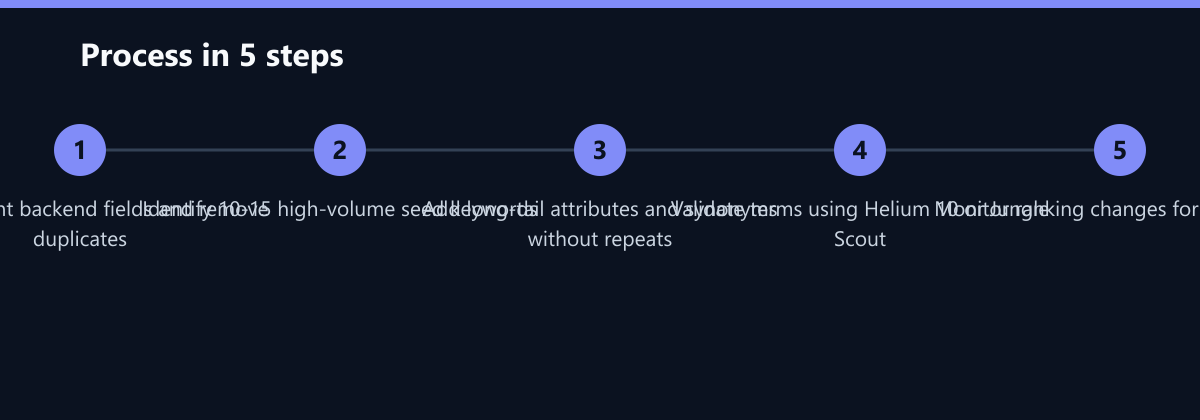
Selecting the right backend keywords is a data-driven science, not a guessing game. Intuition may help, but it cannot predict search volume or competitive density. To build a robust keyword list, follow this structured approach:
- Seed Keywords: Start with 10–15 core terms that define your product. These are the high-volume, head terms that your title likely already covers. Use these to anchor your semantic field.
- Long-Tail Attributes: Expand into specific attributes such as color, size, material, use case, or compatible devices. For example, if you sell a “running shoe,” long-tail terms might include “lightweight breathable mesh for trail running.”
- Synonyms and Variations: Consider how different demographics might search for the same item. Include common misspellings, abbreviations, and regional variations. If you sell in the US and UK, include both “sneakers” and “trainers” if relevant.
Validate these terms using professional tools like Helium 10 or Jungle Scout. Look for keywords with a balance of high search volume and moderate competitive density. Avoid terms with extremely high volume but very low relevance, as they can dilute your relevance score without driving sales.
Mastering the 250-Byte Limit
Amazon imposes a strict limit of 250 bytes for the search terms field. This is not a character limit; it is a byte limit, which means that special characters or accents may take up more space. This constraint demands precision. You are not trying to stuff the field with as many words as possible; you are trying to achieve maximum semantic coverage within the available space.
To optimize this space, adhere to the following rules:
- Eliminate Stop Words: Words like “the,” “and,” “for,” “with,” and “a” are ignored by the algorithm but consume bytes. Remove them entirely. Instead of “running shoes for men,” use “running shoes men.”
- Avoid Brand Names: Never include your own brand name or, more importantly, competitor brand names. This is a compliance risk that can lead to listing suppression. Focus on generic terms and attributes.
- No Repetition: As mentioned, repeating words wastes space. If “waterproof” is in your title, do not include it in the backend unless you are using a specific synonym like “water resistant” or “IPX7 rated.”
Structure your terms logically. Group related concepts together to ensure that the algorithm understands the context. For instance, if you are selling a coffee maker, group terms related to brewing method (“drip,” “pour over”), capacity (“12 cup,” “large”), and features (“programmable,” “keep warm”).
Measuring Success and Iterating
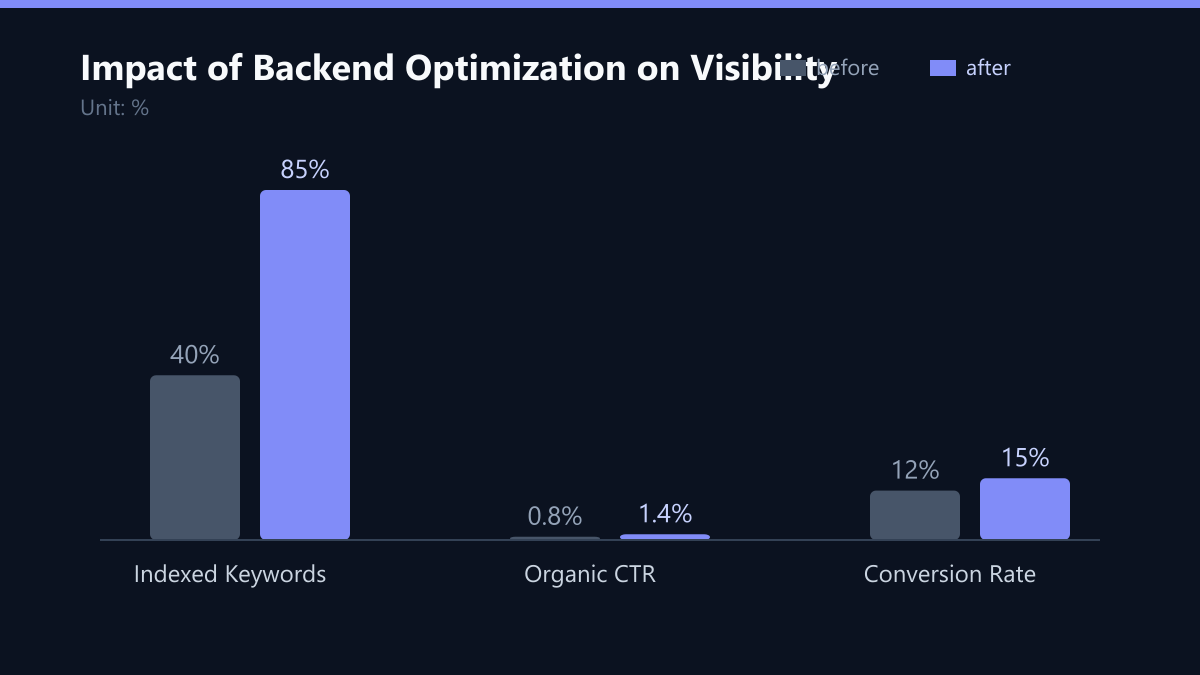
Optimization is an iterative process. Once you have updated your backend search terms, the work is not done. You must measure the impact to determine if your changes improved performance. The most effective way to track this is through the Amazon Brand Analytics dashboard.
Key Performance Indicators (KPIs) to monitor include:
- Search Frequency Rank (SFR): Track how your product ranks for your target keywords. A drop in SFR (a lower number is better) indicates improved visibility.
- Click-Through Rate (CTR): Monitor if your new indexing has attracted more clicks. If CTR drops, your new keywords might be attracting irrelevant traffic.
- Conversion Rate (CVR): The ultimate metric. If your CVR increases, it suggests that the traffic you are capturing is highly relevant and ready to buy.
Conduct a review every two to four weeks after making changes. If a keyword is indexed but does not generate sales, investigate why. Is the price too high? Are the images low quality? Is the product description unclear? Adjust your strategy accordingly.
Typical Mistakes to Avoid
Even experienced sellers make errors that hinder their performance. Here are the most common pitfalls:
- Keyword Stuffing: Overloading the field with irrelevant terms to capture volume. This confuses the algorithm and lowers your relevance score, leading to lower rankings for your core terms.
- Ignoring the Byte Limit: Assuming that more text is better. If you exceed the limit, Amazon may truncate your entry, meaning your most important long-tail terms at the end of the string might never be indexed.
- Static Optimization: Believing that once you set your backend terms, they will work forever. Search trends change, new competitors enter the market, and customer behavior evolves. Without regular updates, your listing becomes stale and less competitive.
Checklist for Backend Optimization
- Audit Current Fields: Copy your existing backend terms and check for duplicates against your title and bullets.
- Remove Stop Words: Strip out all non-essential words like “the,” “a,” and “and.”
- Validate Keywords: Use Helium 10 or Jungle Scout to confirm search volume and relevance for your new terms.
- Check Byte Count: Ensure your total entry is under 250 bytes. Use a byte counter tool if necessary.
- Monitor Performance: Set up a tracking sheet to record SFR, CTR, and CVR for your top 10 keywords over the next 30 days.
By treating your backend search terms as a strategic asset rather than an afterthought, you unlock significant hidden traffic. The A9 algorithm rewards precision and relevance. Use the 250 bytes wisely, avoid common mistakes, and continuously iterate based on data. This approach ensures that your product remains visible, relevant, and competitive in the ever-changing Amazon marketplace.
Passend dazu
- Performance Marketing
- SEO & AI Search (GEO)
- Increasing Email Click-Through Rate to 12% in the Spanish B2B Software Sector with Dynamic Product Blocks
- Affiliate Marketing
- Content & CRO
- CRM Marketing
- Reducing Lead Response Time by 40% in the IT Services Sector with SLA-Based Follow-up Automation (Scandinavia)
- Manufacturing in Asia: Optimizing Campaign Budgets by 25% through Server-Side Data Synchronization between AdWords and SAP
- Scaling Ad Budgets in Benelux with Constant CTR via Dynamic Search