The Standard vs. Custom Object Decision
Most Salesforce implementations begin with the familiar triad of standard objects: Leads, Contacts, and Opportunities. For simple, linear sales processes, this architecture is sufficient. However, as a B2B SaaS business scales, the rigidity of standard fields often fails to capture the nuance of product usage and complex customer journeys. You find yourself forcing square data into round fields, resulting in messy data and limited visibility.
Custom objects allow you to model business entities that do not fit neatly into standard categories. This flexibility is powerful, but it comes with a price tag. You are not just adding fields; you are adding structural complexity to your data model. Every new object introduces new relationships, permissions, and automation paths that must be managed.
Before proceeding, you must ask three critical questions. First, does the entity have a lifecycle independent of the Account? For example, a specific product trial does not die when the Account record is archived. Second, do you need to track relationships between multiple non-account entities? If you need to link specific content assets to specific user segments, standard objects struggle. Third, will this data drive specific marketing or sales automations? If the data is static and only for reporting, a custom field might suffice. If the answer to any of these is yes, a custom object may be necessary. If the answer is no, consider custom fields on standard objects to keep your environment lean.
Typical Mistakes in Object Design
Even experienced admins make errors that lead to technical debt. Here are the most common pitfalls to avoid:
- Building Without an Owner: The most frequent mistake is creating an object without a named data steward. If no one is responsible for data quality, the object will rot. Rotting data is worse than no data because it erodes trust in the CRM.
- Ignoring Integration Limits: Custom objects often require custom API mappings for third-party tools. Teams frequently build the object first and then realize their marketing automation platform cannot sync the data efficiently, leading to rework.
- Over-Engineering on Day One: Attempting to model every possible future scenario in the initial build leads to a bloated schema. Start with the minimum viable object and expand only when the business need is proven.
Common Use Cases in B2B SaaS
B2B SaaS companies face unique data challenges that standard Salesforce objects cannot handle. Below are the most common scenarios where custom objects provide tangible value.
1. Product Entitlements and SKUs Standard Products and Price Books are often insufficient for SaaS. You may need to track specific feature toggles, usage limits, or trial periods. A custom ‘Entitlement’ object linked to the Opportunity allows you to track exactly what a customer is paying for and when it expires. This is crucial for renewal forecasting.
2. Campaign Assets and Content Marketing teams often need to track content assets (whitepapers, webinars) separately from the campaigns that use them. A custom ‘Content Asset’ object lets you attribute engagement to specific pieces of content, not just the campaign name. This allows for deeper ROI analysis on content marketing efforts.
3. Partner and Reseller Data If you have a channel partner program, you need to track partner-specific details, commission structures, and co-marketing activities. A ‘Partner’ custom object keeps this data clean and separate from your direct sales team, preventing confusion in reporting.
4. Customer Success Milestones For SaaS, success is not just closing the deal. It is onboarding, adoption, and renewal. A ‘Success Milestone’ object allows you to track key activities (e.g., ‘First API Call’, ‘Team Training Completed’) and link them to renewal risk. This provides a granular view of customer health.
The Hidden Costs of Complexity
Adding a custom object is easy. Maintaining it is hard. Every new object adds overhead to your Salesforce environment. You must budget for this ongoing effort. The hidden costs are often underestimated during the planning phase.
Maintenance Burden:
- Permissions: You need to define profile and permission set access for every new object. This requires careful audit to prevent security gaps.
- Validation Rules: You must write and test rules to ensure data integrity. Complex validation logic can slow down page loads if not optimized.
- Automation: Flows, Triggers, and Workflows must be updated to handle the new data. Every change in the object structure may break existing automations.
- Reporting: Dashboards and reports must be rebuilt to include the new relationships. This is a significant time investment for reporting analysts.
User Adoption Risk: If your sales or marketing team does not understand why the custom object exists, they will not use it. Poor data entry leads to poor insights. A custom object that sits empty is a waste of resources. User adoption is the single biggest predictor of success. If the UI is confusing or the process is too complex, adoption will fail.
Integration Complexity: If you use Marketing Automation tools or CRM sync tools, custom objects often require custom API mappings. This increases the time and cost of integrations. Ensure your IT team can map the fields before you commit to the build. Unexpected API limits can halt data sync, leading to stale data in downstream systems.
Rule of Thumb: Only build a custom object if the data has a clear owner and a defined process for entry and usage. If you cannot name the person responsible for data quality, do not build the object. This simple rule prevents 80% of failed custom object implementations.
Impact on Automation and Journeys
Custom objects are powerful enablers for advanced marketing automation. They allow you to trigger journeys based on specific, granular data points that standard objects cannot provide. This is where the ROI becomes most apparent.
Example: Usage-Based Triggers Imagine a custom ‘Usage Metric’ object that tracks API calls per day. You can build a journey that triggers when a customer’s usage drops by 20% for three consecutive days. This is a high-intent signal for a churn risk intervention. Standard objects cannot provide this level of granularity. You can only track this if you have a dedicated object for usage data.
Benefits for Journeys:
- Precision: Trigger journeys based on specific product features used, not just lead status. This increases relevance and response rates.
- Segmentation: Create segments based on entitlement expiration or content asset engagement. This allows for highly targeted messaging.
- Scoring: Incorporate custom object data into Lead Scoring models for higher accuracy. Usage data is a strong predictor of conversion likelihood.
Technical Requirement: To use custom objects in Marketing Automation, your tool must support custom object sync. Most major platforms (HubSpot, Marketo, Braze) do, but it requires configuration. Ensure your IT team can map the fields before you commit to the build. Test the sync in a sandbox environment to verify data integrity and latency.
How You Measure Success
You cannot improve what you do not measure. To determine if your custom objects are delivering value, track the following KPIs:
| KPI | Method | Target |
|---|---|---|
| Data Completeness | % of records with required fields filled | >95% |
| Automation Trigger Rate | Number of journeys triggered by custom object data | Baseline + 20% |
| Maintenance Hours | Hours spent per month on object maintenance | <10 hours |
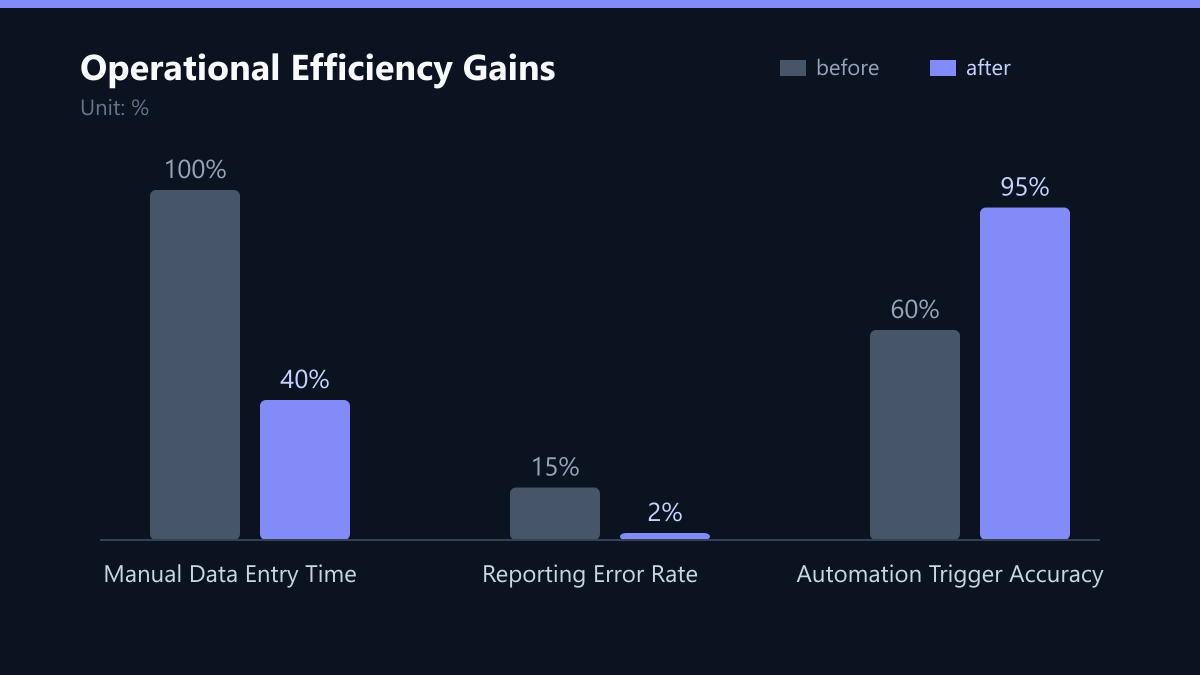
Data completeness is the most critical metric. If your custom object is 50% empty, it is not providing value. Automation trigger rate shows whether the data is actually being used to drive actions. Maintenance hours help you budget for the ongoing cost. If maintenance hours exceed 10 hours per month, you may have over-engineered the solution.
Decision Framework: Build or Buy?
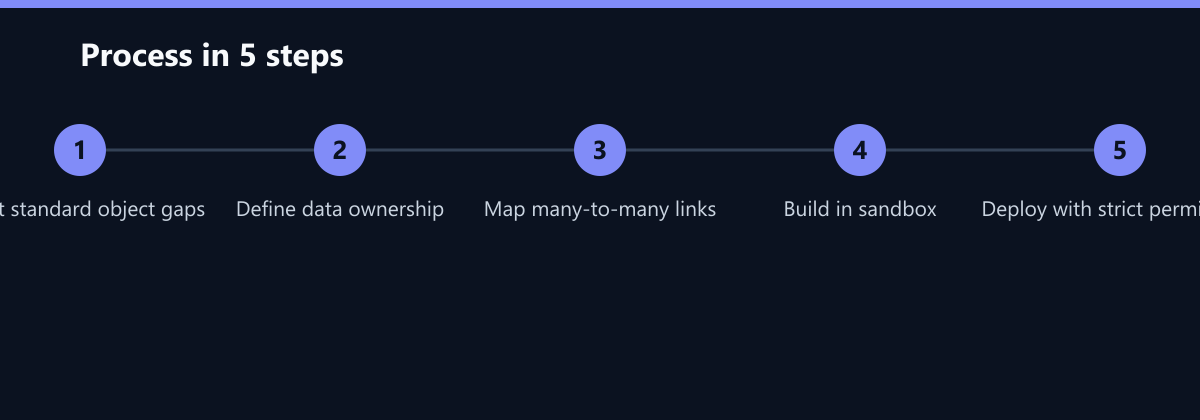
Before committing to a custom object, run through this decision framework. This helps you avoid unnecessary complexity. Follow these steps in order:
- Can you solve it with standard fields? If you can add 3-5 custom fields to a standard object and meet your needs, do that. It is cheaper and easier to maintain. Custom fields are less risky than custom objects.
- Do you need many-to-many relationships? If you need to link multiple Products to multiple Accounts with specific metadata (e.g., start date, end date), you need a junction object. This is a strong case for a custom object. Standard objects cannot handle many-to-many relationships natively.
- Is the data volume high? If you expect thousands of records per account (e.g., individual API calls), consider using a custom object. If it is just a few notes or attachments, use a standard field or related list. High volume data can slow down standard objects.
- Who owns the data? Assign a clear owner. If no one is responsible, the data will rot. Rotting data is worse than no data. The owner must be willing to maintain the object over time.
Summary Table:
| Criterion | Standard Object | Custom Object |
|---|---|---|
| Data Volume | Low/Medium | High |
| Relationships | Simple (1-to-many) | Complex (Many-to-many) |
| Automation Needs | Basic | Advanced/Granular |
| Maintenance Cost | Low | High |
| User Adoption | High | Variable |
Implementation Checklist
If you decide to build a custom object, follow this checklist to minimize risk:
- Start Small: Do not build a complex data model on day one. Start with the core fields you need for your immediate use case. You can add more later. Over-engineering is the enemy of adoption.
- Define Naming Conventions: Use clear, consistent naming for fields and objects. Avoid abbreviations. For example, use ‘Entitlement_Expiration_Date__c’ instead of ‘Exp_Date__c’. Clear names reduce errors and improve usability.
- Document Everything: Create a data dictionary for your custom objects. Document what each field means, who enters it, and how it is used. This is critical for onboarding new team members and reducing dependency on specific individuals.
- Test Thoroughly: Test your custom object in a sandbox environment before deploying to production. Ensure that permissions, validation rules, and integrations work as expected. Do not skip this step. Production issues are expensive to fix.
- Monitor Usage: After launch, monitor how often the object is used. If usage is low, investigate why. Is the UI confusing? Is the process too complex? Adjust accordingly. Regular reviews ensure the object continues to provide value.
FAQ
How many custom objects can a Salesforce organization have?
Salesforce limits the number of custom objects based on your edition. Enterprise and Unlimited editions typically allow up to 200 custom objects. However, practical limits are usually lower due to maintenance and performance considerations. Aim for fewer than 10 custom objects unless you have a dedicated admin team. More objects mean more complexity and higher maintenance costs.
Can I use custom objects in Salesforce reports and dashboards?
Yes, custom objects can be included in reports and dashboards. You can create report types that include custom objects and their relationships to standard objects. This allows you to build complex reports that combine data from multiple sources. Ensure your report builders have the necessary permissions to view the custom object data.
What is the difference between a custom object and a custom field?
A custom field is an additional data point added to an existing object (e.g., adding a ‘Website’ field to the Contact object). A custom object is an entirely new table in your database (e.g., creating a ‘Contract’ object). Custom objects are used when you need to store records that are distinct from your standard business entities. Custom fields are simpler and cheaper to maintain.
Do custom objects affect Salesforce API limits?
Yes, custom objects can consume API limits. Each API call that includes custom objects counts against your daily limit. If you have many custom objects and high data volumes, you may need to optimize your API usage to avoid hitting limits. Monitor your API usage in the Salesforce setup page regularly to ensure you do not exceed your quotas.