The Hidden Cost of Waiting
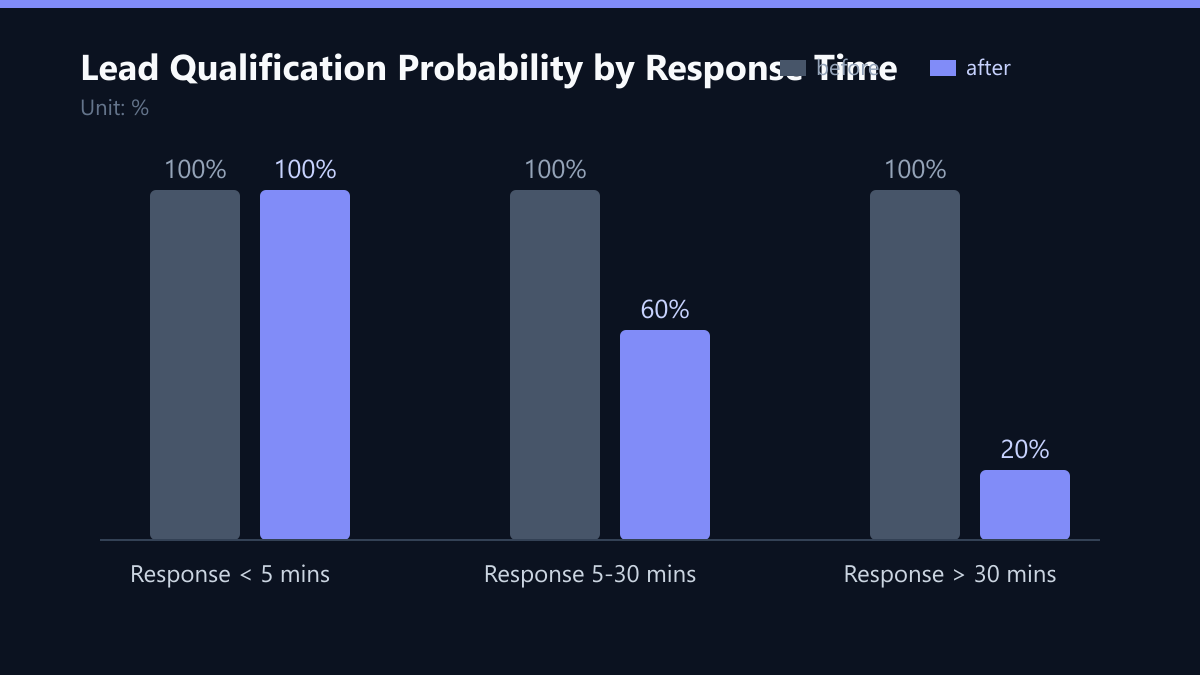
In the B2B landscape, speed is not just a competitive advantage; it is the primary driver of conversion. Data from high-performing sales teams consistently shows that leads contacted within 5 minutes are 5x more likely to qualify than those contacted after 30 minutes. This statistic is not merely a benchmark; it is a hard constraint on your revenue potential. When a lead submits a form, their intent is at its absolute peak. Every minute of silence allows doubt to creep in, and competitors with automated systems are already capturing that same intent.
The decay of intent is exponential. Within the first 10 minutes, a lead is actively evaluating options, checking emails, and comparing features. If your team does not respond immediately, the lead moves to the next option on their list. This creates a tripartite risk: intent decay reduces the likelihood of a close, competitive displacement hands your prospect to a rival, and perceived unprofessionalism signals a disorganized company to a potential client. The cost of delayed response is not just a lost sale; it is a damaged brand reputation before the conversation even begins.
The Psychology of the 5-Minute Window
The 5-minute window is not an arbitrary target; it is grounded in behavioral psychology and digital attention spans. This timeframe aligns with the average duration a prospect remains in a state of high cognitive engagement with a new vendor. Within this window, the problem they are trying to solve is fresh in their mind. A prompt response positions your brand as responsive, reliable, and attentive.
Several psychological factors reinforce the effectiveness of this rapid response:
- Reciprocity: Quick action encourages quick return communication. When you give immediate value, the lead feels obligated to engage.
- Momentum: The conversation starts while the problem is fresh. Stopping the momentum requires significant effort from the lead, whereas continuing it is the path of least resistance.
- Trust Building: Immediate contact reduces anxiety about sharing personal data. It signals that the company has systems in place to handle their information securely and efficiently.
Manual vs. Automated Workflows
Manual response is impossible to scale while maintaining the 5-minute standard. Human reaction times, email check intervals, and meeting schedules create unavoidable delays. Even the most diligent sales representative cannot guarantee a sub-5-minute response 24/7/365. Automation eliminates these bottlenecks by removing the human element from the initial trigger.
A robust marketing automation stack ensures that every lead receives a personalized, immediate acknowledgment. This does not replace human interaction; it initiates it. By automating the first touch, you free your sales team to focus on high-value conversations rather than administrative triage.
| Feature | Manual Response | Automated Response |
|---|---|---|
| Average Time | 15-45 minutes | < 5 minutes |
| Coverage | Business hours only | 24/7/365 |
| Consistency | Variable | Standardized |
| Data Capture | Often incomplete | Real-time logging |
The table above highlights the fundamental difference: manual processes are reactive and inconsistent, while automated processes are proactive and standardized. This consistency is critical for building trust across a large volume of leads.
Implementation: Building the 5-Minute Engine
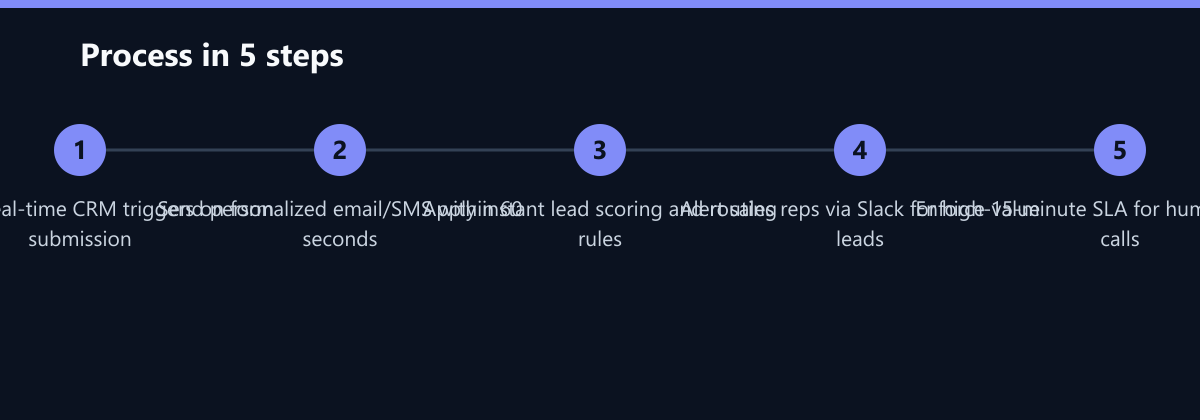
Building this capability requires more than a simple auto-reply. It demands a structured journey that qualifies and routes leads effectively. Here is the step-by-step process to implement a robust 5-minute response strategy.
Step 1: Real-time Trigger Setup Configure your CRM to trigger workflows immediately upon form submission. Ensure that web forms sync with your database without latency. If there is a delay in data transfer, the entire chain is compromised. Use webhooks or native integrations to ensure sub-second data transmission.
Step 2: Personalized Instant Acknowledgment Send an email or SMS within 60 seconds. Include the lead’s name, the specific service requested, and a clear next step. Avoid generic templates. The message should feel like it was written by a human, even if it is generated by a machine. For example, “Hi [Name], thanks for your interest in [Service]. Here is the resource you asked for…”
Step 3: Lead Scoring and Routing Apply scoring rules instantly. High-scoring leads should be alerted to sales reps via Slack or SMS. Low-scoring leads enter a nurturing sequence. This ensures that your most valuable prospects get the most attention, while less qualified leads are nurtured without consuming sales bandwidth.
Step 4: Human Follow-up Protocol Define SLAs for human contact. If a lead does not respond to the automated email, a sales rep must call within 15 minutes for high-value prospects. This creates a multi-channel approach that maximizes the chance of engagement.
Measuring Success: KPIs and Metrics
You cannot improve what you do not measure. Track response time as a core KPI alongside conversion rate. The following metrics provide a comprehensive view of your performance:
- Time to First Contact: Average minutes from submission to first human or automated touch. Aim for < 5 minutes.
- Response Rate: Percentage of leads who engage after the initial contact. Monitor this to ensure your automated content is relevant.
- Conversion Lift: Compare conversion rates of leads contacted <5 mins vs. >30 mins. This directly quantifies the ROI of your speed.
- Cost Per Acquisition (CPA): Monitor if faster response reduces ad spend waste. Lower CPAs indicate that your leads are more qualified and easier to close.
Teams that enforce strict response time SLAs typically see a 20-30% increase in qualified meetings. This improvement directly impacts revenue without increasing marketing spend. By tracking these KPIs, you can identify bottlenecks in your workflow and optimize for continuous improvement.
Typical Mistakes to Avoid
Many organizations fail to implement effective response strategies due to technical or process gaps. Avoid these common pitfalls:
- Broken Integrations: If your form data does not reach the CRM in real-time, automation fails. Test data flow regularly to ensure there are no delays or dropped records.
- Generic Content: Auto-replies that lack personalization feel robotic and can alienate prospects. Use merge fields for name, company, and interest to create a personalized experience.
- Lack of Sales Alignment: Marketing must hand off to sales seamlessly. Define clear ownership for each lead stage to prevent leads from falling through the cracks.
- Ignoring Time Zones: Ensure your automation respects local time zones for international leads to avoid awkward overnight emails. A 2 AM email can feel intrusive and unprofessional.
Checklist for Implementation
- Verify real-time data sync between web forms and CRM.
- Draft personalized email templates with merge fields.
- Define lead scoring criteria and routing rules.
- Configure Slack/SMS alerts for high-value leads.
- Establish SLAs for human follow-up calls.
- Set up dashboards to track response time and conversion lift.
By addressing these issues and following this checklist, you ensure that your 5-minute promise is actually delivered, building long-term trust with your prospective clients. The result is a more efficient sales process, higher conversion rates, and a stronger brand reputation.