The Freemium Filter: Why Generic Scoring Fails
Freemium models in B2B SaaS create a unique challenge: high volume, low intent. Without precise scoring, sales teams drown in noise, wasting hours on users who will never convert. The objective is not to score everyone, but to identify the small percentage of users showing high purchase intent early. This allows for immediate, personalized outreach rather than generic follow-ups.
The core goal is to distinguish between ‘active free users’ and ‘sales-ready leads.’ This distinction drives three critical outcomes:
- Volume Control: Filter out noise to prevent sales team burnout.
- Speed to Lead: Trigger notifications for high-score users within minutes.
- Resource Allocation: Focus budget and effort on high-potential segments.
Both HubSpot and Salesforce can handle this task, but their approaches to complexity, integration, and cost differ significantly. Choosing the wrong tool can lead to either under-utilization of data or over-engineering of processes.
HubSpot: Speed and Native Simplicity
HubSpot excels in ease of setup and native data synchronization. Its lead scoring is built directly into the CRM, requiring no additional middleware for basic use cases. This makes it ideal for mid-market teams that prioritize speed over extreme customization.
Scoring Mechanism:
- Explicit Data: Form fields, company size, job title.
- Implicit Data: Page views, email opens, feature usage (if integrated).
- Logic: Simple if-then rules or weighted points.
Pros:
- Fast Implementation: Set up basic scores in under an hour.
- Unified Interface: Marketing and Sales see the same score in one place.
- Cost-Effective: No extra cost for basic scoring in Starter/Professional tiers.
Cons:
- Limited Complexity: Advanced conditional logic can become unwieldy.
- Data Silos: Requires careful integration to capture deep product usage data from your SaaS app.
Salesforce: Granular Control for Scale
Salesforce offers unparalleled flexibility for complex scoring models. It is better suited for enterprises with distinct data sources and a need for deep segmentation. The scoring engine is robust but requires significant configuration effort.
Scoring Mechanism:
- Custom Fields: Highly granular attributes.
- API-Driven Updates: Real-time updates from product analytics tools.
- Advanced Logic: Complex multi-step conditions and decay algorithms.
Pros:
- Infinite Scalability: Handles millions of records without performance drops.
- Deep Integration: Connects seamlessly with Salesforce Einstein and third-party analytics.
- Custom Decay: You can programmatically reduce scores for inactive users over time.
Cons:
- Steep Learning Curve: Requires admin expertise or external consultants.
- Cost: Additional licenses often needed for advanced automation features.
- Overkill for SMBs: Complexity can slow down initial rollout.
Defining Rules for B2B SaaS
Regardless of the platform, your rules must reflect your specific buyer journey. Generic scores fail in SaaS because ‘interest’ looks different in software than in services. You must combine firmographic data with behavioral signals.
Recommended Rule Structure:
-
Firmographic Base (20-30 points):
- Company Size: 50-500 employees (High Value).
- Industry: Tech/Finance/Healthcare (High Relevance).
- Job Title: C-Suite, VP, Director (Decision Makers).
-
Behavioral Signals (40-60 points):
- Product Usage: Accessed ‘Advanced Features’ 3+ times.
- Engagement: Opened 3+ pricing emails in the last 30 days.
- Intent: Viewed ‘Contact Sales’ page twice.
- Onboarding Completion: Completed >80% of onboarding steps.
-
Negative Signals (Minus Points):
- Unsubscribed from marketing emails.
- No login for 14 days.
- Bounced email 3+ times.
Implementation Tip: Start with 5-7 rules. Too many rules create noise. Monitor conversion rates for high-score leads and adjust weights monthly.
Head-to-Head: HubSpot vs. Salesforce
The choice depends on your team size, technical resources, and data infrastructure. HubSpot is faster to deploy; Salesforce is more powerful for long-term growth.
| Feature | HubSpot | Salesforce |
|---|---|---|
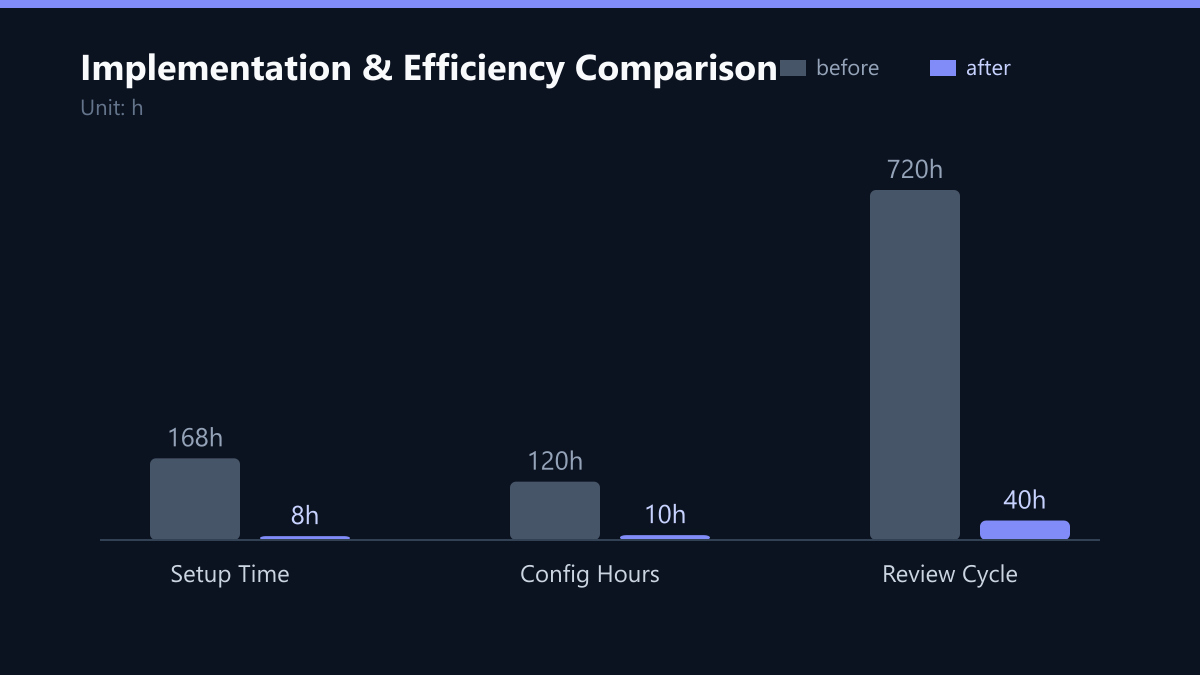
| Setup Time | Hours to Days | Weeks to Months |
| Complexity | Low to Medium | High |
| Cost (Scoring) | Included in Pro/Enterprise | Often requires extra licenses |
| Decay Logic | Basic (Manual or Simple) | Advanced (Custom/Code) |
| Best For | SMB/Mid-Market, Speed | Enterprise, Complex Data |
| Integration | Native + App Store | Native + Extensive API |
Decision Matrix:
- Choose HubSpot if you have <50 employees, need quick results, and your data is mostly in CRM/Email.
- Choose Salesforce if you have >100 employees, complex data pipelines, and need custom decay algorithms.
Cost Analysis and ROI
Scoring is not just a feature; it’s a process that impacts headcount efficiency. The ROI comes from increased conversion rates and reduced cost per acquisition (CPA).
HubSpot Costs:
- Marketing Pro: ~$800/month (3 seats).
- Sales Pro: ~$900/month (3 seats).
- Total: ~$1,700/month for basic setup.
Salesforce Costs:
- Sales Cloud: ~$100/user/month.
- Marketing Cloud: ~$125/user/month.
- Implementation: $10k-$50k one-time for setup.
- Total: $2,000+/month + high initial cost.
ROI Calculation: If your average deal size is $10,000 and you convert 1% of leads, a 10% improvement in conversion rate adds $10,000 in revenue. The software cost is negligible compared to the revenue uplift. Focus on accuracy, not just volume.
Implementation Best Practices
A scoring model is only as good as its maintenance. Static scores become obsolete as user behavior changes. You must establish a feedback loop between Sales and Marketing.
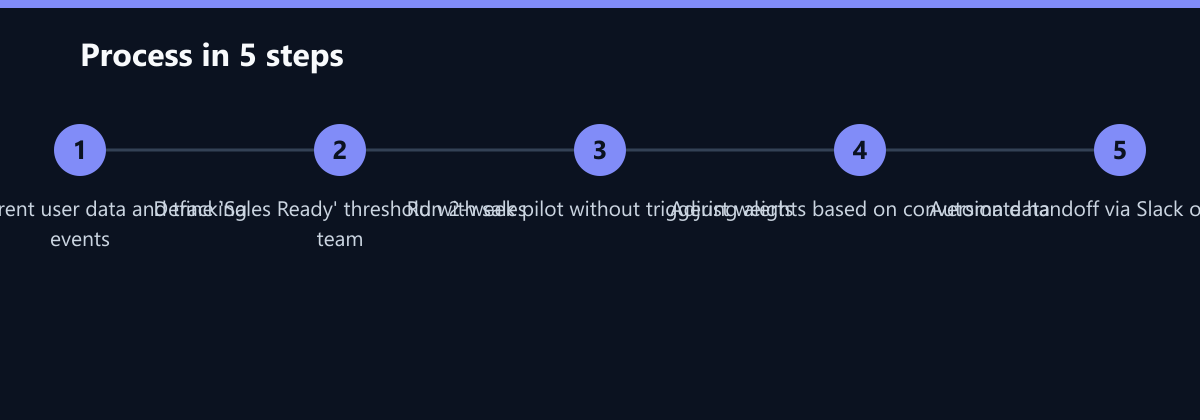
Step-by-Step Implementation:
- Audit Current Data: Ensure job titles, company sizes, and product usage events are tracked accurately.
- Define ‘Sales Ready’: Agree with Sales on the exact score threshold (e.g., 80/100).
- Pilot Test: Run the model for 2 weeks without triggering sales alerts. Analyze the distribution of scores.
- Adjust Weights: If high-score leads aren’t converting, lower the weight of behavioral signals or raise the threshold.
- Automate Handoff: Trigger a Slack/Teams notification or create a Task for Sales when the threshold is crossed.
Typical Mistakes to Avoid
- Ignoring Decay: A user who was hot 6 months ago but inactive for 2 months should not have the same score as a new active user. Implement time-based decay in both platforms if possible.
- Over-Engineering Rules: Starting with 20+ rules creates noise. Start simple with 5-7 high-impact signals and expand only when data justifies it.
- Lack of Sales Alignment: If sales does not agree on the definition of ‘Sales Ready,’ the model will be ignored. Involve sales leaders in the threshold definition.
- Static Thresholds: Market conditions change. A threshold that works in Q1 may be too high or too low in Q3. Review and adjust quarterly.
How You Measure Success
To determine if your lead scoring model is working, track these KPIs:
- Conversion Rate of High-Score Leads: Compare the close rate of leads above the threshold versus those below. A significant gap indicates effective scoring.
- Sales Cycle Length: Measure the time from lead creation to close for high-score leads. Shorter cycles indicate better qualification.
- Lead Velocity: Track the number of sales-ready leads generated per week. This helps you forecast pipeline and adjust marketing spend.
- Cost Per Acquisition (CPA): Monitor the CPA for high-score leads. If CPA decreases while volume stays stable, your model is improving efficiency.
Method: Use a simple dashboard in your CRM or BI tool to track these metrics weekly. Compare month-over-month trends to identify if rule changes are having a positive impact.
Checklist for Launch
- Audit data quality for firmographic and behavioral fields.
- Define the ‘Sales Ready’ threshold with sales leadership.
- Configure 5-7 initial scoring rules in your CRM.
- Run a 2-week pilot without triggering alerts.
- Analyze score distribution and adjust weights.
- Enable automated handoffs and notifications.
- Schedule monthly reviews for rule performance.
Final Recommendation
For most mid-market B2B SaaS companies with a freemium model, HubSpot is the pragmatic choice. It offers sufficient power for effective lead scoring without the overhead of a massive implementation. You can start with simple rules and scale as your data grows.
Choose Salesforce only if you already have a complex data stack, require enterprise-level security, or anticipate scaling beyond 1,000 sales-ready leads per month.
Action Plan:
- Map your current user journey.
- Identify the top 5 behaviors that predict conversion.
- Implement a basic 50-point scoring model in your chosen CRM.
- Review conversion rates monthly and refine rules.
Do not wait for the ‘perfect’ model. Start simple, measure results, and iterate. The best lead scoring model is the one that your sales team actually uses.