The Hidden Cost of Inbox Misplacement
Email remains the highest ROI channel in B2B sales, but only if it reaches the primary inbox. A low deliverability rate directly impacts lead generation and revenue forecasts. In competitive SaaS markets, being filtered into the Promotions or Spam tab means losing visibility to competitors who maintain clean sender reputations. The distinction is critical: the Primary Inbox offers high engagement and open rates, while the Promotions Tab results in lower visibility and delayed opens. The Spam Folder is the worst-case scenario, offering zero visibility and a high unsubscribe risk.
The goal is consistent placement in the primary inbox. This requires technical hygiene and behavioral data optimization. ISPs like Microsoft Outlook, Gmail, and Yahoo use complex algorithms to evaluate sender trust. One misconfigured DNS record or a high bounce rate can trigger immediate filtering, silently destroying your pipeline.
Technical Foundation: DNS Authentication
Technical authentication is the foundation of trust. Without proper DNS records, email providers cannot verify that your domain is authorized to send mail. This is the most common technical reason for deliverability failures. You must ensure four specific records are correctly configured to establish legitimacy.
- SPF (Sender Policy Framework): Lists all servers allowed to send mail for your domain. Keep the count of included hosts under 10 to avoid DNS lookup errors.
- DKIM (DomainKeys Identified Mail): Adds a cryptographic signature to your email headers. Use a 2048-bit key for better security and compatibility with major providers.
- DMARC (Domain-based Message Authentication, Reporting, and Conformance): Tells receivers how to handle emails that fail SPF or DKIM checks. Start with a policy of
p=noneto monitor, then move top=quarantineand finallyp=rejectas your reputation stabilizes. - rDNS (Reverse DNS): Ensures the IP address sending your mail points back to your domain. Mismatches here are a red flag for spam filters.
Use tools like MXToolbox or DNS Checker to validate these records. If any record is missing or misconfigured, fix it immediately. Changes can take up to 48 hours to propagate globally, so plan your implementation timeline accordingly.
List Hygiene: The First Line of Defense
Sending to invalid addresses destroys your sender reputation. High bounce rates signal to ISPs that your list is unmanaged or purchased. This triggers automatic filtering for all subsequent campaigns. You must treat list hygiene as an ongoing process, not a one-time task.
- Hard Bounces: These indicate invalid email addresses. Remove them immediately. A hard bounce rate above 2% requires a full list audit.
- Soft Bounces: These are temporary issues like a full mailbox. Retry once after 24 hours. If it bounces again, treat it as a hard bounce.
- Engagement Data: Regularly suppress users who have not opened any email in the last 6–12 months. Inactive users contribute to low engagement metrics, which ISPs use to judge relevance.
Implement a double opt-in process for new subscribers. This ensures consent and reduces the likelihood of spam complaints. For B2B lists, verify addresses before adding them to your CRM. Use verification tools to check syntax and MX records before sending. This proactive approach prevents reputation damage before it starts.
Strategic Domain Warm-Up
If you are launching a new domain or subdomain for marketing, do not send full volume immediately. Cold domains have no reputation history. Sending thousands of emails on day one looks like spam behavior to ISPs. A structured warm-up phase is essential for long-term success.
- Week 1-2: Send 10–50 emails per day. Focus on highly engaged users.
- Week 3-4: Increase to 100–500 emails per day. Monitor bounce and complaint rates closely.
- Month 2+: Gradually scale to your target volume. Increase by 20–30% per week if metrics remain healthy.
Use a separate subdomain for transactional and marketing emails. This isolates reputation issues. If marketing emails get flagged, transactional emails like password resets remain unaffected. This separation protects critical business communications. Track engagement metrics daily during the warm-up phase. Pause scaling if bounce rates exceed 2% or spam complaints exceed 0.1%.
Content Optimization for Filters
Content analysis is a key component of spam filtering. ISPs scan subject lines, body text, and links for spammy patterns. Even legitimate B2B content can trigger filters if it uses aggressive language or excessive formatting.
- Subject Lines: Avoid all caps, excessive punctuation, and spam trigger words like “Free,” “Guarantee,” or “Urgent.” Keep subject lines under 50 characters for mobile readability.
- Body Text: Maintain a 60/40 ratio of text to images. Images do not pass spam filters, but text does. Ensure your email renders correctly on mobile devices. Broken layouts increase spam complaints.
- Links: Use short, clean URLs. Avoid URL shorteners like bit.ly, which are often associated with phishing. Ensure all links are clickable and lead to valid, SSL-secured pages.
- Unsubscribe Link: Place a clear, functional unsubscribe link in the footer. Hiding this link or making it difficult to use violates CAN-SPAM and GDPR regulations. It also increases the likelihood of users reporting your email as spam.
A/B test subject lines and send times. Small variations in wording can significantly impact open rates. Monitor engagement per segment. Tailor content to specific user behaviors to improve relevance scores.
Reputation Monitoring and Feedback
Sender reputation is dynamic. It changes based on user behavior, bounce rates, and spam complaints. You must actively monitor your standing with major ISPs. Ignoring these signals can lead to sudden blacklisting.
- Google Postmaster Tools: Sign up with your sending domain to view your reputation in Gmail. It provides data on spam rate, deliverability, and domain reputation.
- Microsoft SNDS: Monitor your sender reputation in Outlook. It tracks complaint rates and IP reputation.
- Feedback Loops (FBL): Subscribe to FBLs from major providers. These services notify you when a user marks your email as spam. You can then suppress that user immediately, preventing future complaints.
Set up automated alerts for reputation drops. If your reputation falls below a threshold, pause sending and investigate. Common causes include a recent list import, a technical outage, or a change in content strategy. Regular monitoring allows you to react quickly to issues before they escalate.
Segmentation for Relevance
Relevance is the strongest predictor of open rates. ISPs use engagement data to determine if your emails are wanted. Sending the same generic message to all users lowers overall engagement.
- Behavioral Segmentation: Group users by actions like page visits, webinar attendance, or product usage. Send content relevant to their specific interests.
- Life Cycle Stages: Tailor emails to where the user is in the funnel. New leads need educational content, while trial users need onboarding tips.
- Preference Centers: Allow users to choose the frequency and type of content they receive. This reduces unsubscribes and improves long-term engagement.
Personalization goes beyond inserting a first name. Use dynamic content blocks to show relevant case studies, features, or offers. This increases the likelihood of opens and clicks. High engagement signals to ISPs that your emails are valuable, improving deliverability over time. Focus on building long-term relationships rather than one-off blasts.
Pre-Send Testing Protocol
Never send a campaign without testing. Pre-send checks catch technical and content errors that could harm your reputation.
- Spam Score Testing: Use tools like Litmus or Email on Acid to check your spam score. Aim for a score below 10. These tools simulate how different ISPs will handle your email.
- Render Testing: Check how your email looks on different devices and email clients. Broken images or misaligned text increase spam complaints.
- Link Checking: Ensure all links are active and lead to the correct destination. Broken links damage trust and increase bounce rates.
Conduct a small-scale test send to an internal list first. Gather feedback on content and design. Make necessary adjustments before sending to the full list. This final step ensures that your campaign is optimized for both deliverability and engagement. Consistent testing builds a culture of quality and reliability in your email marketing program.
Typical Mistakes to Avoid
- Ignoring Soft Bounces: Treating temporary issues as permanent or ignoring them entirely. Always retry once after 24 hours before suppressing.
- Buying Email Lists: Purchased lists have high bounce and complaint rates, instantly damaging your domain reputation. Always rely on organic, verified sign-ups.
- Inconsistent Sending Volumes: Sudden spikes in email volume can trigger spam filters. Maintain a consistent sending schedule or ramp up gradually.
- Neglecting Mobile Optimization: A significant portion of B2B emails are opened on mobile devices. Broken layouts lead to user frustration and spam reports.
How You Measure Success
To determine if your deliverability strategy is working, track these concrete KPIs:
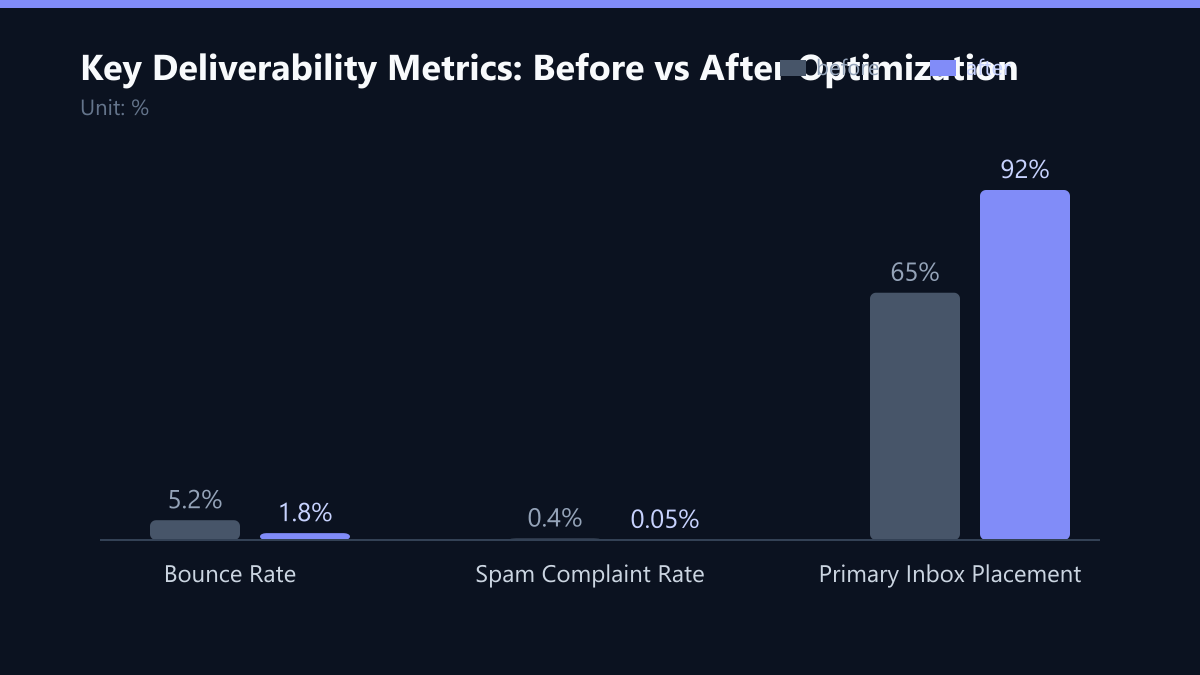
- Bounce Rate: Aim for below 2%. Use your ESP’s reporting dashboard to monitor this per campaign.
- Spam Complaint Rate: Keep this under 0.1%. Monitor via Feedback Loops and Postmaster Tools.
- Primary Inbox Placement: Use tools like GlockApps or Litmus to measure where your emails land. Aim for above 90% in the primary inbox.
- Open and Click Rates: While volatile, these indicate engagement. A CTR above 2–3% is a strong signal of relevance.
Method: Set up a weekly dashboard review. Compare current metrics against your baseline from before optimization. If bounce rates rise, immediately audit your list. If inbox placement drops, check your DNS records and recent content changes.
Checklist for Implementation
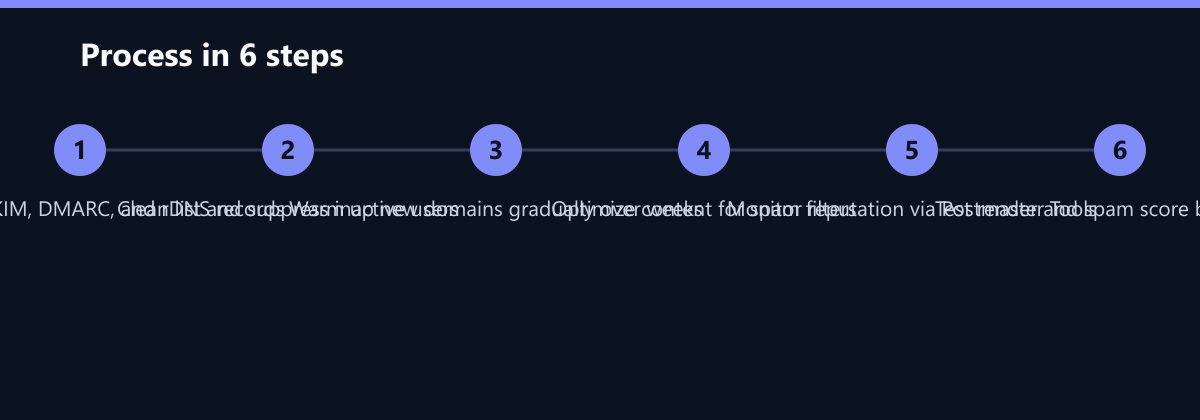
- Verify SPF, DKIM, DMARC, and rDNS records using MXToolbox.
- Implement double opt-in for all new subscribers.
- Clean existing list: remove hard bounces and suppress inactive users (6–12 months).
- Set up separate subdomains for transactional and marketing emails.
- Begin domain warm-up with 10–50 emails per day.
- Subscribe to Google Postmaster Tools and Microsoft SNDS.
- Run spam score tests on all new templates before sending.
- Establish a quarterly list cleaning schedule.