The Hidden Cost of Data Silos in B2B Stacks
Most mid-market B2B companies operate with a fragmented technology stack where customer relationship management (CRM) and product information management (PIM) systems exist in isolation. While this separation allows specialized teams to manage their respective domains, it creates a critical vulnerability: the data silo. In this environment, the CRM holds contact details and deal stages, while the PIM manages product attributes, pricing, and media assets. When these systems fail to synchronize, the consequences ripple through the entire customer journey.
Marketing teams end up sending campaigns based on outdated product information, while sales representatives quote prices that differ from the live web store. The result is a disjointed customer experience that erodes trust and directly impacts revenue. Common manifestations of this failure include stale data, where price discrepancies cause deal slippage; missing attributes, where email campaigns lack key specifications required for technical buyers; and duplicate records, where the same customer appears in multiple formats across platforms, leading to fragmented communication histories.
Establishing the Technical Foundation
Successful synchronization is not merely about connecting two APIs; it requires a robust technical foundation capable of handling data volume, frequency, and security. Before any code is written, the infrastructure must be designed to ensure reliable data flow. Four components are non-negotiable for a stable integration.
First, you must understand API Rate Limits. Both HubSpot and major PIM providers impose strict throughput limits to prevent server overload. Ignoring these limits leads to throttling, which interrupts synchronization and creates data gaps. Second, Webhook Configuration is essential for modern integrations. Instead of polling the API at fixed intervals, which wastes server resources and introduces latency, webhooks provide real-time triggers. This ensures that updates are propagated immediately upon change. Third, Error Logging must be centralized. Without a unified log of every failed request, debugging synchronization issues becomes a game of guesswork. You need a system that captures error codes, timestamps, and payload details for every failed transaction. Finally, Authentication Security is paramount. Use OAuth 2.0 for secure token management and never hardcode API keys in your codebase. This approach allows for secure rotation of credentials without downtime.
Strategic Data Mapping and Source of Truth
Before implementation, you must define how data fields map between systems. A clear mapping document prevents data corruption and ensures semantic consistency. This step requires close collaboration between IT and marketing teams to agree on which data is critical and where it should reside. The following table illustrates a typical mapping strategy for a B2B context:
| CRM Field | PIM Field | Direction | Frequency |
|---|---|---|---|
| Account Name | Company ID | CRM to PIM | Real-time |
| Product SKU | SKU Code | PIM to CRM | On Change |
| Last Contact Date | Last Interaction | CRM to PIM | Daily Batch |
| Customer Segment | Audience Tag | CRM to PIM | Real-time |
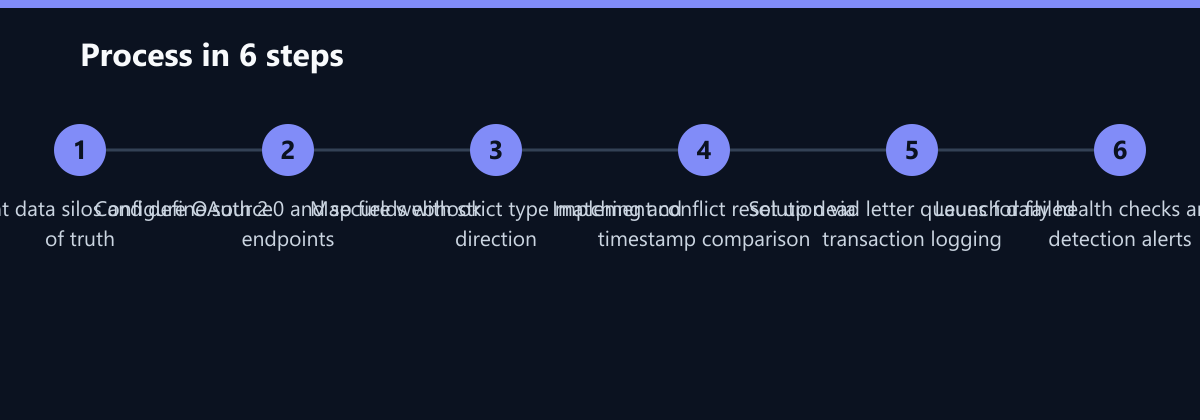
The most critical rule in this phase is defining the primary source of truth for each data type. For example, the CRM should own contact data, while the PIM owns product details. Do not allow two-way synchronization for the same field unless absolutely necessary. Two-way sync for a single field leads to circular updates and data conflicts. If the CRM sends an update to the PIM, and the PIM sends it back to the CRM, you create an infinite loop. Unidirectional flow for specific fields is the safest approach.
Resolving Conflicts and Handling Edge Cases
Data conflicts are inevitable when multiple users update records simultaneously or when batch processes overlap. Your integration logic must handle these conflicts predictably to maintain data integrity. A common mistake is overwriting newer data with older data during a batch process, which silently corrupts the record.
To prevent this, implement Timestamp Comparison. Compare the last modified timestamp of both records, and let the newer record win. This is a simple but effective rule for most scenarios. For complex objects, use Field-Level Merge rather than replacing the entire record. This preserves unique data from both systems, ensuring that no information is lost during the update. Additionally, implement a Dead Letter Queue (DLQ). Store failed records in this queue for manual review. Do not discard failed transactions silently; every error must be accounted for. Finally, design your API calls to be Idempotent. Retrying a failed request should not create duplicate entries. Idempotency ensures that even if a network glitch causes a duplicate request, the system remains consistent.
Monitoring, Maintenance, and Success Metrics
Synchronization is not a one-time setup; it is an ongoing process that requires continuous monitoring to ensure data quality remains high over time. Automated alerts help your team react quickly to integration failures before they impact customer-facing operations.
Run Daily Health Checks using automated scripts that verify record counts match between systems. If the number of active customers in the CRM does not match the number of customer profiles in the PIM, an alert should be triggered. Implement Anomaly Detection to set alerts for sudden spikes in data transfer or error rates. A sudden increase in errors often indicates a change in API behavior or a data quality issue in the source system. Conduct Quarterly Audits to review mapping rules and ensure they still align with business needs. Product catalogs and CRM fields evolve over time, and static mappings can become obsolete. Finally, maintain up-to-date Documentation of all integration points. This reduces onboarding time for new developers and ensures that business logic is preserved even if key personnel leave the team.
Typical Mistakes to Avoid
Even with a solid plan, teams often fall into specific traps that undermine their synchronization efforts. Understanding these common pitfalls can save weeks of debugging time.
- Ignoring Data Type Mismatches: Mapping a string field in the CRM to an integer field in the PIM causes parsing errors that fail silently or corrupt data. Always validate data types during the mapping phase.
- Lack of Idempotency: Failing to design idempotent API calls means that network retries create duplicate records. This leads to a bloated database and inconsistent reporting.
- Over-Synchronizing: Attempting to synchronize every single field in real-time is inefficient and often unnecessary. Focus on critical data for real-time sync and use batch processing for the rest.
- No Fallback Strategy: If the webhook fails, there is no mechanism to catch the update. Always have a periodic batch job that acts as a safety net to catch any missed real-time events.
How You Measure Success
To determine if your CRM-PIM synchronization is working effectively, you need to track specific KPIs. These metrics provide a clear picture of data health and integration performance.
- Data Consistency Rate: Measure the percentage of records that match perfectly across both systems. A target of 99.5% or higher is typical for mature integrations. Use a daily script to compare a sample of records and calculate this percentage.
- Time to Sync: Track the average time between an event occurring in the source system and the update appearing in the target system. For real-time webhooks, this should be under 5 seconds. For batch jobs, it should align with your scheduled frequency.
- Error Rate: Monitor the percentage of failed API requests. A rate below 1% is acceptable. Any spike above this threshold should trigger an immediate investigation.
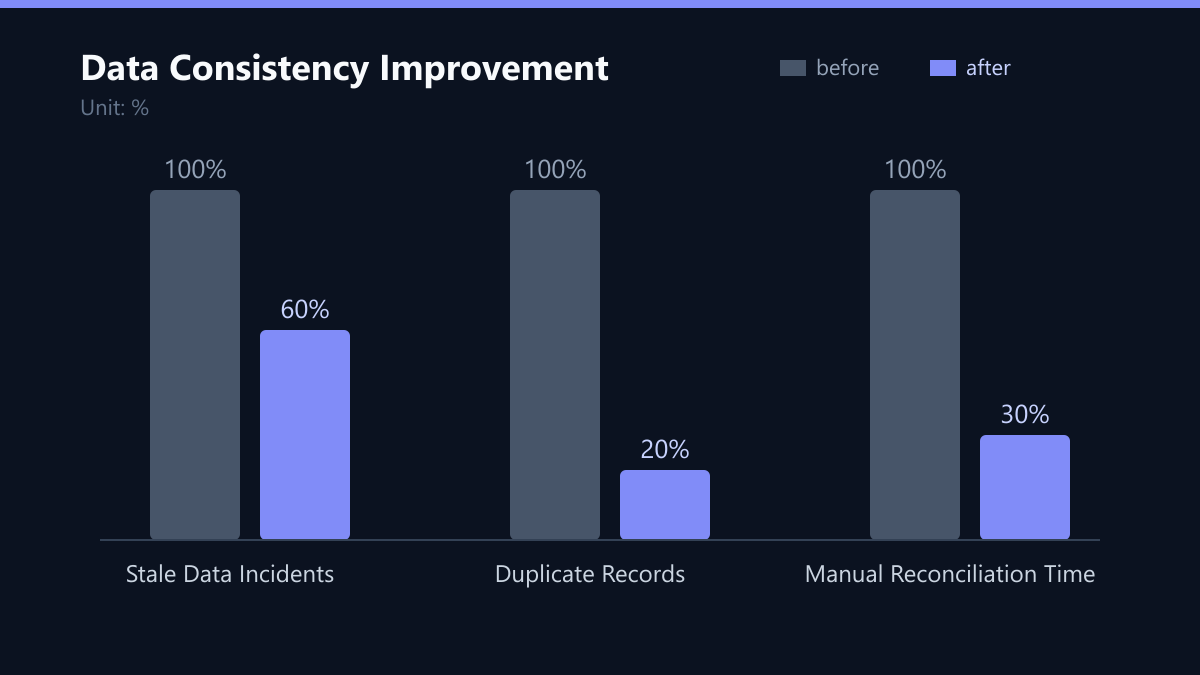
- Manual Reconciliation Time: Track the hours spent by staff manually fixing data discrepancies. A successful integration should reduce this time by at least 50% within the first quarter.
Implementation Checklist
Use this checklist to ensure your integration is ready for production. Each step builds on the previous one, creating a robust foundation for data consistency.
- Audit: Identify all data fields that need synchronization and define the source of truth for each.
- Security: Configure OAuth 2.0 tokens and ensure API keys are stored in a secure vault, not in code.
- Mapping: Create a detailed mapping document with data type validation and unidirectional flow rules.
- Logic: Implement conflict resolution logic using timestamp comparison and field-level merging.
- Resilience: Set up dead letter queues and idempotency keys for all API calls.
- Monitoring: Deploy daily health checks, anomaly detection alerts, and a centralized logging system.
- Testing: Run end-to-end tests with sample data to verify that updates propagate correctly and errors are handled gracefully.
By following this structured approach, you transform your CRM and PIM from isolated silos into a unified data ecosystem. This not only improves the accuracy of your customer communications but also frees up your team to focus on strategic initiatives rather than data cleanup. The investment in robust synchronization pays off through higher customer trust, more efficient sales processes, and a cleaner, more reliable data foundation for future growth.