The Hidden Cost of Broken Data Flows
In mid-market B2B environments, a single data mismatch is rarely just a technical glitch. It is a direct revenue leak. When sales and marketing operate on misaligned data, you waste ad spend on unqualified leads and miss critical follow-ups that close deals. Most integration failures do not stem from complex technical limitations but from poor initial planning. Addressing these foundational issues early saves significant time and budget, preventing the accumulation of technical debt that slows down your entire go-to-market strategy.
The core problem is that broken integrations create data silos. Marketing sees a lead as “new” while sales sees it as “stale” because the sync failed. This disconnect erodes customer trust and reduces conversion rates. By systematically addressing the five most common integration errors, you can transform your CRM from a passive database into an active engine for revenue growth.
1. The Field Mapping Trap
The most frequent error is connecting tools without aligning field definitions. It sounds simple, but teams often link a marketing automation platform to a CRM where one system uses ‘Company Name’ and the other uses ‘Account Name.’ This mismatch breaks automated workflows instantly. If the data cannot be mapped correctly, the integration fails silently, leaving gaps in your pipeline.
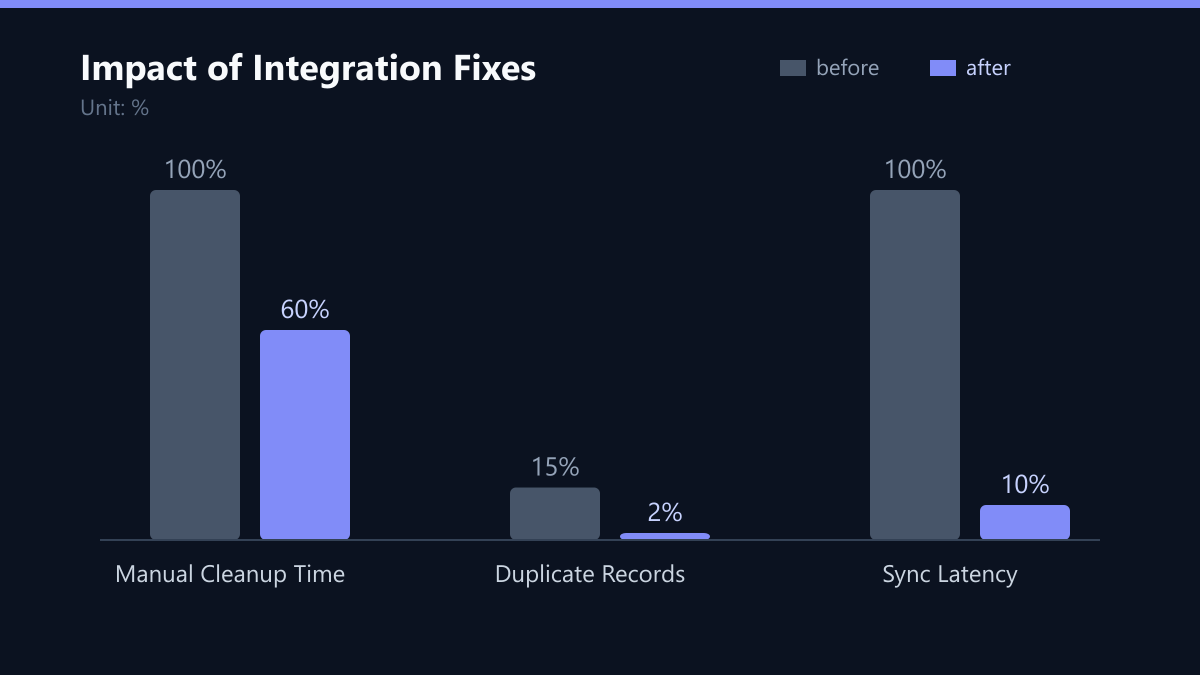
To solve this, you must create a single source of truth for all core fields. Before connecting any APIs, map every field explicitly. Use validation rules to prevent inconsistent data entry at the source. Standardizing fields ensures that data flows correctly across platforms. This single step reduces manual cleanup tasks by up to 40 percent, freeing your team to focus on strategy rather than data entry.
2. The Duplicate Record Problem
Duplicate records are a natural byproduct of multiple entry points. If a lead signs up via a form and also visits your website, the CRM may create two separate profiles. This skews reporting and confuses sales reps, who might contact the wrong person or double-up on outreach. Proper deduplication improves lead scoring accuracy and ensures sales teams contact the right person at the right time.
Implement deduplication rules based on unique identifiers like email and domain. Use a unified ID for cross-platform tracking to maintain consistency. Run regular audits to merge accidental duplicates. Without this logic, your reporting becomes unreliable, and your team wastes time investigating phantom leads.
3. The Latency Gap: Why Batch Fails
Many organizations rely on batch processing to sync data, which often delays updates by hours or even days. In a competitive B2B landscape, this is unacceptable. Sales reps may call a lead who just opted out or a deal that has already closed. This damages customer trust and reduces conversion rates significantly.
To fix this, move away from batch processing for critical events. Use webhooks for instant data transfer. Set up real-time triggers for critical events like ‘Lead Created’ or ‘Deal Closed.’ Monitor sync logs to detect delays immediately. Real-time sync ensures that all teams work with current information. This improves response times and increases close rates, giving you a competitive edge in speed-to-lead.
4. Security and Compliance Blind Spots
Transferring data between systems without proper security controls creates significant vulnerabilities. GDPR and CCPA require strict data handling practices. Non-compliance can result in heavy fines and reputational damage that far exceeds the cost of implementing proper security measures.
Prioritize security by encrypting data in transit and at rest. Define clear data retention policies to ensure you are not holding onto data you do not need. Conduct regular security audits on integration points. This protects your business and builds customer trust. It also simplifies compliance reporting across different regions, reducing legal risk and operational overhead.
5. The “Set-and-Forget” Myth
Integrations are not set-and-forget. API changes, software updates, or increased data volume can break workflows at any time. Without monitoring, these issues go unnoticed until they cause major disruptions. A broken integration might work for a month, then fail silently, leaving your team unaware until a major report is wrong.
Set up automated alerts for failed syncs. Review integration performance monthly to ensure stability. Document all changes to maintain a clear history. Continuous monitoring ensures long-term stability. It allows your team to fix minor issues before they impact revenue, ensuring that your data remains accurate and actionable.
Typical Mistakes to Avoid
Even with a solid plan, teams often fall into specific traps that undermine their integration efforts.
- Ignoring Error Handling: Many teams assume that if a sync fails, it will retry automatically. Without explicit error handling and logging, failed records are lost. Always configure what happens when a sync fails so that no data is silently dropped.
- Over-Reliance on Custom Fields: While custom fields are powerful, overusing them creates complexity. If every team creates their own custom fields without standardization, you end up with a fragmented data model. Stick to core fields and use custom fields sparingly with clear documentation.
- Lack of Stakeholder Buy-In: Technical teams often build integrations in isolation. Without input from sales and marketing, the integration may not meet their actual needs. Involve end-users in the design phase to ensure the data flows match their workflows.
How You Measure Success
To determine if your integration fixes are working, you need concrete KPIs. Do not rely on gut feelings. Track the following metrics:
- Data Accuracy Rate: Measure the percentage of records with complete and correct core fields. Aim for 95% or higher. Use a sample-based audit to verify this monthly.
- Sync Latency: Track the time between an event occurring in the source system and it appearing in the CRM. For real-time workflows, this should be under 5 seconds. Use API logs to measure this.
- Duplicate Rate: Monitor the percentage of duplicate records in your CRM. A healthy system should have less than 1% duplicates. Run automated reports to track this trend over time.
Implementation Checklist
Follow this checklist to ensure a robust CRM integration:
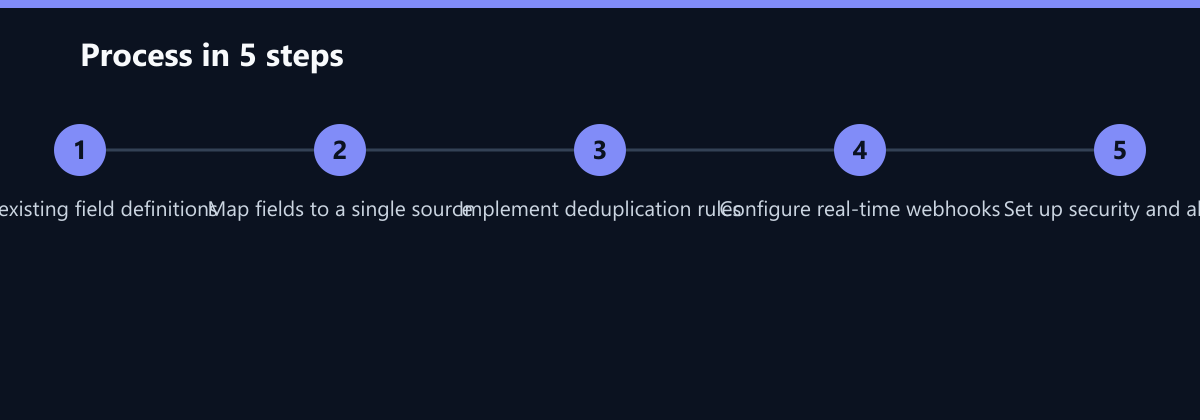
- Audit Current State: Document all existing fields and data flows. Identify gaps and inconsistencies.
- Define Standards: Create a data dictionary with clear field definitions and validation rules.
- Map Fields: Explicitly map every field between systems. Test with sample data before going live.
- Implement Deduplication: Set up automated rules to merge duplicates based on email and domain.
- Configure Real-Time Sync: Use webhooks for critical events. Set up alerts for failures.
- Secure the Pipeline: Encrypt data in transit and at rest. Define retention policies.
- Monitor and Maintain: Set up automated alerts and schedule regular audits.
By following these steps, you can eliminate the most common CRM integration errors. This leads to cleaner data, faster response times, and higher revenue. Start with a small pilot project to test your new workflows before rolling them out across the entire organization. Remember, the goal is not just to connect systems, but to create a seamless data ecosystem that drives business growth.
Passend dazu
- Affiliate Marketing
- Content & CRO
- Conversational Marketing
- Five Targeting Errors in LinkedIn Campaign Manager and How to Avoid Them
- Negative Keywords: Common Mistakes and How to Fix Them
- Avoid Affiliate Reporting Errors: 5 KPIs to Track Immediately
- Critical Errors in CRM Data Migration and How to Prevent Them